

As of 21 Nov 2026, Paint by Code is #87 in Paid · Graphics & Design in Canada, the one tracked chart it's in. Over the last 7 days its biggest fall was 81 places, to #87 in Paid · Graphics & Design in Canada. Its best rank in the last 7 days was #6 in Paid · Graphics & Design in Canada. Appulse Index first saw Paint by Code in a tracked chart on 14 Nov 2026. Since then it has charted on 8 days in 1 country, with a best rank of #6 in Paid · Graphics & Design in Canada on 14 Nov 2026.
Current rank
#87Canada · Paid · Graphics & Design
- Was
- #67 days ago
- Change
- Down 81 placesover 7 days
- Best
- #6in 7 days
- Longest chart run
- 8 daysCanada · Paid · Graphics & Design
- New ratings, 7 days
- 0Canada · since 14 Nov 2026
Chart record
Every tracked chart, country and day since Appulse Index first saw this app in a chart.
What's new
Version 1.4 · 17 days ago
This 1.4 update is again insane: Added: Liquid Glass — Create wizard, Customize / App Settings cards, and Paint Studio floating panels use glass materials on iOS 26+ (material fallback earlier) UI polish — Create photo preview + look chips; Customize live look preview; full-screen Processing; Gallery grid/list + empty state; Paint Studio glass rail + tool tips; Compare / Export chrome Smart Look — on-device Vision saliency + Apple Intelligence (when available) suggests a look from your photo on Create and Customize; subject-aware color reduction keeps palette detail on the main subject Accessibility modes — Standard / High contrast / Color-blind patterns for outlines, numbers, and legend swatches Guided paint — focus one color number, highlight matching regions, fill-only that number (default toggle in App Settings) Smart crop — Vision subject framing before color reduction Palette lock — reuse a fixed color kit across photos (lock from Customize / Paint Studio) Live Activity — canvas creation progress on Lock Screen / Dynamic Island while you leave Processing Background processing — Creating your canvas keeps running if you swipe away; returns you when the canvas is ready Adaptive toolbars — Paint Studio visibility priority, overflow menu, pinned share, and toolbar minimization Document API — canvases as WritableDocument with async open progress PencilKit stroke APIs — stroke IDs / journal, programmatic erase, Bézier conversion PaperKit notes — locked line-art overlay, adornments, notes sheet with handwriting recognition Changed: Processing feels full-screen (progress and steps, not a boxed card) Create / Customize / Gallery / Result chrome tightened around Liquid Glass and look preview Paint Studio tool rail and Compare / Export surfaces align with the glass system App Settings gains accessibility mode, guided-paint default, and Smart Look–related defaults alongside existing studio prefs Fixed: Processing could hang around 25% during Smart Look / saliency (downsample + capped heat map; no Vision TaskGroup cancel that tripped EXC_BREAKPOINT) Leaving Processing mid-run no longer cancels the pipeline (ViewModel-owned task + Live Activity updates)
Ranking events
- Dropped #14 → #64 in Paid · Graphics & DesignCanada
- Entered the Paid · Graphics & Design chart at #6Canada
About
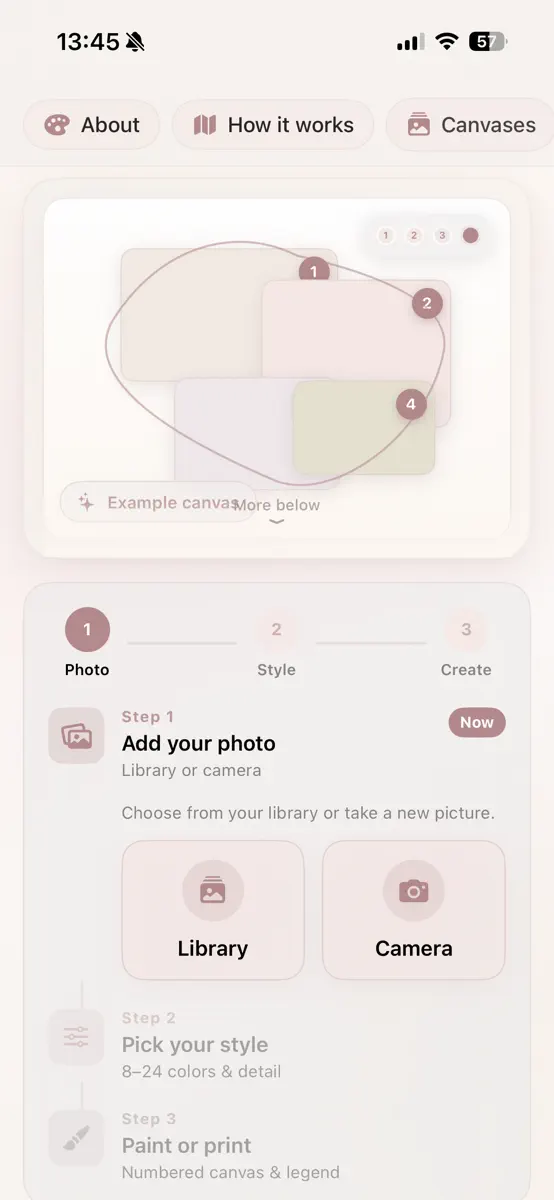
Paint by Code turns your favorite photos into beautiful paint-by-numbers canvases — ready to color in the app or print at home. HOW IT WORKS 1. Add a photo from your library or camera 2. Choose your style — 8 to 24 colors, detail level, and canvas format 3. Generate your numbered canvas with a matching color legend 4. Paint in the app with Apple Pencil, or export to print FEATURES • Smart region detection — clear, paintable areas • Numbered canvas with color legend matched to your palette •…
Ranks come from Apple's public App Store charts, checked once a day. Appulse Index isn't affiliated with Apple.
Rank history
Higher on the chart is better: #1 is at the top.
Sign in to see 30 days, 90 days and all history.
Canada · Paid · Graphics & Design: best #6, latest #87, over 7 snapshots since 15 Nov.
In 1 chart now
| Chart | Rank | 24 h | 7 days | Best | Days on chart |
|---|---|---|---|---|---|
| Canada· Paid · Graphics & Design · best #6 · 8 days · 7 days Down 81 places | #87 | Down 12 places | Down 81 places | #6 | 8 |
Competitors
Compare with the top 3Full chartTop of Paid · Graphics & Design in Canada. Paint by Code is #87 there. Changes are over 7 days.
- #1 (number one)No change
 Procreate PocketSavage Interactive Pty Ltd
- #2Up 1 place
 Nomad SculptHexanomad
- #3Up 5 places
 ibis Paintibis inc.
- #4Up 5 places
 Miniature StudioJake Ellis
- #5New entry
 Lumen DarkroomZeeshan Khan
- #6Down 2 places
 Camera Lucida™: AR DrawingCamera Lucida
- #7Up 20 places
 Sci-Fi ThemesNSTE, LLC
- #8New entry
 Font ShelfMarcos Romero Lamas
- #9Down 7 places
 AltoPaint: Oil & WatercolorHigh Line Labs LLC
- #10Not enough history yet
 Color Sense for SafariAlfredo Grassau
- #11Not enough history yet
 SVG Picker for SafariAlfredo Grassau
- #12Not enough history yet
 Threadprint: Cross StitchVladimir Rodzaevskiy
- #13Up 49 places
- #14Up 10 places
 StitchSketchMozusystems, LLC
- #15Up 33 places
 Sanzo Color PalettesNicolae Gherasim
- #16Not enough history yet
 StencilStack - Street StencilsSteve Mitchell
- #17Down 10 places
 ChromaMagicMichele Clamp
- #18Up 7 places
 VizRef LiteStudio Pixanoh
- #19Down 4 places
 Percolator: Drippy MosaicsTinrocket, LLC
- #20Down 4 places
 SketchClub: Draw & Paintblackpawn.com

Screenshots

As of 21 Nov 2026, Paint by Code is #87 in Paid · Graphics & Design in Canada, the one tracked chart it's in. Over the last 7 days its biggest fall was 81 places, to #87 in Paid · Graphics & Design in Canada. Its best rank in the last 7 days was #6 in Paid · Graphics & Design in Canada. Appulse Index first saw Paint by Code in a tracked chart on 14 Nov 2026. Since then it has charted on 8 days in 1 country, with a best rank of #6 in Paid · Graphics & Design in Canada on 14 Nov 2026.
Store listing
How the app presents itself on the App Store. Select a screenshot to open it full size.
App facts
What Apple publishes about this app. Ratings are from one country's App Store.
- Price
- CA$4.99
- Released
- 16 Jul 2026
- Last update
- Version 1.4
- Requires
- iOS 26.2or later
- Size
- 18.5 MB
- Languages
- 2
Chart record
Every tracked chart, country and day since Appulse Index first saw this app in a chart.
Rank history
Higher on the chart is better: #1 is at the top.
Sign in to see 30 days, 90 days and all history.
Canada · Paid · Graphics & Design: best #6, latest #87, over 7 snapshots since 15 Nov.
Current rankings
Every chart this app is in right now, best position first.
| Chart | Rank | 24 h | 7 days | Best | Days on chart |
|---|---|---|---|---|---|
| Canada· Paid · Graphics & Design · best #6 · 8 days · 7 days Down 81 places | #87 | Down 12 places | Down 81 places | #6 | 8 |
Ranking events
Entries, big moves, #1s and new versions we've recorded, by day.
- Dropped #14 → #64 in Paid · Graphics & DesignCanada
- Entered the Paid · Graphics & Design chart at #6Canada
Competitors
Compare with the top 3Full chartTop of Paid · Graphics & Design in Canada. Paint by Code is #87 there. Changes are over 7 days.
- #1 (number one)No changeProcreate PocketSavage Interactive Pty Ltd
- #2Up 1 placeNomad SculptHexanomad
- #3Up 5 placesibis Paintibis inc.
- #4Up 5 placesMiniature StudioJake Ellis
- #5New entryLumen DarkroomZeeshan Khan
- #6Down 2 placesCamera Lucida™: AR DrawingCamera Lucida
- #7Up 20 placesSci-Fi ThemesNSTE, LLC
- #8New entryFont ShelfMarcos Romero Lamas
- #9Down 7 placesAltoPaint: Oil & WatercolorHigh Line Labs LLC
- #10Not enough history yetColor Sense for SafariAlfredo Grassau
- #11Not enough history yetSVG Picker for SafariAlfredo Grassau
- #12Not enough history yetThreadprint: Cross StitchVladimir Rodzaevskiy
- #13Up 49 places
- #14Up 10 placesStitchSketchMozusystems, LLC
- #15Up 33 placesSanzo Color PalettesNicolae Gherasim
- #16Not enough history yetStencilStack - Street StencilsSteve Mitchell
- #17Down 10 placesChromaMagicMichele Clamp
- #18Up 7 placesVizRef LiteStudio Pixanoh
- #19Down 4 placesPercolator: Drippy MosaicsTinrocket, LLC
- #20Down 4 placesSketchClub: Draw & Paintblackpawn.com
- #87Down 81 places
 Paint by CodeThis app
About
From the app's App Store listing.
Paint by Code turns your favorite photos into beautiful paint-by-numbers canvases — ready to color in the app or print at home.
HOW IT WORKS 1. Add a photo from your library or camera 2. Choose your style — 8 to 24 colors, detail level, and canvas format 3. Generate your numbered canvas with a matching color legend 4. Paint in the app with Apple Pencil, or export to print
FEATURES
- Smart region detection — clear, paintable areas
- Numbered canvas with color legend matched to your palette
•…
What's new
Version 1.4 · 4 Nov 2026 ·
This 1.4 update is again insane:
Added:
Liquid Glass — Create wizard, Customize / App Settings cards, and Paint Studio floating panels use glass materials on iOS 26+ (material fallback earlier) UI polish — Create photo preview + look chips; Customize live look preview; full-screen Processing; Gallery grid/list + empty state; Paint Studio glass rail + tool tips; Compare / Export chrome Smart Look — on-device Vision saliency + Apple Intelligence (when available) suggests a look from your photo on Create and Customize; subject-aware color reduction keeps palette detail on the main subject Accessibility modes — Standard / High contrast / Color-blind patterns for outlines, numbers, and legend swatches Guided paint — focus one color number, highlight matching regions, fill-only that number (default toggle in App Settings) Smart crop — Vision subject framing before color reduction Palette lock — reuse a fixed color kit across photos (lock from Customize / Paint Studio) Live Activity — canvas creation progress on Lock Screen / Dynamic Island while you leave Processing Background processing — Creating your canvas keeps running if you swipe away; returns you when the canvas is ready Adaptive toolbars — Paint Studio visibility priority, overflow menu, pinned share, and toolbar minimization Document API — canvases as WritableDocument with async open progress PencilKit stroke APIs — stroke IDs / journal, programmatic erase, Bézier conversion PaperKit notes — locked line-art overlay, adornments, notes sheet with handwriting recognition Changed:
Processing feels full-screen (progress and steps, not a boxed card) Create / Customize / Gallery / Result chrome tightened around Liquid Glass and look preview Paint Studio tool rail and Compare / Export surfaces align with the glass system App Settings gains accessibility mode, guided-paint default, and Smart Look–related defaults alongside existing studio prefs Fixed:
Processing could hang around 25% during Smart Look / saliency (downsample + capped heat map; no Vision TaskGroup cancel that tripped EXC_BREAKPOINT) Leaving Processing mid-run no longer cancels the pipeline (ViewModel-owned task + Live Activity updates)
Ranks come from Apple's public App Store charts, checked once a day. Appulse Index isn't affiliated with Apple.