

As of 21 Nov 2026, Culla — Fast Photo Culling is #33 in Paid · Photo & Video in India, the one tracked chart it's in. Its best rank in the last 7 days was #21 in Paid · Photo & Video in India. Appulse Index first saw Culla — Fast Photo Culling in a tracked chart on 13 Nov 2026. Since then it has charted on 8 days in 4 countries, with a best rank of #20 in Paid · Photo & Video in Canada on 14 Nov 2026.
Current rank
#33India · Paid · Photo & Video
- Was
- —7 days ago
- Change
- Not enough history yetover 7 days
- Best
- #21in 7 days
- Longest chart run
- 2 daysIndia · Paid · Photo & Video
- New ratings, 7 days
- —Needs a week of rating history
Chart record
Every tracked chart, country and day since Appulse Index first saw this app in a chart.
What's new
Version 1.4 · today
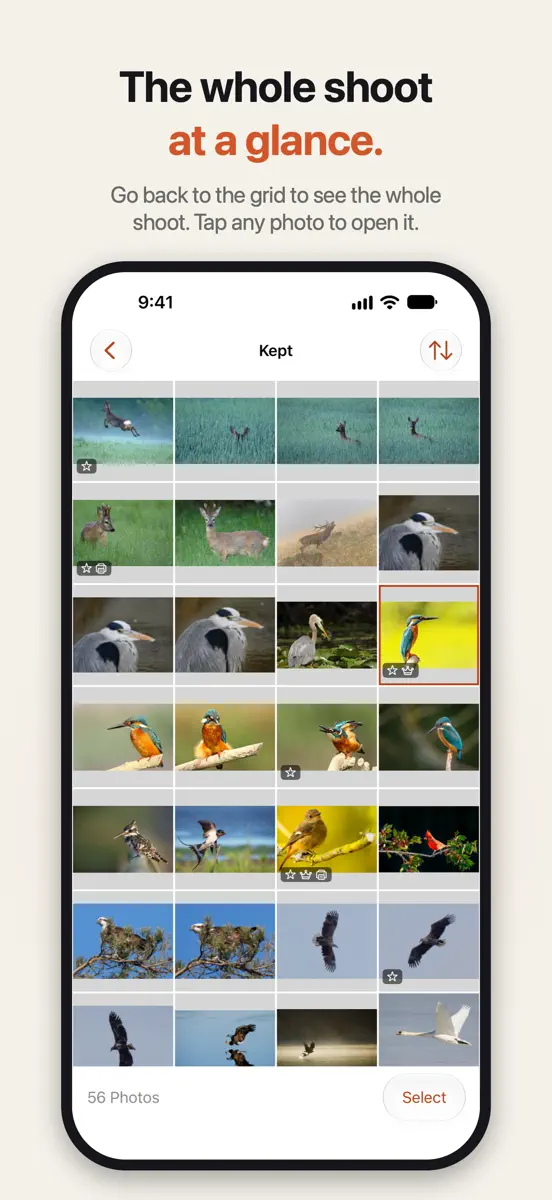
Culla 1.4: we finally see the big picture. And we picked up French and German, just to impress you. • The grid: the screen you see before opening a photo now shows the whole collection. Tap Select and swipe across photos to select a group, or touch and hold for the menu. Then reject, restore or tag them all in one go. Commitment issues, solved. • Changed your mind about all of them? Shake once to undo the action for the whole batch. We don't hold grudges. • In Rejected, delete just the photos you've selected. Breaking up with a few, not with everyone. • A swipe from the left edge goes back through collections, photos and the grid. Going back is always allowed here. • The inspector now reads the XMP: rating, label, title, description, keywords, creator, copyright. Plus serial numbers, firmware and the shutter count on Nikon. We like to know who we're dealing with. • If a rating or label can't be saved to a .xmp sidecar, Culla now says so instead of sulking in silence. Communication is key. • Culla now speaks French and German, and we've polished its Russian and Spanish. Bonjour. Hallo. Hola again. • On iPad with a keyboard: ⌘G grid, ⌘E photo, ⌘[ and ⌘] back and forward. Tag shortcuts can no longer include ⌘. Existing ones are kept but no longer work, so assign a new shortcut. Still one tap per decision and zero imports. We just learned to look at more than one of you at a time.
Ranking events
- New version 1.4 (was 1.3)
- Entered the Paid · Photo & Video chart at #21India
- Entered the Paid · Photo & Video chart at #85United States
- Dropped #20 → #52 in Paid · Photo & VideoCanada
- Entered the Paid · Photo & Video chart at #20Canada
- Entered the Paid · Photo & Video chart at #45France
About
Culla is a fast way to cull a shoot on your iPhone or iPad. Open a memory card, an external disk or a folder in Files, or an album in your Photos library, and start right away: there's nothing to import and no catalogue to build. Look at each photo once and decide: keep it, reject it or tag it. One tap per decision, and the next photo is already on screen. Or open the grid and deal with a dozen at once. RIGHT ON THE CARD • Connect a card reader or a disk and open it in Files. Photos appear…
Ranks come from Apple's public App Store charts, checked once a day. Appulse Index isn't affiliated with Apple.
Rank history
Higher on the chart is better: #1 is at the top.
Sign in to see 30 days, 90 days and all history.
India · Paid · Photo & Video: best #21, latest #33, over 7 snapshots since 15 Nov.
In 1 chart now
| Chart | Rank | 24 h | 7 days | Best | Days on chart |
|---|---|---|---|---|---|
| India· Paid · Photo & Video · best #21 · 2 days | #33 | Down 12 places | Not enough history yet | #21 | 2 |
Competitors
Compare with the top 3Full chartTop of Paid · Photo & Video in India. Culla — Fast Photo Culling is #33 there. Changes are over 7 days.
- #1 (number one)No change
 Chromagraph CameraChromatic Applications LLC
- #2No change
- #3No change
 LumaFusionLuma Touch LLC
- #4Up 1 place
 ProCamera. Raw+ Manual CameraCocologics
- #5Up 5 places
 Cadrage Director's ViewfinderCadrage GmbH
- #6No change
 Teleprompt: Video TeleprompterSteward Technologies Ltd
- #7Up 2 places
 YoungPhoto - Aesthetic CameraSeungyun Kim
- #8New entry
 Stop Motion Studio ProCATEATER, LLC
- #9Down 5 places
- #10Up 43 places
- #11Down 4 places
 Video Master ProHaruki Daunrodo
- #12Up 4 places
 AstroShaderAstroShader Limited
- #13Up 5 places
 Rarevision VHS: Retro CamRarevision
- #14Up 16 places
 BerryFilm - Korean Style CamSeungyun Kim
- #15Up 5 places
 Kino - Pro Video CameraLux Optics Incorporated
- #16Down 8 places
 Light | Long ExposureAlexander Sukhanov
- #17Up 39 places
 kirakira+bytes inc.
- #18Up 3 places
 LumyRaja Vijayaraman
- #19Up 10 places
 PhotoPillsPhotoPills S.L.
- #20New entry
 Wallpaper Expert ProSahitya P


Screenshots



As of 21 Nov 2026, Culla — Fast Photo Culling is #33 in Paid · Photo & Video in India, the one tracked chart it's in. Its best rank in the last 7 days was #21 in Paid · Photo & Video in India. Appulse Index first saw Culla — Fast Photo Culling in a tracked chart on 13 Nov 2026. Since then it has charted on 8 days in 4 countries, with a best rank of #20 in Paid · Photo & Video in Canada on 14 Nov 2026.
Store listing
How the app presents itself on the App Store. Select a screenshot to open it full size.
App facts
What Apple publishes about this app. Ratings are from one country's App Store.
- Price
- ₹2,499.00
- Released
- 7 Oct 2026
- Last update
- Version 1.4
- Requires
- iOS 26.0or later
- Size
- 5.3 MB
- Languages
- 5
Chart record
Every tracked chart, country and day since Appulse Index first saw this app in a chart.
Rank history
Higher on the chart is better: #1 is at the top.
Sign in to see 30 days, 90 days and all history.
India · Paid · Photo & Video: best #21, latest #33, over 7 snapshots since 15 Nov.
Current rankings
Every chart this app is in right now, best position first.
| Chart | Rank | 24 h | 7 days | Best | Days on chart |
|---|---|---|---|---|---|
| India· Paid · Photo & Video · best #21 · 2 days | #33 | Down 12 places | Not enough history yet | #21 | 2 |
Ranking events
Entries, big moves, #1s and new versions we've recorded, by day.
- New version 1.4 (was 1.3)
- Entered the Paid · Photo & Video chart at #21India
- Entered the Paid · Photo & Video chart at #85United States
- Dropped #20 → #52 in Paid · Photo & VideoCanada
- Entered the Paid · Photo & Video chart at #20Canada
- Entered the Paid · Photo & Video chart at #45France
Competitors
Compare with the top 3Full chartTop of Paid · Photo & Video in India. Culla — Fast Photo Culling is #33 there. Changes are over 7 days.
- #1 (number one)No changeChromagraph CameraChromatic Applications LLC
- #2No change
- #3No changeLumaFusionLuma Touch LLC
- #4Up 1 placeProCamera. Raw+ Manual CameraCocologics
- #5Up 5 placesCadrage Director's ViewfinderCadrage GmbH
- #6No changeTeleprompt: Video TeleprompterSteward Technologies Ltd
- #7Up 2 placesYoungPhoto - Aesthetic CameraSeungyun Kim
- #8New entryStop Motion Studio ProCATEATER, LLC
- #9Down 5 places
- #10Up 43 places
- #11Down 4 placesVideo Master ProHaruki Daunrodo
- #12Up 4 placesAstroShaderAstroShader Limited
- #13Up 5 placesRarevision VHS: Retro CamRarevision
- #14Up 16 placesBerryFilm - Korean Style CamSeungyun Kim
- #15Up 5 placesKino - Pro Video CameraLux Optics Incorporated
- #16Down 8 placesLight | Long ExposureAlexander Sukhanov
- #17Up 39 placeskirakira+bytes inc.
- #18Up 3 placesLumyRaja Vijayaraman
- #19Up 10 placesPhotoPillsPhotoPills S.L.
- #20New entryWallpaper Expert ProSahitya P
- #33Not enough history yet
 Culla — Fast Photo CullingThis app
About
From the app's App Store listing.
Culla is a fast way to cull a shoot on your iPhone or iPad. Open a memory card, an external disk or a folder in Files, or an album in your Photos library, and start right away: there's nothing to import and no catalogue to build.
Look at each photo once and decide: keep it, reject it or tag it. One tap per decision, and the next photo is already on screen. Or open the grid and deal with a dozen at once.
RIGHT ON THE CARD
- Connect a card reader or a disk and open it in Files. Photos appear…
What's new
Version 1.4 · 20 Nov 2026 ·
Culla 1.4: we finally see the big picture. And we picked up French and German, just to impress you.
- The grid: the screen you see before opening a photo now shows the whole collection. Tap Select and swipe across photos to select a group, or touch and hold for the menu. Then reject, restore or tag them all in one go. Commitment issues, solved.
- Changed your mind about all of them? Shake once to undo the action for the whole batch. We don't hold grudges.
- In Rejected, delete just the photos you've selected. Breaking up with a few, not with everyone.
- A swipe from the left edge goes back through collections, photos and the grid. Going back is always allowed here.
- The inspector now reads the XMP: rating, label, title, description, keywords, creator, copyright. Plus serial numbers, firmware and the shutter count on Nikon. We like to know who we're dealing with.
- If a rating or label can't be saved to a .xmp sidecar, Culla now says so instead of sulking in silence. Communication is key.
- Culla now speaks French and German, and we've polished its Russian and Spanish. Bonjour. Hallo. Hola again.
- On iPad with a keyboard: ⌘G grid, ⌘E photo, ⌘[ and ⌘] back and forward. Tag shortcuts can no longer include ⌘. Existing ones are kept but no longer work, so assign a new shortcut.
Still one tap per decision and zero imports. We just learned to look at more than one of you at a time.
Ranks come from Apple's public App Store charts, checked once a day. Appulse Index isn't affiliated with Apple.