

As of 21 Nov 2026, AI-HUB Desktop is #15 in Grossing · Developer Tools in Australia, its best of 3 chart positions across 2 countries. Appulse Index first saw AI-HUB Desktop in a tracked chart on 8 Nov 2026. Since then it has charted on 11 days in 3 countries, with a best rank of #15 in Grossing · Developer Tools in Australia on 21 Nov 2026.
Current rank
#15Australia · Grossing · Developer Tools
- Was
- —7 days ago
- Change
- Not enough history yetover 7 days
- Best
- #15in 7 days
- Longest chart run
- 3 daysUnited States · Grossing · Developer Tools
- New ratings, 7 days
- —Needs a week of rating history
Chart record
Every tracked chart, country and day since Appulse Index first saw this app in a chart.
What's new
Version 1.15 · 1 day ago
- Sending and stopping in the chat now use a dedicated long-lived connection with a heartbeat; a silently dropped link is detected sooner and reconnects automatically, so sending and interrupting are steadier. - A to-do plan bar above the input area updates live over the long connection; each task stays on one line and long ones are truncated. - Pressing send while the input method is still composing now gives a light haptic and a short hint instead of swallowing it silently. - Dragging to reorder sessions, workspaces and devices shows a drop line and a ripple. - The just-captured screenshot becomes an app-wide inbox: the same image appears on home and in every conversation for 60 seconds, and tapping it on home opens a new conversation with the image attached. - When the keyboard rises, the content and message list move up with it instead of hiding behind the input card. - The permission-level trigger now dims and disables itself while a turn is running. - Mermaid code blocks in chats render as flowcharts, sequence diagrams and pie charts, showing a source placeholder first while streaming. - In the album pre-selection, a newer screenshot replaces an older one, and the pre-selection chip dismisses itself when you pick an image or take a photo yourself. - The network page fixes loopback forwarding and address-book handling for direct / IPv6 addresses: LAN-only / direct-only / relay-only modes no longer wrongly keep or drop IPv6 forwarding, every IPv6 candidate is recorded regardless of mode, and it is refilled within two minutes after switching modes. - Public relay routing is now decided by the computer and the phone follows: several phones on one computer no longer fight over a line; two new selectable lines, the short list is delivered encrypted from the controller, and address cleanup is more accurate. - The remote computer no longer switches lines erratically when the network changes; automatic routing is steadier. - The computer network page adds an "Auto-report network address" switch at the top as its own card, so you can turn each computer's master-control address reporting on or off. - Adding a device by scan now shows a centered dialog whose failure reasons are layered by QR code shape; after pairing the app sends one real probe and only reports "connected" on success, and rejected credentials (401) trigger an automatic per-device credential re-sync with re-scan suggested only after repeated failures. - Sponsorship moves from a dialog to its own subpage (USDT and Afdian side by side, Afdian shown by region), making clear it is voluntary, buys no features and is paid outside the app. - Home load failures now appear in a centered dialog and no longer repeat; copied error text includes the app version, OS and time. - Workflow status bars now line up when expanded; fixed edge-rail tap misalignment, extension cells show their own icon, multi-device sidebar workspaces no longer open blank, stats "recent days" no longer adds an empty column, network page route descriptions are shorter and the public relay address no longer leaks into the relay field, and the duplicate local-Agent hints in the sidebar are gone.
Ranking events
- Entered the Grossing · Developer Tools chart at #15Australia
- Entered the Grossing · Developer Tools chart at #87United States
- Entered the Free · Developer Tools chart at #78United States
- New version 1.15 (was 1.14)
- New version 1.14 (was 1.13)
- Entered the Free · Developer Tools chart at #100United States
Show 9 earlier events
- New version 1.13 (was 1.12)
- New version 1.12 (was 1.11)
- New version 1.11 (was 1.10)
- New version 1.10 (was 1.7)
- Entered the Grossing · Developer Tools chart at #31Japan
- New version 1.7 (was 1.5)
- Dropped #42 → #89 in Grossing · Developer ToolsUnited States
- Entered the Grossing · Developer Tools chart at #42United States
- New version 1.6 (was 1.5)
About
AI-HUB is the mobile client for your desktop AI coding sessions (DeepSeek Harness): the Harness keeps running on your computer, while the phone shows where the code is, where the agent got stuck and what it just changed — and lets you keep talking to it. AI-HUB is a third-party client and is not affiliated with DeepSeek. When it helps Checking on the way to work whether that fix landed; waiting somewhere for a result while the agent stops to ask you something; finishing before bed the…
Ranks come from Apple's public App Store charts, checked once a day. Appulse Index isn't affiliated with Apple.
Rank history
Higher on the chart is better: #1 is at the top.
Sign in to see 30 days, 90 days and all history.
Australia · Grossing · Developer Tools: best #15, latest #15, over 7 snapshots since 15 Nov.
In 3 charts now
| Chart | Rank | 24 h | 7 days | Best | Days on chart |
|---|---|---|---|---|---|
| Australia· Grossing · Developer Tools · best #15 · 1 day | #15 | New entry | Not enough history yet | #15 | 1 |
| United States· Grossing · Developer Tools · best #42 · 3 days | #87 | New entry | Not enough history yet | #42 | 3 |
| United States· Free · Developer Tools · best #78 · 3 days | #90 | Down 12 places | Not enough history yet | #78 | 3 |
Competitors
Compare with the top 3Full chartTop of Grossing · Developer Tools in Australia. AI-HUB Desktop is #15 there. Changes are over 7 days.
- #1 (number one)No change
- #2Up 2 places
 Termius - Modern SSH ClientTermius Corporation
- #3Down 1 place
 GitHubGitHub
- #4Down 1 place
 CursorX Corp.
- #5Up 1 place
 Emergent AI: Vibe Code AppsEmergent Labs Inc
- #6Up 62 places
 Pyto IDEDevelobile S.p.A.
- #7Up 8 places
 Moshi: herdr/tmux on SSH/MOSHMoshi Tech Ltd.
- #8Down 3 places
 Boya OSShenzhen Perfect Acoustic Technology Co., LTD
- #9Not enough history yet
 Run Code: Compiler & EditorSahana A S
- #10New entry
 Nextpad++Andrey Letov
- #11New entry
 Code Viewer & Text Editorskoroapps s.r.o.
- #12Up 26 places
 Visual Code Editor - vCodeDevang Samirbhai Shah
- #13Not enough history yet
 Reins: for Ollama & LM StudioIbrahim Cetin
- #14New entry
 Happy: Codex & Claude Code AppBulka, LLC
- #16New entry
- #17Up 63 places
 Surge 6Surge Networks Inc.
- #18Not enough history yet
 Netli.fyi: Netlify ClientFenrir Digital
- #19Up 65 places
 Python IDE & Jupyter – JunoRational Matter
- #20Down 6 places
 SSH Client - Secure ShellFishAnders Borum
- #21Up 66 places
 Runestone Text EditorSimon B. Støvring


Screenshots
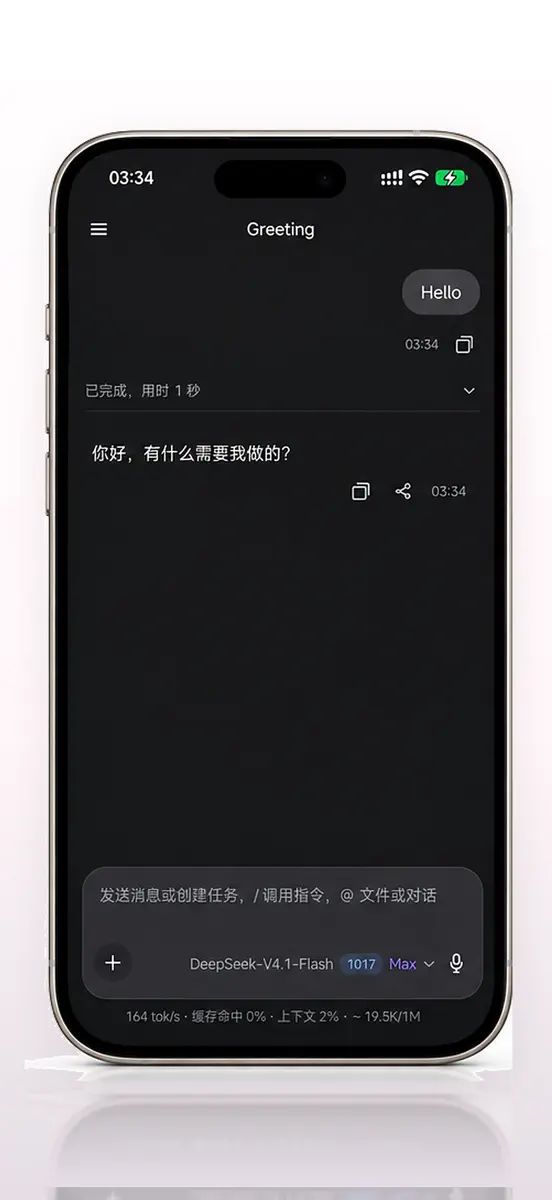


As of 21 Nov 2026, AI-HUB Desktop is #15 in Grossing · Developer Tools in Australia, its best of 3 chart positions across 2 countries. Appulse Index first saw AI-HUB Desktop in a tracked chart on 8 Nov 2026. Since then it has charted on 11 days in 3 countries, with a best rank of #15 in Grossing · Developer Tools in Australia on 21 Nov 2026.
Store listing
How the app presents itself on the App Store. Select a screenshot to open it full size.
App facts
What Apple publishes about this app. Ratings are from one country's App Store.
- Price
- Free
- Rating
- 5.0 / 5 stars1 rating United States
- Released
- 20 Oct 2026
- Last update
- Version 1.15
- Requires
- iOS 15.1or later
- Size
- 98.2 MB
- Languages
- 11
Chart record
Every tracked chart, country and day since Appulse Index first saw this app in a chart.
Rank history
Higher on the chart is better: #1 is at the top.
Sign in to see 30 days, 90 days and all history.
Australia · Grossing · Developer Tools: best #15, latest #15, over 7 snapshots since 15 Nov.
Current rankings
Every chart this app is in right now, best position first.
| Chart | Rank | 24 h | 7 days | Best | Days on chart |
|---|---|---|---|---|---|
| Australia· Grossing · Developer Tools · best #15 · 1 day | #15 | New entry | Not enough history yet | #15 | 1 |
| United States· Grossing · Developer Tools · best #42 · 3 days | #87 | New entry | Not enough history yet | #42 | 3 |
| United States· Free · Developer Tools · best #78 · 3 days | #90 | Down 12 places | Not enough history yet | #78 | 3 |
Ranking events
Entries, big moves, #1s and new versions we've recorded, by day.
- Entered the Grossing · Developer Tools chart at #15Australia
- Entered the Grossing · Developer Tools chart at #87United States
- Entered the Free · Developer Tools chart at #78United States
- New version 1.15 (was 1.14)
- New version 1.14 (was 1.13)
- Entered the Free · Developer Tools chart at #100United States
- New version 1.13 (was 1.12)
- New version 1.12 (was 1.11)
- New version 1.11 (was 1.10)
- New version 1.10 (was 1.7)
- Entered the Grossing · Developer Tools chart at #31Japan
- New version 1.7 (was 1.5)
- Dropped #42 → #89 in Grossing · Developer ToolsUnited States
- Entered the Grossing · Developer Tools chart at #42United States
- New version 1.6 (was 1.5)
Competitors
Compare with the top 3Full chartTop of Grossing · Developer Tools in Australia. AI-HUB Desktop is #15 there. Changes are over 7 days.
- #1 (number one)No change
- #2Up 2 placesTermius - Modern SSH ClientTermius Corporation
- #3Down 1 placeGitHubGitHub
- #4Down 1 placeCursorX Corp.
- #5Up 1 placeEmergent AI: Vibe Code AppsEmergent Labs Inc
- #6Up 62 placesPyto IDEDevelobile S.p.A.
- #7Up 8 placesMoshi: herdr/tmux on SSH/MOSHMoshi Tech Ltd.
- #8Down 3 placesBoya OSShenzhen Perfect Acoustic Technology Co., LTD
- #9Not enough history yetRun Code: Compiler & EditorSahana A S
- #10New entryNextpad++Andrey Letov
- #11New entryCode Viewer & Text Editorskoroapps s.r.o.
- #12Up 26 placesVisual Code Editor - vCodeDevang Samirbhai Shah
- #13Not enough history yetReins: for Ollama & LM StudioIbrahim Cetin
- #14New entryHappy: Codex & Claude Code AppBulka, LLC
- #15New entry
 AI-HUB DesktopThis app
- #16New entry
- #17Up 63 placesSurge 6Surge Networks Inc.
- #18Not enough history yetNetli.fyi: Netlify ClientFenrir Digital
- #19Up 65 placesPython IDE & Jupyter – JunoRational Matter
- #20Down 6 placesSSH Client - Secure ShellFishAnders Borum
- #21Up 66 placesRunestone Text EditorSimon B. Støvring
About
From the app's App Store listing.
AI-HUB is the mobile client for your desktop AI coding sessions (DeepSeek Harness): the Harness keeps running on your computer, while the phone shows where the code is, where the agent got stuck and what it just changed — and lets you keep talking to it. AI-HUB is a third-party client and is not affiliated with DeepSeek.
When it helps Checking on the way to work whether that fix landed; waiting somewhere for a result while the agent stops to ask you something; finishing before bed the…
What's new
Version 1.15 · 19 Nov 2026 ·
- Sending and stopping in the chat now use a dedicated long-lived connection with a heartbeat; a silently dropped link is detected sooner and reconnects automatically, so sending and interrupting are steadier.
- A to-do plan bar above the input area updates live over the long connection; each task stays on one line and long ones are truncated.
- Pressing send while the input method is still composing now gives a light haptic and a short hint instead of swallowing it silently.
- Dragging to reorder sessions, workspaces and devices shows a drop line and a ripple.
- The just-captured screenshot becomes an app-wide inbox: the same image appears on home and in every conversation for 60 seconds, and tapping it on home opens a new conversation with the image attached.
- When the keyboard rises, the content and message list move up with it instead of hiding behind the input card.
- The permission-level trigger now dims and disables itself while a turn is running.
- Mermaid code blocks in chats render as flowcharts, sequence diagrams and pie charts, showing a source placeholder first while streaming.
- In the album pre-selection, a newer screenshot replaces an older one, and the pre-selection chip dismisses itself when you pick an image or take a photo yourself.
- The network page fixes loopback forwarding and address-book handling for direct / IPv6 addresses: LAN-only / direct-only / relay-only modes no longer wrongly keep or drop IPv6 forwarding, every IPv6 candidate is recorded regardless of mode, and it is refilled within two minutes after switching modes.
- Public relay routing is now decided by the computer and the phone follows: several phones on one computer no longer fight over a line; two new selectable lines, the short list is delivered encrypted from the controller, and address cleanup is more accurate.
- The remote computer no longer switches lines erratically when the network changes; automatic routing is steadier.
- The computer network page adds an "Auto-report network address" switch at the top as its own card, so you can turn each computer's master-control address reporting on or off.
- Adding a device by scan now shows a centered dialog whose failure reasons are layered by QR code shape; after pairing the app sends one real probe and only reports "connected" on success, and rejected credentials (401) trigger an automatic per-device credential re-sync with re-scan suggested only after repeated failures.
- Sponsorship moves from a dialog to its own subpage (USDT and Afdian side by side, Afdian shown by region), making clear it is voluntary, buys no features and is paid outside the app.
- Home load failures now appear in a centered dialog and no longer repeat; copied error text includes the app version, OS and time.
- Workflow status bars now line up when expanded; fixed edge-rail tap misalignment, extension cells show their own icon, multi-device sidebar workspaces no longer open blank, stats "recent days" no longer adds an empty column, network page route descriptions are shorter and the public relay address no longer leaks into the relay field, and the duplicate local-Agent hints in the sidebar are gone.
Ranks come from Apple's public App Store charts, checked once a day. Appulse Index isn't affiliated with Apple.