

As of 21 Nov 2026, DecHex - プログラマ電卓 is #42 in Paid · Developer Tools in Japan, its best of 2 chart positions across 1 country. Its best rank in the last 7 days was #1 in Paid · Developer Tools in Japan. Appulse Index first saw DecHex - プログラマ電卓 in a tracked chart on 6 Nov 2026. Since then it has charted on 11 days in 2 countries, with a best rank of #1 in Paid · Developer Tools in Japan on 16 Nov 2026.
Current rank
#42Japan · Paid · Developer Tools
- Was
- —7 days ago
- Change
- Not enough history yetover 7 days
- Best
- #1 (number one)in 7 days
- Longest chart run
- 7 daysJapan · Paid · Developer Tools
- New ratings, 7 days
- —Needs a week of rating history
Chart record
Every tracked chart, country and day since Appulse Index first saw this app in a chart.
What's new
Version 1.1 · 8 days ago
バージョン 1.1 は iPhone Duo に最適化し、Mac での使い心地を改善しました。 iPhone Duo - 内側ディスプレイ専用レイアウト:プログラマ電卓は左に結果、右にキー。横向きでは基本電卓の横に計算履歴を常に表示し、タップで呼び出せます - テーブルトップの姿勢:半分折って机に置くと、上半分で結果を見て、下半分でキーを押せます - ブックの姿勢:折り目で左右のページに分かれ、キーが折り目にかかりません。関数電卓モードは2ページに分けて配置 - 折ると、ヒンジの角度に合わせて折り目に影が付きます - タイトルとボタンをシステムのサイドツールバーに配置 - 内側ディスプレイでは別のページを新しいウインドウで開き、並べて使えます - 外側ディスプレイのレイアウトを見直し、キーを大きくしました Mac - Mac でキーボード入力できない問題を修正。数字、演算子、Return、Delete をそのまま使えます そのほかの改善 - ツール画面がシステムのライトとダークの外観にすぐ切り替わるように - ページを示すドットがツールの内容に重ならないように - タイトルバーのボタンを押しやすく
Ranking events
- Dropped #11 → #38 in Paid · Developer ToolsJapan
- Reached #1 in Paid · Developer ToolsJapan
- Entered the Paid · Developer Tools chart at #7Japan
- Entered the Grossing · Developer Tools chart at #52Japan
- New version 1.1 (was 1.0.6)
- New version 1.0.6 (was 1.0)
Show 1 earlier event
- Entered the Paid · Developer Tools chart at #17United States
About
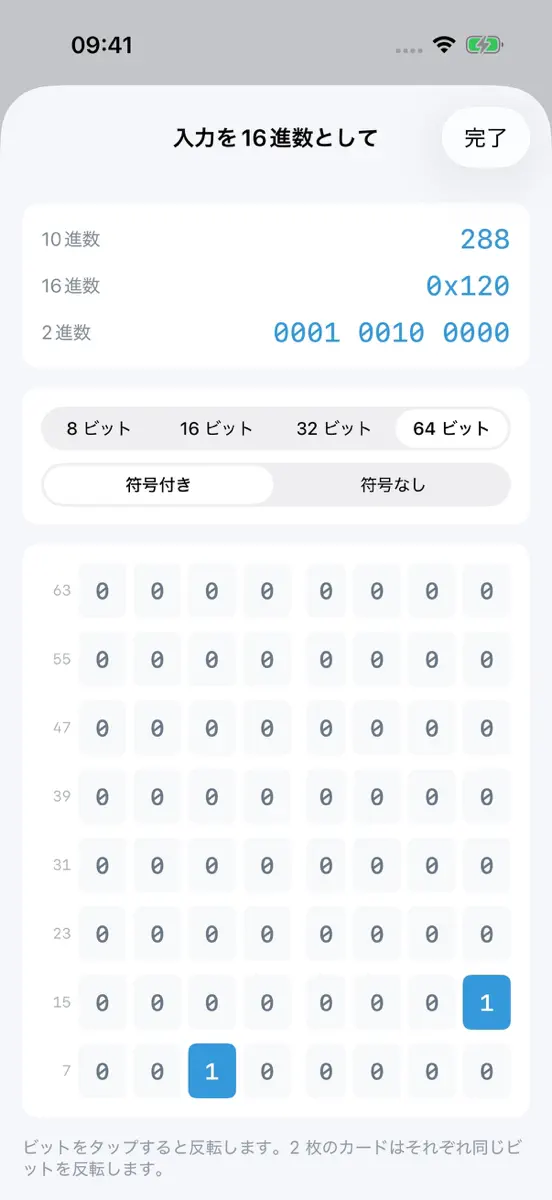
もう進数を選ぶ必要はありません。 多くのプログラマ電卓は、入力の前に HEX か DEC を選ばなければならず、間違えたら最初からやり直しです。DecHex はその手順をなくしました。同じ入力を、2枚のカードが同時に2通りに解釈します。 入力を16進数として:入力を16進数とみなし、10進数と16進数の結果を表示します。 入力を10進数として:同じ入力を10進数とみなし、10進数と16進数の結果を表示します。 見たいほうのカードを見るだけ。切り替えも、迷うことも、計算し直すこともありません。 プログラマ電卓 - 1A と入力すると、上のカードが10進数の 26 だと教えてくれます。13 と入力すると、下のカードが 0xD だと教えてくれます - 任意精度:加減乗除は 64 ビットを超えてもオーバーフローしません - ビット幅は 8、16、32、64 ビット、符号ありと符号なしを選べます。ビット演算と2進数表示は選んだ幅の2の補数で計算します - 2進数は入力に合わせてリアルタイムに表示。2進数の行をタップすると、1ビットずつ反転できます - フルキーパッド:A から…
Ranks come from Apple's public App Store charts, checked once a day. Appulse Index isn't affiliated with Apple.
Rank history
Higher on the chart is better: #1 is at the top.
Sign in to see 30 days, 90 days and all history.
Japan · Paid · Developer Tools: best #1, latest #42, over 7 snapshots since 15 Nov.
In 2 charts now
| Chart | Rank | 24 h | 7 days | Best | Days on chart |
|---|---|---|---|---|---|
| Japan· Paid · Developer Tools · best #1 · 7 days | #42 | Down 4 places | Not enough history yet | #1 | 7 |
| Japan· Grossing · Developer Tools · best #35 · 7 days | #89 | Down 7 places | Not enough history yet | #35 | 7 |
Competitors
Compare with the top 3Full chartTop of Paid · Developer Tools in Japan. DecHex - プログラマ電卓 is #42 there. Changes are over 7 days.
- #1 (number one)Up 1 place
 SSH Term XHaga Kunihiko
- #2Up 16 places
 QuickIssue - 1秒GitHub Issue記録yudai hirose
- #3Not enough history yet
 TDInputari lintzeris
- #4Not enough history yet
 iRTSPRyan Rudes
- #5Up 12 places
 Cookie Editor Safari ExtensionZamalabs Yazılım ve Bilgi Teknolojileri Limited Şirketi
- #6Not enough history yet
 Internet Speed LimiterNeuralQuark
- #7Not enough history yet
 GrafanaUIRoman Senchuk
- #8Not enough history yet
 Edit HTTP Headers for SafariAlfredo Grassau
- #9Not enough history yet
 My Styles: Custom Website LookMoustafa Elsayed
- #10Not enough history yet
 Crabrix: Rust CompilerSerhii Ziborov
- #11Up 80 places
- #12Not enough history yet
 Haptic ForgeHobbySoft OU
- #13Not enough history yet
 Agent Code PagerJacob Hargus
- #14Down 13 places
 LadderTouchMotonari Hibi
- #15Down 7 places
 Source 3Street Coder LLC
- #16Down 7 places
 Continuous .NET C# and F# IDEKrueger Systems, Inc.
- #17Down 7 places
 iPulse - Monitor Your DeviceThe Iconfactory
- #18Down 7 places
 UDIDitBite Size Bytes, Inc.
- #19Down 7 places
 Inspect BrowserParallax Dynamics Inc.
- #20Down 17 places
 Code Appthebaselab Ltd

Screenshots





As of 21 Nov 2026, DecHex - プログラマ電卓 is #42 in Paid · Developer Tools in Japan, its best of 2 chart positions across 1 country. Its best rank in the last 7 days was #1 in Paid · Developer Tools in Japan. Appulse Index first saw DecHex - プログラマ電卓 in a tracked chart on 6 Nov 2026. Since then it has charted on 11 days in 2 countries, with a best rank of #1 in Paid · Developer Tools in Japan on 16 Nov 2026.
Store listing
How the app presents itself on the App Store. Select a screenshot to open it full size.
App facts
What Apple publishes about this app. Ratings are from one country's App Store.
- Price
- ¥150
- Released
- 5 Nov 2026
- Last update
- Version 1.1
- Requires
- iOS 15.6or later
- Size
- 4.1 MB
- Languages
- 6
Chart record
Every tracked chart, country and day since Appulse Index first saw this app in a chart.
Rank history
Higher on the chart is better: #1 is at the top.
Sign in to see 30 days, 90 days and all history.
Japan · Paid · Developer Tools: best #1, latest #42, over 7 snapshots since 15 Nov.
Current rankings
Every chart this app is in right now, best position first.
| Chart | Rank | 24 h | 7 days | Best | Days on chart |
|---|---|---|---|---|---|
| Japan· Paid · Developer Tools · best #1 · 7 days | #42 | Down 4 places | Not enough history yet | #1 | 7 |
| Japan· Grossing · Developer Tools · best #35 · 7 days | #89 | Down 7 places | Not enough history yet | #35 | 7 |
Ranking events
Entries, big moves, #1s and new versions we've recorded, by day.
- Dropped #11 → #38 in Paid · Developer ToolsJapan
- Reached #1 in Paid · Developer ToolsJapan
- Entered the Paid · Developer Tools chart at #7Japan
- Entered the Grossing · Developer Tools chart at #52Japan
- New version 1.1 (was 1.0.6)
- New version 1.0.6 (was 1.0)
- Entered the Paid · Developer Tools chart at #17United States
Competitors
Compare with the top 3Full chartTop of Paid · Developer Tools in Japan. DecHex - プログラマ電卓 is #42 there. Changes are over 7 days.
- #1 (number one)Up 1 placeSSH Term XHaga Kunihiko
- #2Up 16 placesQuickIssue - 1秒GitHub Issue記録yudai hirose
- #3Not enough history yetTDInputari lintzeris
- #4Not enough history yetiRTSPRyan Rudes
- #5Up 12 placesCookie Editor Safari ExtensionZamalabs Yazılım ve Bilgi Teknolojileri Limited Şirketi
- #6Not enough history yetInternet Speed LimiterNeuralQuark
- #7Not enough history yetGrafanaUIRoman Senchuk
- #8Not enough history yetEdit HTTP Headers for SafariAlfredo Grassau
- #9Not enough history yetMy Styles: Custom Website LookMoustafa Elsayed
- #10Not enough history yetCrabrix: Rust CompilerSerhii Ziborov
- #11Up 80 places
- #12Not enough history yetHaptic ForgeHobbySoft OU
- #13Not enough history yetAgent Code PagerJacob Hargus
- #14Down 13 placesLadderTouchMotonari Hibi
- #15Down 7 placesSource 3Street Coder LLC
- #16Down 7 placesContinuous .NET C# and F# IDEKrueger Systems, Inc.
- #17Down 7 placesiPulse - Monitor Your DeviceThe Iconfactory
- #18Down 7 placesUDIDitBite Size Bytes, Inc.
- #19Down 7 placesInspect BrowserParallax Dynamics Inc.
- #20Down 17 placesCode Appthebaselab Ltd
- #42Not enough history yet
 DecHex - プログラマ電卓This app
About
From the app's App Store listing.
もう進数を選ぶ必要はありません。
多くのプログラマ電卓は、入力の前に HEX か DEC を選ばなければならず、間違えたら最初からやり直しです。DecHex はその手順をなくしました。同じ入力を、2枚のカードが同時に2通りに解釈します。
入力を16進数として:入力を16進数とみなし、10進数と16進数の結果を表示します。 入力を10進数として:同じ入力を10進数とみなし、10進数と16進数の結果を表示します。
見たいほうのカードを見るだけ。切り替えも、迷うことも、計算し直すこともありません。
プログラマ電卓
- 1A と入力すると、上のカードが10進数の 26 だと教えてくれます。13 と入力すると、下のカードが 0xD だと教えてくれます
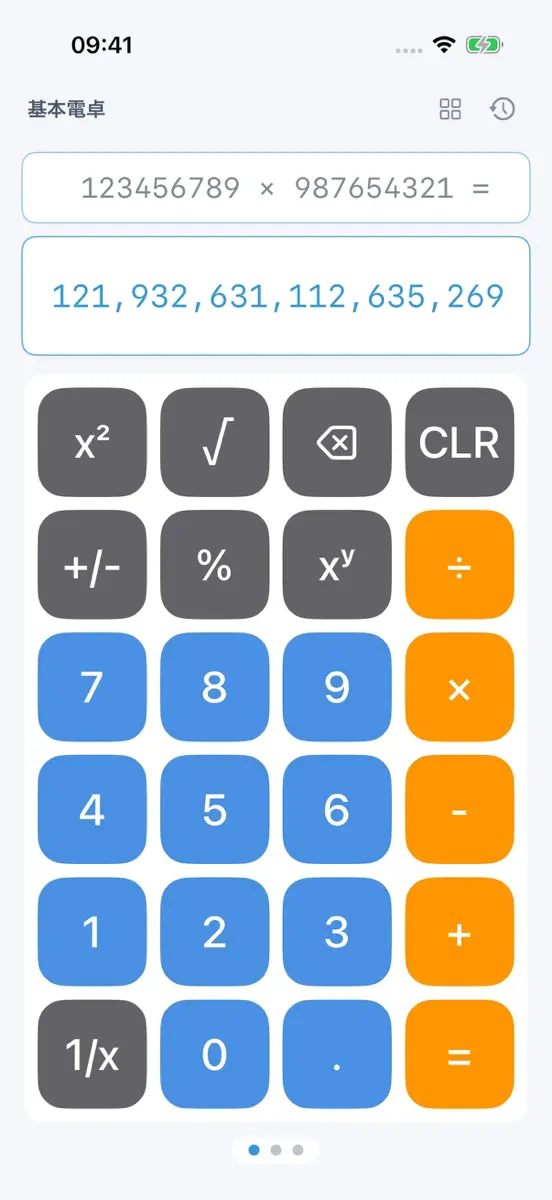
- 任意精度:加減乗除は 64 ビットを超えてもオーバーフローしません
- ビット幅は 8、16、32、64 ビット、符号ありと符号なしを選べます。ビット演算と2進数表示は選んだ幅の2の補数で計算します
- 2進数は入力に合わせてリアルタイムに表示。2進数の行をタップすると、1ビットずつ反転できます
- フルキーパッド:A から…
What's new
Version 1.1 · 12 Nov 2026 ·
バージョン 1.1 は iPhone Duo に最適化し、Mac での使い心地を改善しました。
iPhone Duo
- 内側ディスプレイ専用レイアウト:プログラマ電卓は左に結果、右にキー。横向きでは基本電卓の横に計算履歴を常に表示し、タップで呼び出せます
- テーブルトップの姿勢:半分折って机に置くと、上半分で結果を見て、下半分でキーを押せます
- ブックの姿勢:折り目で左右のページに分かれ、キーが折り目にかかりません。関数電卓モードは2ページに分けて配置
- 折ると、ヒンジの角度に合わせて折り目に影が付きます
- タイトルとボタンをシステムのサイドツールバーに配置
- 内側ディスプレイでは別のページを新しいウインドウで開き、並べて使えます
- 外側ディスプレイのレイアウトを見直し、キーを大きくしました
Mac
- Mac でキーボード入力できない問題を修正。数字、演算子、Return、Delete をそのまま使えます
そのほかの改善
- ツール画面がシステムのライトとダークの外観にすぐ切り替わるように
- ページを示すドットがツールの内容に重ならないように
- タイトルバーのボタンを押しやすく
Ranks come from Apple's public App Store charts, checked once a day. Appulse Index isn't affiliated with Apple.