

SSH Files – Secure ShellFish
Anders Borum
As of 22 Nov 2026, SSH Files – Secure ShellFish is #8 in Grossing · Developer Tools in Germany, its best of 15 chart positions across 11 countries. Over the last 7 days its biggest climb was 68 places, to #16 in Grossing · Developer Tools in Japan. Its best rank in the last 7 days was #6 in Grossing · Developer Tools in Germany. Appulse Index first saw SSH Files – Secure ShellFish in a tracked chart on 8 Oct 2026. Since then it has charted on 45 days in 11 countries, with a best rank of #5 in Grossing · Developer Tools in Germany on 12 Oct 2026.
Current rank
#8Germany · Grossing · Developer Tools
- Was
- #97 days ago
- Change
- Up 1 placeover 7 days
- Best
- #6in 7 days
- Longest chart run
- 45 daysGermany · Grossing · Developer Tools
- New ratings, 7 days
- +6Germany · since 14 Nov 2026
Chart record
Every tracked chart, country and day since Appulse Index first saw this app in a chart.
What's new
Version 2026.35 · 9 days ago
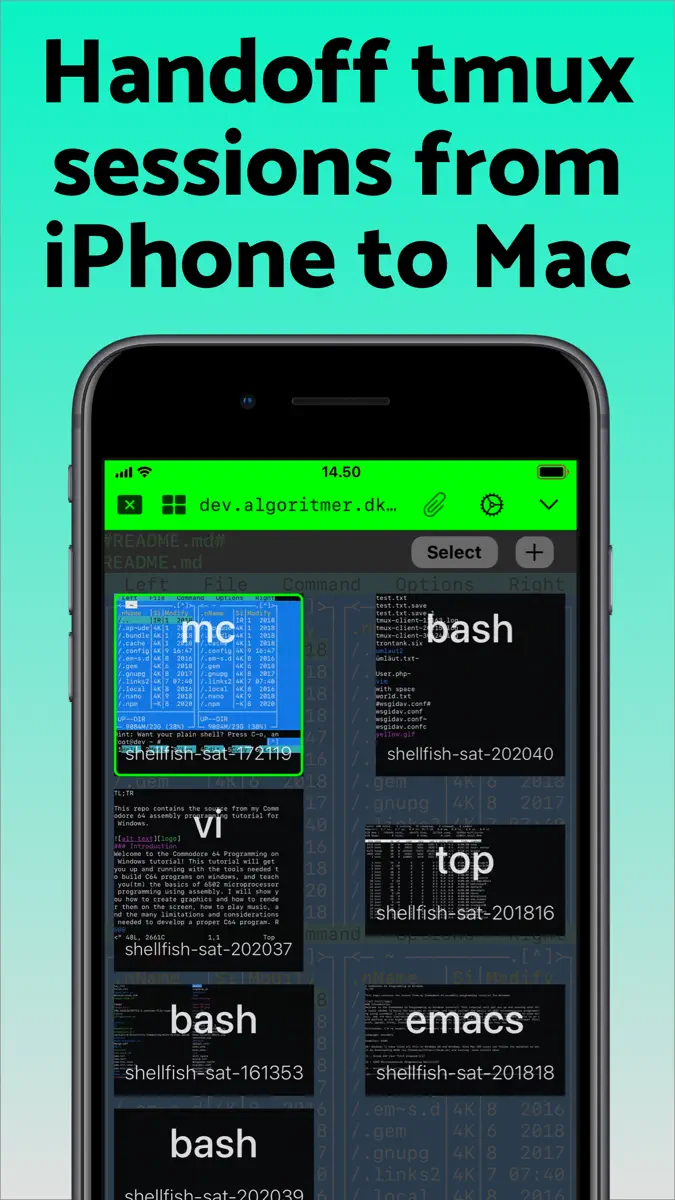
Taps and clicks in programs that read the mouse, like tmux, vim and Midnight Commander, now move the cursor and select text the way they do everywhere else in the terminal. Turn on ⌥ in the keyboard bar, or hold Option on a hardware keyboard, to send them to the program instead, including right-clicks and drags. Long-press ⌥ and turn on Send Clicks to Server to make that the default. Mosh now works for servers reached through a tunnel set to Always, switching to SSH if no reply arrives, and Mosh through a VPN such as Tailscale now works on cellular networks. An imported font family now draws bold and italic text with its own bold and italic faces. Import all the files of a family at once. Link detection leaves out trailing punctuation and markdown brackets, follows links across wrapped lines, opens mailto links in Mail and opens OSC 8 links with a single tap when their text is the address. Fixes the top rows of the terminal ending up under the status bar after switching terminals with ⌘ and a number while the tab bar is hidden. Includes improvements from last version: This version introduces Mosh as an experimental feature. Choose Mosh under Persistence when editing a server to try it. Mosh is designed to keep the terminal connected as you move between Wi-Fi and cellular, through network dropouts and while your iPhone or iPad sleeps, and to show what you type right away on a slow connection. The server needs mosh-server and must accept UDP on ports 60000 to 61000, and ShellFish shows how to install mosh-server if it is missing. If Mosh gives you trouble, switch Persistence back to None or tmux, and feedback on what went wrong is very welcome. Images sent with the kitty graphics protocol now show in the terminal, from tools like kitten icat and yazi and from Claude Code mods that draw images. Run Install from Shell Integration on the server so Claude Code knows it can draw them. Images do not come through tmux or Mosh.
Ranking events
- Climbed #43 → #16 in Grossing · Developer ToolsJapan
- Dropped #47 → #80 in Free · Developer ToolsGermany
- Entered the Free · Developer Tools chart at #83Spain
- Entered the Free · Developer Tools chart at #79Mexico
- Climbed #83 → #47 in Free · Developer ToolsGermany
- Climbed #70 → #20 in Grossing · Developer ToolsAustralia
Show 24 earlier events
- Entered the Free · Developer Tools chart at #86Canada
- Dropped #61 → #95 in Free · Developer ToolsJapan
- Entered the Free · Developer Tools chart at #54Australia
- Climbed #100 → #11 in Grossing · Developer ToolsJapan
- Entered the Free · Developer Tools chart at #74Japan
- Dropped #60 → #85 in Free · Developer ToolsFrance
- Entered the Free · Developer Tools chart at #100Canada
- Climbed #57 → #18 in Grossing · Developer ToolsSpain
- Entered the Free · Developer Tools chart at #86United Kingdom
- Climbed #49 → #22 in Grossing · Developer ToolsMexico
- Climbed #77 → #49 in Free · Developer ToolsFrance
- Climbed #78 → #15 in Grossing · Developer ToolsCanada
- Climbed #43 → #8 in Grossing · Developer ToolsUnited Kingdom
- Climbed #78 → #53 in Free · Developer ToolsJapan
- Climbed #99 → #64 in Free · Developer ToolsGermany
- Dropped #14 → #39 in Grossing · Developer ToolsAustralia
- Entered the Free · Developer Tools chart at #82Spain
- Entered the Free · Developer Tools chart at #83Mexico
- Entered the Free · Developer Tools chart at #78Japan
- New version 2026.35 (was 2026.34)
- Climbed #51 → #8 in Grossing · Developer ToolsBrazil
- Climbed #68 → #21 in Grossing · Developer ToolsIndia
- Dropped #34 → #61 in Grossing · Developer ToolsJapan
- Climbed #44 → #8 in Grossing · Developer ToolsFrance
About
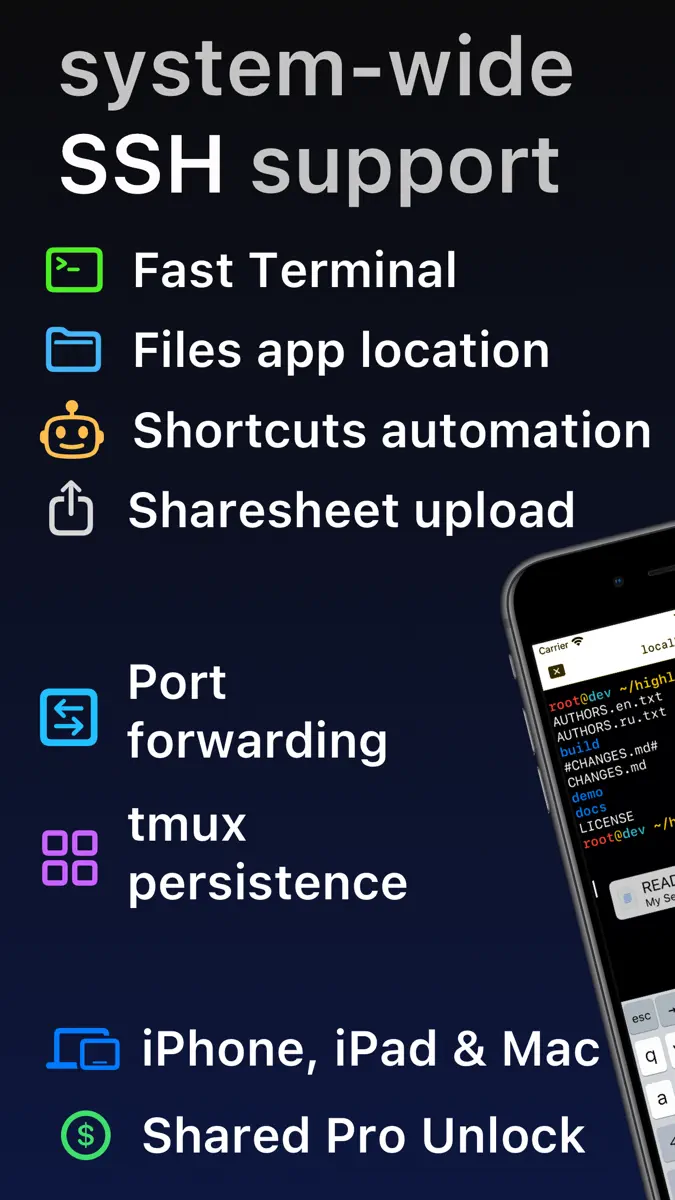
Lightning fast SSH terminal with remote file access. No other app fuses your SSH servers and iOS devices as well as Secure ShellFish. Tap Get and see for yourself. Terminal supports standard text editing gestures for selection, scrolling and copy/paste as well as custom gestures to send arrow keys and tabulator making shell entry and full screen editing with vim or emacs delightful. Bar above the keyboard makes it easy to type special keys and insert snippets. Select and drag filenames out of
Ranks come from Apple's public App Store charts, checked once a day. Appulse Index isn't affiliated with Apple.
Rank history
Higher on the chart is better: #1 is at the top.
Sign in to see 30 days, 90 days and all history.
Germany · Grossing · Developer Tools: best #6, latest #8, over 7 snapshots since 16 Nov.
In 15 charts now
| Chart | Rank | 24 h | 7 days | Best | Days on chart |
|---|---|---|---|---|---|
| Germany· Grossing · Developer Tools · best #5 · 45 days · 7 days Up 1 place | #8 | Up 2 places | Up 1 place | #5 | 45 |
| Japan· Grossing · Developer Tools · best #7 · 44 days · 7 days Up 68 places | #16 | Up 27 places | Up 68 places | #7 | 44 |
| Spain· Grossing · Developer Tools · best #10 · 37 days · 7 days Up 41 places | #23 | Down 9 places | Up 41 places | #10 | 37 |
| United States· Grossing · Developer Tools · best #7 · 45 days · 7 days Down 3 places | #27 | Down 13 places | Down 3 places | #7 | 45 |
| Australia· Grossing · Developer Tools · best #6 · 45 days · 7 days Up 4 places | #35 | Down 15 places | Up 4 places | #6 | 45 |
| United Kingdom· Grossing · Developer Tools · best #8 · 45 days · 7 days Down 4 places | #47 | Up 21 places | Down 4 places | #8 | 45 |
| Australia· Free · Developer Tools · best #49 · 21 days | #49 | Up 21 places | Not enough history yet | #49 | 21 |
| Canada· Grossing · Developer Tools · best #8 · 45 days · 7 days Up 28 places | #50 | Down 18 places | Up 28 places | #8 | 45 |
| Mexico· Grossing · Developer Tools · best #9 · 45 days · 7 days Down 8 places | #57 | Down 8 places | Down 8 places | #9 | 45 |
| France· Grossing · Developer Tools · best #7 · 45 days · 7 days Down 49 places | #64 | Up 6 places | Down 49 places | #7 | 45 |
| Canada· Free · Developer Tools · best #64 · 15 days | #68 | Up 18 places | Not enough history yet | #64 | 15 |
| India· Grossing · Developer Tools · best #5 · 45 days · 7 days Down 40 places | #73 | Down 8 places | Down 40 places | #5 | 45 |
| Germany· Free · Developer Tools · best #43 · 42 days · 7 days Down 16 places | #80 | Down 33 places | Down 16 places | #43 | 42 |
| Japan· Free · Developer Tools · best #51 · 22 days · 7 days Down 30 places | #83 | Up 7 places | Down 30 places | #51 | 22 |
| Brazil· Grossing · Developer Tools · best #8 · 45 days · 7 days Down 57 places | #93 | Down 2 places | Down 57 places | #8 | 45 |
Competitors
Compare with the top 3Full chartTop of Grossing · Developer Tools in Germany. SSH Files – Secure ShellFish is #8 there. Changes are over 7 days.
- #1 (number one)No change
 GitHubGitHub
- #2No change
- #3No change
 CursorX Corp.
- #4No change
 Termius - Modern SSH ClientTermius Corporation
- #5Up 3 places
 Emergent AI: Vibe Code AppsEmergent Labs Inc
- #6Up 28 places
 Textastic Code EditorAlexander Blach
- #7Up 10 places
 Proxyman - Captura HTTPSProxyman LLC
- #9Up 37 places
 Blink Shell, Build & CodeBlink Shell, Inc
- #10Up 6 places
 ProxMateLars Herres
- #11Up 14 places
 Text EditorTAPUNIVERSE LLC
- #12Down 6 places
 Moshi: herdr/tmux en SSH/MOSHMoshi Tech Ltd.
- #13Up 1 place
 Working Copy - Git clientAnders Borum
- #14New entry
 OpenClient for OpenCodeNicolas Toporcov
- #15Not enough history yet
 DualMac: Escritorio remoto VNCMARIUS LABS
- #16Up 3 places
 WebSSH - Sysadmin ToolboxMENGUS ARNAUD
- #17Up 10 places
 Device Monitor²Fast-Devs Project
- #18Up 3 places
 Python Editor AppAndromeda Corp LTD
- #19Up 71 places
 OnSpace AI: Mobile App BuilderSoulZ AI Inc.
- #20Up 55 places
 Xogot:iPad & iPhone 向け GodotXibbon, Inc
- #21Not enough history yet
 GDevelop - Create & Play GamesGDEVELOP FRANCE

Screenshots



More from Anders Borum
| App | Best rank now | Released | App Store |
|---|---|---|---|
Working Copy - Git clientDeveloper Tools · | Grossing · Developer ToolsMexico#3 |

SSH Files – Secure ShellFish
Anders Borum
As of 22 Nov 2026, SSH Files – Secure ShellFish is #8 in Grossing · Developer Tools in Germany, its best of 15 chart positions across 11 countries. Over the last 7 days its biggest climb was 68 places, to #16 in Grossing · Developer Tools in Japan. Its best rank in the last 7 days was #6 in Grossing · Developer Tools in Germany. Appulse Index first saw SSH Files – Secure ShellFish in a tracked chart on 8 Oct 2026. Since then it has charted on 45 days in 11 countries, with a best rank of #5 in Grossing · Developer Tools in Germany on 12 Oct 2026.
Store listing
How the app presents itself on the App Store. Select a screenshot to open it full size.
App facts
What Apple publishes about this app. Ratings are from one country's App Store.
- Price
- Free
- Rating
- 4.8 / 5 stars722 ratings Germany
- Released
- 28 Jun 2019
- Last update
- Version 2026.35
- Requires
- iOS 17.4or later
- Size
- 144.1 MB
- Languages
- 2
Chart record
Every tracked chart, country and day since Appulse Index first saw this app in a chart.
Rank history
Higher on the chart is better: #1 is at the top.
Sign in to see 30 days, 90 days and all history.
Germany · Grossing · Developer Tools: best #6, latest #8, over 7 snapshots since 16 Nov.
Current rankings
Every chart this app is in right now, best position first.
| Chart | Rank | 24 h | 7 days | Best | Days on chart |
|---|---|---|---|---|---|
| Germany· Grossing · Developer Tools · best #5 · 45 days · 7 days Up 1 place | #8 | Up 2 places | Up 1 place | #5 | 45 |
| Japan· Grossing · Developer Tools · best #7 · 44 days · 7 days Up 68 places | #16 | Up 27 places | Up 68 places | #7 | 44 |
| Spain· Grossing · Developer Tools · best #10 · 37 days · 7 days Up 41 places | #23 | Down 9 places | Up 41 places | #10 | 37 |
| United States· Grossing · Developer Tools · best #7 · 45 days · 7 days Down 3 places | #27 | Down 13 places | Down 3 places | #7 | 45 |
| Australia· Grossing · Developer Tools · best #6 · 45 days · 7 days Up 4 places | #35 | Down 15 places | Up 4 places | #6 | 45 |
| United Kingdom· Grossing · Developer Tools · best #8 · 45 days · 7 days Down 4 places | #47 | Up 21 places | Down 4 places | #8 | 45 |
| Australia· Free · Developer Tools · best #49 · 21 days | #49 | Up 21 places | Not enough history yet | #49 | 21 |
| Canada· Grossing · Developer Tools · best #8 · 45 days · 7 days Up 28 places | #50 | Down 18 places | Up 28 places | #8 | 45 |
| Mexico· Grossing · Developer Tools · best #9 · 45 days · 7 days Down 8 places | #57 | Down 8 places | Down 8 places | #9 | 45 |
| France· Grossing · Developer Tools · best #7 · 45 days · 7 days Down 49 places | #64 | Up 6 places | Down 49 places | #7 | 45 |
| Canada· Free · Developer Tools · best #64 · 15 days | #68 | Up 18 places | Not enough history yet | #64 | 15 |
| India· Grossing · Developer Tools · best #5 · 45 days · 7 days Down 40 places | #73 | Down 8 places | Down 40 places | #5 | 45 |
| Germany· Free · Developer Tools · best #43 · 42 days · 7 days Down 16 places | #80 | Down 33 places | Down 16 places | #43 | 42 |
| Japan· Free · Developer Tools · best #51 · 22 days · 7 days Down 30 places | #83 | Up 7 places | Down 30 places | #51 | 22 |
| Brazil· Grossing · Developer Tools · best #8 · 45 days · 7 days Down 57 places | #93 | Down 2 places | Down 57 places | #8 | 45 |
Ranking events
Entries, big moves, #1s and new versions we've recorded, by day.
- Climbed #43 → #16 in Grossing · Developer ToolsJapan
- Dropped #47 → #80 in Free · Developer ToolsGermany
- Entered the Free · Developer Tools chart at #83Spain
- Entered the Free · Developer Tools chart at #79Mexico
- Climbed #83 → #47 in Free · Developer ToolsGermany
- Climbed #70 → #20 in Grossing · Developer ToolsAustralia
- Entered the Free · Developer Tools chart at #86Canada
- Dropped #61 → #95 in Free · Developer ToolsJapan
- Entered the Free · Developer Tools chart at #54Australia
- Climbed #100 → #11 in Grossing · Developer ToolsJapan
- Entered the Free · Developer Tools chart at #74Japan
- Dropped #60 → #85 in Free · Developer ToolsFrance
- Entered the Free · Developer Tools chart at #100Canada
- Climbed #57 → #18 in Grossing · Developer ToolsSpain
- Entered the Free · Developer Tools chart at #86United Kingdom
- Climbed #49 → #22 in Grossing · Developer ToolsMexico
- Climbed #77 → #49 in Free · Developer ToolsFrance
- Climbed #78 → #15 in Grossing · Developer ToolsCanada
- Climbed #43 → #8 in Grossing · Developer ToolsUnited Kingdom
- Climbed #78 → #53 in Free · Developer ToolsJapan
- Climbed #99 → #64 in Free · Developer ToolsGermany
- Dropped #14 → #39 in Grossing · Developer ToolsAustralia
- Entered the Free · Developer Tools chart at #82Spain
- Entered the Free · Developer Tools chart at #83Mexico
- Entered the Free · Developer Tools chart at #78Japan
- New version 2026.35 (was 2026.34)
- Climbed #51 → #8 in Grossing · Developer ToolsBrazil
- Climbed #68 → #21 in Grossing · Developer ToolsIndia
- Dropped #34 → #61 in Grossing · Developer ToolsJapan
- Climbed #44 → #8 in Grossing · Developer ToolsFrance
Competitors
Compare with the top 3Full chartTop of Grossing · Developer Tools in Germany. SSH Files – Secure ShellFish is #8 there. Changes are over 7 days.
- #1 (number one)No changeGitHubGitHub
- #2No change
- #3No changeCursorX Corp.
- #4No changeTermius - Modern SSH ClientTermius Corporation
- #5Up 3 placesEmergent AI: Vibe Code AppsEmergent Labs Inc
- #6Up 28 placesTextastic Code EditorAlexander Blach
- #7Up 10 placesProxyman - Captura HTTPSProxyman LLC
- #8Up 1 place
 SSH Files – Secure ShellFishThis app
- #9Up 37 placesBlink Shell, Build & CodeBlink Shell, Inc
- #10Up 6 placesProxMateLars Herres
- #11Up 14 placesText EditorTAPUNIVERSE LLC
- #12Down 6 placesMoshi: herdr/tmux en SSH/MOSHMoshi Tech Ltd.
- #13Up 1 placeWorking Copy - Git clientAnders Borum
- #14New entryOpenClient for OpenCodeNicolas Toporcov
- #15Not enough history yetDualMac: Escritorio remoto VNCMARIUS LABS
- #16Up 3 placesWebSSH - Sysadmin ToolboxMENGUS ARNAUD
- #17Up 10 placesDevice Monitor²Fast-Devs Project
- #18Up 3 placesPython Editor AppAndromeda Corp LTD
- #19Up 71 placesOnSpace AI: Mobile App BuilderSoulZ AI Inc.
- #20Up 55 placesXogot:iPad & iPhone 向け GodotXibbon, Inc
- #21Not enough history yetGDevelop - Create & Play GamesGDEVELOP FRANCE
About
From the app's App Store listing.
Lightning fast SSH terminal with remote file access. No other app fuses your SSH servers and iOS devices as well as Secure ShellFish. Tap Get and see for yourself.
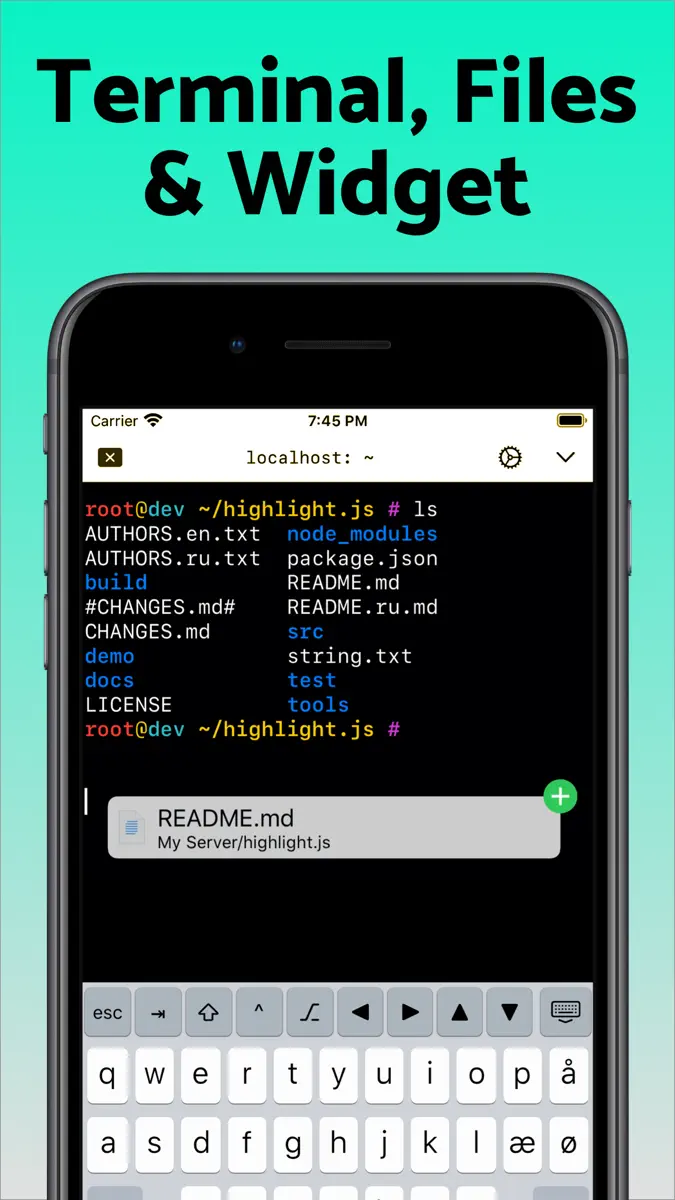
Terminal supports standard text editing gestures for selection, scrolling and copy/paste as well as custom gestures to send arrow keys and tabulator making shell entry and full screen editing with vim or emacs delightful. Bar above the keyboard makes it easy to type special keys and insert snippets.
Select and drag filenames out of
What's new
Version 2026.35 · 13 Nov 2026 ·
Taps and clicks in programs that read the mouse, like tmux, vim and Midnight Commander, now move the cursor and select text the way they do everywhere else in the terminal. Turn on ⌥ in the keyboard bar, or hold Option on a hardware keyboard, to send them to the program instead, including right-clicks and drags. Long-press ⌥ and turn on Send Clicks to Server to make that the default.
Mosh now works for servers reached through a tunnel set to Always, switching to SSH if no reply arrives, and Mosh through a VPN such as Tailscale now works on cellular networks.
An imported font family now draws bold and italic text with its own bold and italic faces. Import all the files of a family at once.
Link detection leaves out trailing punctuation and markdown brackets, follows links across wrapped lines, opens mailto links in Mail and opens OSC 8 links with a single tap when their text is the address.
Fixes the top rows of the terminal ending up under the status bar after switching terminals with ⌘ and a number while the tab bar is hidden.
Includes improvements from last version:
This version introduces Mosh as an experimental feature. Choose Mosh under Persistence when editing a server to try it. Mosh is designed to keep the terminal connected as you move between Wi-Fi and cellular, through network dropouts and while your iPhone or iPad sleeps, and to show what you type right away on a slow connection. The server needs mosh-server and must accept UDP on ports 60000 to 61000, and ShellFish shows how to install mosh-server if it is missing. If Mosh gives you trouble, switch Persistence back to None or tmux, and feedback on what went wrong is very welcome.
Images sent with the kitty graphics protocol now show in the terminal, from tools like kitten icat and yazi and from Claude Code mods that draw images. Run Install from Shell Integration on the server so Claude Code knows it can draw them. Images do not come through tmux or Mosh.
More from Anders Borum
Their other apps that Appulse has seen in the charts, charting ones first.
| App | Best rank now | Released | App Store |
|---|---|---|---|
Working Copy - Git clientDeveloper Tools · | Grossing · Developer ToolsMexico#3 |
Ranks come from Apple's public App Store charts, checked once a day. Appulse Index isn't affiliated with Apple.