

As of 21 Nov 2026, FaceRef Studio is #8 in Paid · Graphics & Design in Mexico, its best of 3 chart positions across 3 countries. Over the last 7 days its biggest fall was 37 places, to #62 in Paid · Graphics & Design in the United States. Its best rank in the last 7 days was #2 in Paid · Graphics & Design in Mexico. Appulse Index first saw FaceRef Studio in a tracked chart on 8 Oct 2026. Since then it has charted on 44 days in 10 countries, with a best rank of #2 in Paid · Graphics & Design in Spain on 30 Oct 2026. Its best in an overall chart was #89 in Top Paid in Spain, on 30 Oct 2026.
Current rank
#8Mexico · Paid · Graphics & Design
- Was
- —7 days ago
- Change
- Not enough history yetover 7 days
- Best
- #2in 7 days
- Longest chart run
- 37 daysUnited States · Paid · Graphics & Design
- New ratings, 7 days
- 0United States · since 14 Nov 2026
Chart record
Every tracked chart, country and day since Appulse Index first saw this app in a chart.
What's new
Version 1.0.1 · 1 month ago
Lighting presets Ten slots to save a whole three-light setup at once - the colour, brightness and direction of every light. Name a slot, load it back whenever you need it, and it stays on your device between sessions. The first row puts every light back to the lighting the app ships with, so a setup that has wandered off is always one tap from a known start. A new way to aim a light Each light's direction is now set by dragging its dot around a shaded ball instead of three sliders. The ball previews the lighting on a sphere as you move, and the outer ring reaches round behind the model for rim and back light. Built for fingers Dragging the light ball or the colour wheel now moves the handle by how far your finger travels, so the point you are choosing is never hidden under your fingertip. A tap still picks the spot you tapped. Handles and light dots are sized to stay comfortable on a phone screen. Also in this version - The Lighting tab is split into Light and Presets, and the colour wheel now stays open instead of hiding behind a swatch. - The hue ring picks the colour under your finger. It used to measure the angle from the top of the wheel, so the handle landed away from where you pressed. - Taps on high-density screens are no longer mistaken for tiny drags, which stopped the colour wheel from picking the point you tapped. - The panel rises above the on-screen keyboard while you type a preset name, instead of the keyboard covering the field. - Set as default and Reset light have been replaced by presets and the App default row, which do both jobs for all three lights at once.
Ranking events
- Entered the Paid · Graphics & Design chart at #2Mexico
- Dropped #6 → #32 in Paid · Graphics & DesignBrazil
- Climbed #45 → #11 in Paid · Graphics & DesignUnited States
- Entered the Paid · Graphics & Design chart at #3Brazil
- Dropped #14 → #64 in Paid · Graphics & DesignJapan
- Dropped #19 → #95 in Paid · Graphics & DesignUnited Kingdom
Show 24 earlier events
- Entered the Paid · Graphics & Design chart at #9Japan
- Entered the Paid · Graphics & Design chart at #11United Kingdom
- Climbed #83 → #21 in Paid · Graphics & DesignUnited States
- Entered the Paid · Graphics & Design chart at #3India
- Dropped #28 → #57 in Paid · Graphics & DesignUnited States
- Dropped #22 → #90 in Paid · Graphics & DesignUnited Kingdom
- Entered the Paid · Graphics & Design chart at #2Spain
- Entered the Top Paid chart at #89Spain
- Entered the Paid · Graphics & Design chart at #8United Kingdom
- Dropped #17 → #49 in Paid · Graphics & DesignGermany
- Dropped #13 → #57 in Paid · Graphics & DesignJapan
- Dropped #14 → #65 in Paid · Graphics & DesignCanada
- Dropped #13 → #44 in Paid · Graphics & DesignFrance
- Entered the Paid · Graphics & Design chart at #11Japan
- Entered the Paid · Graphics & Design chart at #8Canada
- Climbed #92 → #3 in Paid · Graphics & DesignFrance
- Entered the Paid · Graphics & Design chart at #4Germany
- Dropped #18 → #92 in Paid · Graphics & DesignUnited Kingdom
- Climbed #73 → #7 in Paid · Graphics & DesignUnited States
- Entered the Paid · Graphics & Design chart at #9United Kingdom
- New version 1.0.1 (was 1.0)
- Climbed #48 → #16 in Paid · Graphics & DesignUnited States
- Entered the Paid · Graphics & Design chart at #4Brazil
- Entered the Paid · Graphics & Design chart at #29United States
About
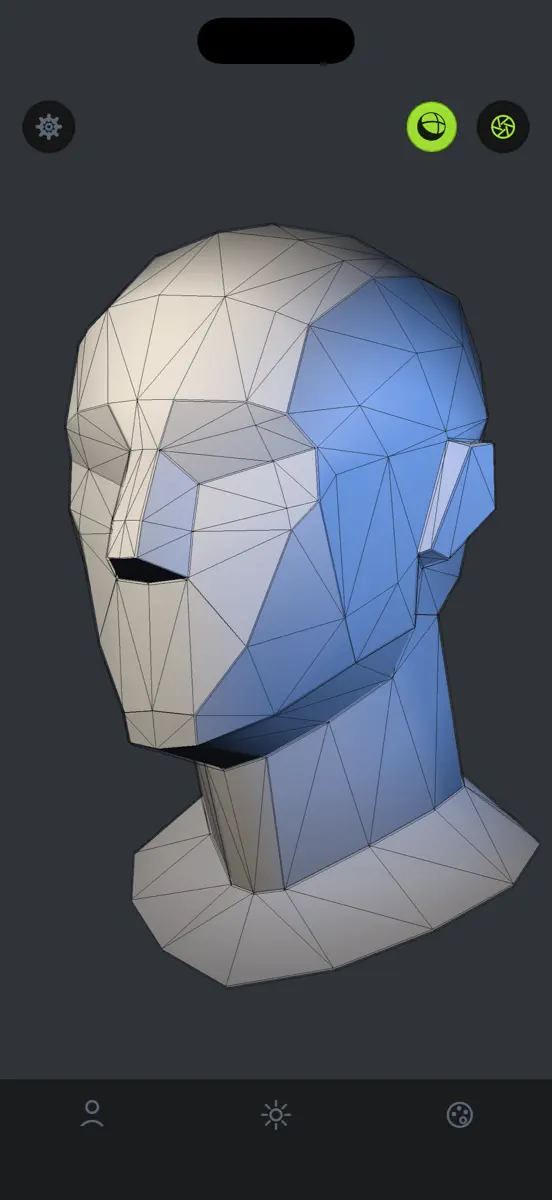
Study the human head from every angle. FaceRef Studio puts a 3D head on your desk while you draw. Rotate it with one finger, pinch to zoom, and light it the way you need - then get back to your paper or tablet. 25 MODELS ACROSS 4 CATEGORIES Basic - two plane-broken heads, plus sphere, cube, cone and cylinder for blocking out forms Classic - the Asaro head in simple and detailed versions, and a skull Stylized - male, female and teen sculpts Detailed - realistic male and female heads, with and…
Ranks come from Apple's public App Store charts, checked once a day. Appulse Index isn't affiliated with Apple.
Rank history
Higher on the chart is better: #1 is at the top.
Sign in to see 30 days, 90 days and all history.
Mexico · Paid · Graphics & Design: best #2, latest #8, over 7 snapshots since 15 Nov.
In 3 charts now
| Chart | Rank | 24 h | 7 days | Best | Days on chart |
|---|---|---|---|---|---|
| Mexico· Paid · Graphics & Design · best #2 · 3 days | #8 | Down 5 places | Not enough history yet | #2 | 3 |
| Brazil· Paid · Graphics & Design · best #3 · 20 days | #44 | Down 9 places | Not enough history yet | #3 | 20 |
| United States· Paid · Graphics & Design · best #7 · 37 days · 7 days Down 37 places | #62 | Down 12 places | Down 37 places | #7 | 37 |
Competitors
Compare with the top 3Full chartTop of Paid · Graphics & Design in Mexico. FaceRef Studio is #8 there. Changes are over 7 days.
- #1 (number one)No change
 Procreate PocketSavage Interactive Pty Ltd
- #2New entry
 Reference Board: Mood BoardJordan Ruchtie
- #3Up 1 place
 Nomad SculptHexanomad
- #4Down 2 places
 AltoPaint: Oil & WatercolorHigh Line Labs LLC
- #5Up 1 place
 Miniature StudioJake Ellis
- #6Up 26 places
 Color Harmony by PowstyWojciech Walczyszyn
- #7New entry
 Paint AnytimeDenis Kolchev
- #9Up 5 places
 Color WheelRoman Sevastyanov
- #10Up 3 places
 ibis Paintibis inc.
- #11Not enough history yet
 FocalPaintbrien dieterle
- #12Down 2 places
 Percolator: Drippy MosaicsTinrocket, LLC
- #13Down 2 places
 SketchClub: Draw & Paintblackpawn.com
- #14Down 2 places
 Miyako Colouring BookTayasui.com
- #15No change
 Camera Lucida™: AR DrawingCamera Lucida
- #16No change
 You Doodle Pro - art on the goDigital Ruby, LLC
- #17No change
 Transparent App IconsNoah Gilmore
- #18No change
 RoughAnimator - animation appJacob KAFKA
- #19No change
 InspiresnowCanoe
- #20No change
 AsketchAndrew Kern
- #21No change
 Kitchen Editor 3D: Design AppSergii Melnyk
Screenshots




As of 21 Nov 2026, FaceRef Studio is #8 in Paid · Graphics & Design in Mexico, its best of 3 chart positions across 3 countries. Over the last 7 days its biggest fall was 37 places, to #62 in Paid · Graphics & Design in the United States. Its best rank in the last 7 days was #2 in Paid · Graphics & Design in Mexico. Appulse Index first saw FaceRef Studio in a tracked chart on 8 Oct 2026. Since then it has charted on 44 days in 10 countries, with a best rank of #2 in Paid · Graphics & Design in Spain on 30 Oct 2026. Its best in an overall chart was #89 in Top Paid in Spain, on 30 Oct 2026.
Store listing
How the app presents itself on the App Store. Select a screenshot to open it full size.
App facts
What Apple publishes about this app. Ratings are from one country's App Store.
- Price
- R$29.90
- Rating
- 4.0 / 5 stars2 ratings United States
- Released
- 22 Sep 2026
- Last update
- Version 1.0.1
- Requires
- iOS 15.0or later
- Size
- 121 MB
- Languages
- 1
Chart record
Every tracked chart, country and day since Appulse Index first saw this app in a chart.
Rank history
Higher on the chart is better: #1 is at the top.
Sign in to see 30 days, 90 days and all history.
Mexico · Paid · Graphics & Design: best #2, latest #8, over 7 snapshots since 15 Nov.
Current rankings
Every chart this app is in right now, best position first.
| Chart | Rank | 24 h | 7 days | Best | Days on chart |
|---|---|---|---|---|---|
| Mexico· Paid · Graphics & Design · best #2 · 3 days | #8 | Down 5 places | Not enough history yet | #2 | 3 |
| Brazil· Paid · Graphics & Design · best #3 · 20 days | #44 | Down 9 places | Not enough history yet | #3 | 20 |
| United States· Paid · Graphics & Design · best #7 · 37 days · 7 days Down 37 places | #62 | Down 12 places | Down 37 places | #7 | 37 |
Ranking events
Entries, big moves, #1s and new versions we've recorded, by day.
- Entered the Paid · Graphics & Design chart at #2Mexico
- Dropped #6 → #32 in Paid · Graphics & DesignBrazil
- Climbed #45 → #11 in Paid · Graphics & DesignUnited States
- Entered the Paid · Graphics & Design chart at #3Brazil
- Dropped #14 → #64 in Paid · Graphics & DesignJapan
- Dropped #19 → #95 in Paid · Graphics & DesignUnited Kingdom
- Entered the Paid · Graphics & Design chart at #9Japan
- Entered the Paid · Graphics & Design chart at #11United Kingdom
- Climbed #83 → #21 in Paid · Graphics & DesignUnited States
- Entered the Paid · Graphics & Design chart at #3India
- Dropped #28 → #57 in Paid · Graphics & DesignUnited States
- Dropped #22 → #90 in Paid · Graphics & DesignUnited Kingdom
- Entered the Paid · Graphics & Design chart at #2Spain
- Entered the Top Paid chart at #89Spain
- Entered the Paid · Graphics & Design chart at #8United Kingdom
- Dropped #17 → #49 in Paid · Graphics & DesignGermany
- Dropped #13 → #57 in Paid · Graphics & DesignJapan
- Dropped #14 → #65 in Paid · Graphics & DesignCanada
- Dropped #13 → #44 in Paid · Graphics & DesignFrance
- Entered the Paid · Graphics & Design chart at #11Japan
- Entered the Paid · Graphics & Design chart at #8Canada
- Climbed #92 → #3 in Paid · Graphics & DesignFrance
- Entered the Paid · Graphics & Design chart at #4Germany
- Dropped #18 → #92 in Paid · Graphics & DesignUnited Kingdom
- Climbed #73 → #7 in Paid · Graphics & DesignUnited States
- Entered the Paid · Graphics & Design chart at #9United Kingdom
- New version 1.0.1 (was 1.0)
- Climbed #48 → #16 in Paid · Graphics & DesignUnited States
- Entered the Paid · Graphics & Design chart at #4Brazil
- Entered the Paid · Graphics & Design chart at #29United States
Competitors
Compare with the top 3Full chartTop of Paid · Graphics & Design in Mexico. FaceRef Studio is #8 there. Changes are over 7 days.
- #1 (number one)No changeProcreate PocketSavage Interactive Pty Ltd
- #2New entryReference Board: Mood BoardJordan Ruchtie
- #3Up 1 placeNomad SculptHexanomad
- #4Down 2 placesAltoPaint: Oil & WatercolorHigh Line Labs LLC
- #5Up 1 placeMiniature StudioJake Ellis
- #6Up 26 placesColor Harmony by PowstyWojciech Walczyszyn
- #7New entryPaint AnytimeDenis Kolchev
- #8Not enough history yet
 FaceRef StudioThis app
- #9Up 5 placesColor WheelRoman Sevastyanov
- #10Up 3 placesibis Paintibis inc.
- #11Not enough history yetFocalPaintbrien dieterle
- #12Down 2 placesPercolator: Drippy MosaicsTinrocket, LLC
- #13Down 2 placesSketchClub: Draw & Paintblackpawn.com
- #14Down 2 placesMiyako Colouring BookTayasui.com
- #15No changeCamera Lucida™: AR DrawingCamera Lucida
- #16No changeYou Doodle Pro - art on the goDigital Ruby, LLC
- #17No changeTransparent App IconsNoah Gilmore
- #18No changeRoughAnimator - animation appJacob KAFKA
- #19No changeInspiresnowCanoe
- #20No changeAsketchAndrew Kern
- #21No changeKitchen Editor 3D: Design AppSergii Melnyk
About
From the app's App Store listing.
Study the human head from every angle.
FaceRef Studio puts a 3D head on your desk while you draw. Rotate it with one finger, pinch to zoom, and light it the way you need - then get back to your paper or tablet.
25 MODELS ACROSS 4 CATEGORIES Basic - two plane-broken heads, plus sphere, cube, cone and cylinder for blocking out forms Classic - the Asaro head in simple and detailed versions, and a skull Stylized - male, female and teen sculpts Detailed - realistic male and female heads, with and…
What's new
Version 1.0.1 · 19 Oct 2026 ·
Lighting presets
Ten slots to save a whole three-light setup at once - the colour, brightness and direction of every light. Name a slot, load it back whenever you need it, and it stays on your device between sessions. The first row puts every light back to the lighting the app ships with, so a setup that has wandered off is always one tap from a known start.
A new way to aim a light
Each light's direction is now set by dragging its dot around a shaded ball instead of three sliders. The ball previews the lighting on a sphere as you move, and the outer ring reaches round behind the model for rim and back light.
Built for fingers
Dragging the light ball or the colour wheel now moves the handle by how far your finger travels, so the point you are choosing is never hidden under your fingertip. A tap still picks the spot you tapped. Handles and light dots are sized to stay comfortable on a phone screen.
Also in this version
- The Lighting tab is split into Light and Presets, and the colour wheel now
stays open instead of hiding behind a swatch.
- The hue ring picks the colour under your finger. It used to measure the angle
from the top of the wheel, so the handle landed away from where you pressed.
- Taps on high-density screens are no longer mistaken for tiny drags, which
stopped the colour wheel from picking the point you tapped.
- The panel rises above the on-screen keyboard while you type a preset name,
instead of the keyboard covering the field.
- Set as default and Reset light have been replaced by presets and the App
default row, which do both jobs for all three lights at once.
Ranks come from Apple's public App Store charts, checked once a day. Appulse Index isn't affiliated with Apple.