

Metadata Pro: EXIF Editor
PLATINUM CITY LLC
As of 21 Nov 2026, Metadata Pro: EXIF Editor is #37 in Paid · Photo & Video in France, its best of 3 chart positions across 3 countries. Its best rank in the last 7 days was #13 in Paid · Photo & Video in France. Appulse Index first saw Metadata Pro: EXIF Editor in a tracked chart on 12 Oct 2026. Since then it has charted on 22 days in 9 countries, with a best rank of #5 in Paid · Photo & Video in Spain on 6 Nov 2026. Its best in an overall chart was #92 in Top Paid in Spain, on 6 Nov 2026.
Current rank
#37France · Paid · Photo & Video
- Was
- —7 days ago
- Change
- Not enough history yetover 7 days
- Best
- #13in 7 days
- Longest chart run
- 10 daysAustralia · Paid · Photo & Video
- New ratings, 7 days
- 0Australia · since 14 Nov 2026
Chart record
Every tracked chart, country and day since Appulse Index first saw this app in a chart.
What's new
Version 11.4 · 2 days ago
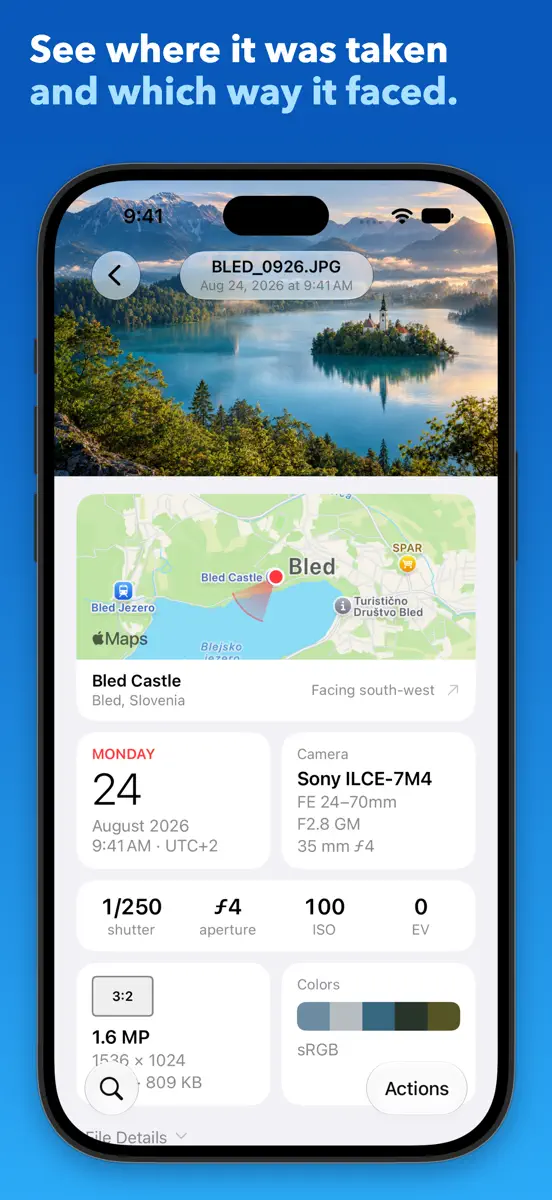
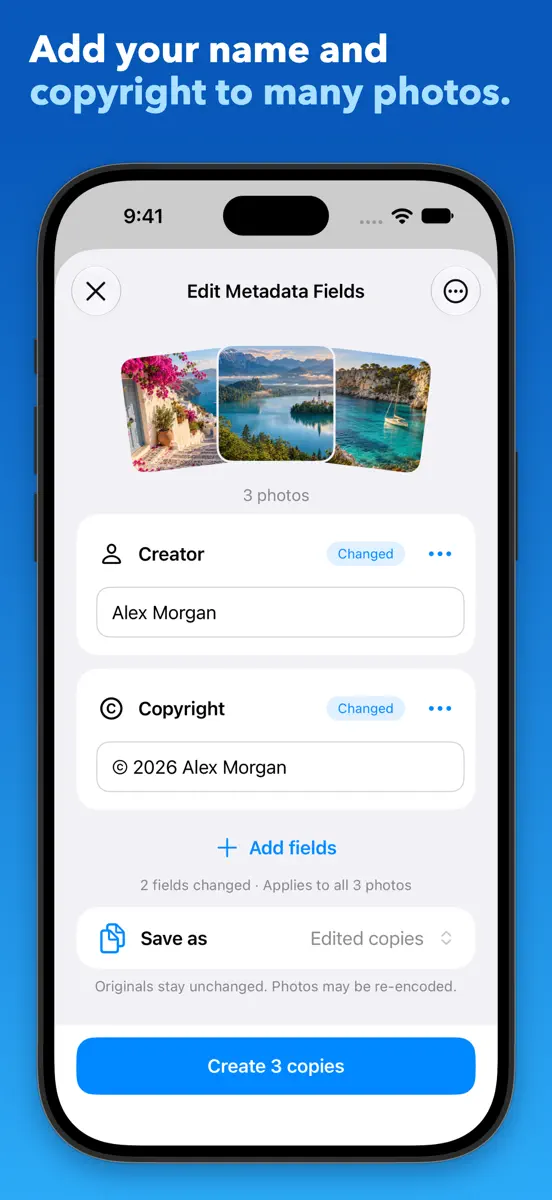
Updating the same Live Photo twice in a row no longer stops with “Nothing was changed”. New in 11.3: • The app is now also in Arabic, Italian, Portuguese (Brazil), Indonesian, and Polish. • WebP photos: removing their metadata or GPS data, and saving edited copies, no longer fails. New in 11.2: • The app is now also in Japanese, Korean, Chinese (Simplified and Traditional), and French. New in 11.1: • Videos: edit their make, model, software, description, copyright, creation date, and location, save or share them without any metadata or GPS data, and update the originals. Their picture and sound are copied as they are. • Remove All Metadata and Remove GPS Data are back: they add a clean copy to your library in one tap, without opening the share sheet. Choose Update originals under Save as to clean the originals instead; Revert in Photos brings the metadata back. • Captions, keywords, and star ratings: on iOS 27, changing Image Description, IPTC Keywords, or the new Star Rating field also updates the photo's caption, keywords, and rating in the Photos app, on one photo or many. • Edited copies keep the caption, keywords, and rating the original has in Photos. • On iOS 27, the photo page shows the caption, keywords, and star rating the Photos app keeps for a photo. • File Details shows whether a photo's file says it was made or edited with AI, the AI tool it names, and any Content Credentials (C2PA), which aren't verified. Version 11 is a complete redesign. • New photo page: the photo, a map showing where it was taken and which way the camera faced, tiles for the date, camera, exposure, file, and colours, then every metadata group. Search by field name or value. • New editor: edit fields on one photo or many, then save edited copies or update the originals. • Files that can't be saved are now listed, and you can retry them. • Templates replace metadata schemas. Save fields and values, or start from a photo's details, and use them on the next batch. • Adjust Date & Time: move the time by an amount or correct a time zone, with a preview before you save. • Set Precise Location: search for a place, move the map, or type coordinates. • Six actions now appear under the Share button in Photos. • New library with albums, Select, and video playback. • New layouts for iPad and iPhone Duo, and dark mode. • New welcome screen and How To guide. What changed: • Exporting metadata is replaced by starting a template from a photo.
Ranking events
- Entered the Paid · Photo & Video chart at #60Japan
- Dropped #70 → #99 in Paid · Photo & VideoAustralia
- Entered the Paid · Photo & Video chart at #13France
- Dropped #34 → #70 in Paid · Photo & VideoAustralia
- Dropped #47 → #84 in Paid · Photo & VideoGermany
- Climbed #91 → #24 in Paid · Photo & VideoUnited States
Show 24 earlier events
- New version 11.4 (was 11.3)
- Entered the Paid · Photo & Video chart at #47Germany
- Entered the Paid · Photo & Video chart at #44Australia
- Dropped #39 → #91 in Paid · Photo & VideoUnited States
- Entered the Paid · Photo & Video chart at #14Spain
- Dropped #55 → #94 in Paid · Photo & VideoJapan
- Entered the Paid · Photo & Video chart at #39United States
- Dropped #25 → #55 in Paid · Photo & VideoJapan
- Entered the Paid · Photo & Video chart at #25Japan
- Entered the Paid · Photo & Video chart at #35France
- New version 11.3 (was 11.2)
- Dropped #35 → #79 in Paid · Photo & VideoUnited Kingdom
- Entered the Paid · Photo & Video chart at #19Spain
- Entered the Paid · Photo & Video chart at #18Brazil
- Climbed #86 → #39 in Paid · Photo & VideoGermany
- Dropped #39 → #77 in Paid · Photo & VideoAustralia
- Dropped #42 → #89 in Paid · Photo & VideoCanada
- New version 11.2 (was 11.1)
- Dropped #40 → #86 in Paid · Photo & VideoGermany
- Dropped #14 → #39 in Paid · Photo & VideoAustralia
- Dropped #21 → #46 in Paid · Photo & VideoFrance
- Climbed #91 → #40 in Paid · Photo & VideoGermany
- Climbed #41 → #14 in Paid · Photo & VideoAustralia
- Climbed #70 → #18 in Paid · Photo & VideoCanada
About
See everything stored in your photos and videos, and change it. Metadata Pro shows every field in a file and lets you edit those fields on one photo or many, in the app or from the Share button in Photos. It's a one-time purchase, with no subscription, ads, in-app purchases, or account. SEE EVERY DETAIL • Open any photo or video to see every detail stored in its file, from camera settings to location and dates. • See on a map where a photo was taken and, when the file records it, which way the
Ranks come from Apple's public App Store charts, checked once a day. Appulse Index isn't affiliated with Apple.
Rank history
Higher on the chart is better: #1 is at the top.
Sign in to see 30 days, 90 days and all history.
France · Paid · Photo & Video: best #13, latest #37, over 7 snapshots since 15 Nov.
In 3 charts now
| Chart | Rank | 24 h | 7 days | Best | Days on chart |
|---|---|---|---|---|---|
| France· Paid · Photo & Video · best #13 · 9 days | #37 | Down 24 places | Not enough history yet | #13 | 9 |
| Japan· Paid · Photo & Video · best #25 · 4 days | #60 | New entry | Not enough history yet | #25 | 4 |
| Australia· Paid · Photo & Video · best #14 · 10 days | #99 | Down 29 places | Not enough history yet | #14 | 10 |
Competitors
Compare with the top 3Full chartTop of Paid · Photo & Video in France. Metadata Pro: EXIF Editor is #37 there. Changes are over 7 days.
- #1 (number one)Up 88 places
 Video Master ProHaruki Daunrodo
- #2Up 49 places
 BerryFilm - Korean Style CamSeungyun Kim
- #3Up 69 places
 ProCam - Pro CameraTinkerworks Apps
- #4Up 36 places
 GR Recipe StudioHD Murray Ltd.
- #5New entry
 Northern Lights Photo TakerLazily Inspired
- #6Down 4 places
 PhotoPillsPhotoPills S.L.
- #7Up 30 places
 Rarevision VHS: Retro CamRarevision
- #8Down 3 places
 2AM CAMAiden Magarian
- #9Down 2 places
 Cadrage Director's ViewfinderCadrage GmbH
- #10Down 4 places
 LumaFusionLuma Touch LLC
- #11Up 76 places
 Mextures Photo EditorMEREK DAVIS COM, LLC
- #12Down 11 places
 Chromagraph CameraChromatic Applications LLC
- #13Up 1 place
 EE35 Film CameraEIGHTIVE DESIGN, Inc.
- #14Not enough history yet
 Screen Off RecorderWujie Yibang (fuzhou) Software Technology Co., Ltd
- #15Up 54 places
 Sun Surveyor (Sol & Lua)Adam Ratana
- #16New entry
 Comic Life 3plasq LLC
- #17Up 7 places
- #18New entry
 Massive Dev Chart TimerFreestyle Photo & Imaging
- #19Up 55 places
 Diptic: Photo Collage MakerRRRB LLC
- #20New entry


Screenshots


More from PLATINUM CITY LLC
| App | Best rank now | Released | App Store |
|---|---|---|---|
 Merge Voice MemosProductivity · | Paid · ProductivitySpain#13 |

Metadata Pro: EXIF Editor
PLATINUM CITY LLC
As of 21 Nov 2026, Metadata Pro: EXIF Editor is #37 in Paid · Photo & Video in France, its best of 3 chart positions across 3 countries. Its best rank in the last 7 days was #13 in Paid · Photo & Video in France. Appulse Index first saw Metadata Pro: EXIF Editor in a tracked chart on 12 Oct 2026. Since then it has charted on 22 days in 9 countries, with a best rank of #5 in Paid · Photo & Video in Spain on 6 Nov 2026. Its best in an overall chart was #92 in Top Paid in Spain, on 6 Nov 2026.
Store listing
How the app presents itself on the App Store. Select a screenshot to open it full size.
App facts
What Apple publishes about this app. Ratings are from one country's App Store.
- Price
- A$5.99
- Released
- 4 Feb 2016
- Last update
- Version 11.4
- Requires
- iOS 17.0or later
- Size
- 22.5 MB
- Languages
- 13
Chart record
Every tracked chart, country and day since Appulse Index first saw this app in a chart.
Rank history
Higher on the chart is better: #1 is at the top.
Sign in to see 30 days, 90 days and all history.
France · Paid · Photo & Video: best #13, latest #37, over 7 snapshots since 15 Nov.
Current rankings
Every chart this app is in right now, best position first.
| Chart | Rank | 24 h | 7 days | Best | Days on chart |
|---|---|---|---|---|---|
| France· Paid · Photo & Video · best #13 · 9 days | #37 | Down 24 places | Not enough history yet | #13 | 9 |
| Japan· Paid · Photo & Video · best #25 · 4 days | #60 | New entry | Not enough history yet | #25 | 4 |
| Australia· Paid · Photo & Video · best #14 · 10 days | #99 | Down 29 places | Not enough history yet | #14 | 10 |
Ranking events
Entries, big moves, #1s and new versions we've recorded, by day.
- Entered the Paid · Photo & Video chart at #60Japan
- Dropped #70 → #99 in Paid · Photo & VideoAustralia
- Entered the Paid · Photo & Video chart at #13France
- Dropped #34 → #70 in Paid · Photo & VideoAustralia
- Dropped #47 → #84 in Paid · Photo & VideoGermany
- Climbed #91 → #24 in Paid · Photo & VideoUnited States
- New version 11.4 (was 11.3)
- Entered the Paid · Photo & Video chart at #47Germany
- Entered the Paid · Photo & Video chart at #44Australia
- Dropped #39 → #91 in Paid · Photo & VideoUnited States
- Entered the Paid · Photo & Video chart at #14Spain
- Dropped #55 → #94 in Paid · Photo & VideoJapan
- Entered the Paid · Photo & Video chart at #39United States
- Dropped #25 → #55 in Paid · Photo & VideoJapan
- Entered the Paid · Photo & Video chart at #25Japan
- Entered the Paid · Photo & Video chart at #35France
- New version 11.3 (was 11.2)
- Dropped #35 → #79 in Paid · Photo & VideoUnited Kingdom
- Entered the Paid · Photo & Video chart at #19Spain
- Entered the Paid · Photo & Video chart at #18Brazil
- Climbed #86 → #39 in Paid · Photo & VideoGermany
- Dropped #39 → #77 in Paid · Photo & VideoAustralia
- Dropped #42 → #89 in Paid · Photo & VideoCanada
- New version 11.2 (was 11.1)
- Dropped #40 → #86 in Paid · Photo & VideoGermany
- Dropped #14 → #39 in Paid · Photo & VideoAustralia
- Dropped #21 → #46 in Paid · Photo & VideoFrance
- Climbed #91 → #40 in Paid · Photo & VideoGermany
- Climbed #41 → #14 in Paid · Photo & VideoAustralia
- Climbed #70 → #18 in Paid · Photo & VideoCanada
Competitors
Compare with the top 3Full chartTop of Paid · Photo & Video in France. Metadata Pro: EXIF Editor is #37 there. Changes are over 7 days.
- #1 (number one)Up 88 placesVideo Master ProHaruki Daunrodo
- #2Up 49 placesBerryFilm - Korean Style CamSeungyun Kim
- #3Up 69 placesProCam - Pro CameraTinkerworks Apps
- #4Up 36 placesGR Recipe StudioHD Murray Ltd.
- #5New entryNorthern Lights Photo TakerLazily Inspired
- #6Down 4 placesPhotoPillsPhotoPills S.L.
- #7Up 30 placesRarevision VHS: Retro CamRarevision
- #8Down 3 places2AM CAMAiden Magarian
- #9Down 2 placesCadrage Director's ViewfinderCadrage GmbH
- #10Down 4 placesLumaFusionLuma Touch LLC
- #11Up 76 placesMextures Photo EditorMEREK DAVIS COM, LLC
- #12Down 11 placesChromagraph CameraChromatic Applications LLC
- #13Up 1 placeEE35 Film CameraEIGHTIVE DESIGN, Inc.
- #14Not enough history yetScreen Off RecorderWujie Yibang (fuzhou) Software Technology Co., Ltd
- #15Up 54 placesSun Surveyor (Sol & Lua)Adam Ratana
- #16New entryComic Life 3plasq LLC
- #17Up 7 places
- #18New entryMassive Dev Chart TimerFreestyle Photo & Imaging
- #19Up 55 placesDiptic: Photo Collage MakerRRRB LLC
- #20New entry
- #37Not enough history yet
 Metadata Pro: EXIF EditorThis app
About
From the app's App Store listing.
See everything stored in your photos and videos, and change it. Metadata Pro shows every field in a file and lets you edit those fields on one photo or many, in the app or from the Share button in Photos. It's a one-time purchase, with no subscription, ads, in-app purchases, or account.
SEE EVERY DETAIL
- Open any photo or video to see every detail stored in its file, from camera settings to location and dates.
- See on a map where a photo was taken and, when the file records it, which way the
What's new
Version 11.4 · 18 Nov 2026 ·
Updating the same Live Photo twice in a row no longer stops with “Nothing was changed”.
New in 11.3:
- The app is now also in Arabic, Italian, Portuguese (Brazil), Indonesian, and Polish.
- WebP photos: removing their metadata or GPS data, and saving edited copies, no longer fails.
New in 11.2:
- The app is now also in Japanese, Korean, Chinese (Simplified and Traditional), and French.
New in 11.1:
- Videos: edit their make, model, software, description, copyright, creation date, and location, save or share them without any metadata or GPS data, and update the originals. Their picture and sound are copied as they are.
- Remove All Metadata and Remove GPS Data are back: they add a clean copy to your library in one tap, without opening the share sheet. Choose Update originals under Save as to clean the originals instead; Revert in Photos brings the metadata back.
- Captions, keywords, and star ratings: on iOS 27, changing Image Description, IPTC Keywords, or the new Star Rating field also updates the photo's caption, keywords, and rating in the Photos app, on one photo or many.
- Edited copies keep the caption, keywords, and rating the original has in Photos.
- On iOS 27, the photo page shows the caption, keywords, and star rating the Photos app keeps for a photo.
- File Details shows whether a photo's file says it was made or edited with AI, the AI tool it names, and any Content Credentials (C2PA), which aren't verified.
Version 11 is a complete redesign.
- New photo page: the photo, a map showing where it was taken and which way the camera faced, tiles for the date, camera, exposure, file, and colours, then every metadata group. Search by field name or value.
- New editor: edit fields on one photo or many, then save edited copies or update the originals.
- Files that can't be saved are now listed, and you can retry them.
- Templates replace metadata schemas. Save fields and values, or start from a photo's details, and use them on the next batch.
- Adjust Date & Time: move the time by an amount or correct a time zone, with a preview before you save.
- Set Precise Location: search for a place, move the map, or type coordinates.
- Six actions now appear under the Share button in Photos.
- New library with albums, Select, and video playback.
- New layouts for iPad and iPhone Duo, and dark mode.
- New welcome screen and How To guide.
What changed:
- Exporting metadata is replaced by starting a template from a photo.
More from PLATINUM CITY LLC
Their other apps that Appulse has seen in the charts, charting ones first.
| App | Best rank now | Released | App Store |
|---|---|---|---|
Merge Voice MemosProductivity · | Paid · ProductivitySpain#13 |
Ranks come from Apple's public App Store charts, checked once a day. Appulse Index isn't affiliated with Apple.