

As of 21 Nov 2026, Kan Do: Project Management is #33 in Paid · Productivity in Australia, its best of 4 chart positions across 4 countries. Over the last 7 days its biggest climb was 2 places, to #74 in Paid · Productivity in the United Kingdom. Its best rank in the last 7 days was #16 in Paid · Productivity in the United States. Appulse Index first saw Kan Do: Project Management in a tracked chart on 8 Oct 2026. Since then it has charted on 44 days in 11 countries, with a best rank of #4 in Paid · Productivity in India on 30 Oct 2026. Its best in an overall chart was #90 in Top Paid in India, on 30 Oct 2026.
Current rank
#33Australia · Paid · Productivity
- Was
- #107 days ago
- Change
- Down 23 placesover 7 days
- Best
- #21in 7 days
- Longest chart run
- 41 daysUnited States · Paid · Productivity
- New ratings, 7 days
- 0Germany · since 10 Nov 2026
Chart record
Every tracked chart, country and day since Appulse Index first saw this app in a chart.
What's new
Version 1.7.5 · 1 day ago
Apple Reminders - Sync with Reminders: a new switch in Settings > Sync > Apple Reminders keeps one Reminders list in step with Kan Do. Your open tasks appear in the list, and a reminder you add to it becomes a task in the Inbox - Title, due date, priority, and checking off travel both ways - Tasks to Sync chooses All Tasks or only Tasks with a Date - Deleting a reminder never deletes its task - Turn it on on one device only. Your other devices get the changes through iCloud Archive - The Archive box at the top of the sidebar now lists tasks archived inside your projects, grouped by project, with Restore and Delete. It used to read "Nothing Archived" while projects held archived tasks Projects and boards - Duplicate, All Tasks Unchecked: a second button when you duplicate a project makes the copy with every task and subtask open again - Tapping the + beside Add task puts the cursor in the field Selecting several tasks - Due Date in the selection bar: tap Select, pick the tasks, then tap Due Date to move them all to Today, Tomorrow, Next Week, or a date you pick. Good for moving what's left of the day to tomorrow - Select now works in Board Layout for Today, Upcoming, and custom smart lists Reminders - Snooze 15 Minutes: a new button when you press and hold a reminder. It brings the same reminder back in fifteen minutes and leaves the task's date alone - Subtask reminders now have the snooze buttons too Shortcuts - Add Task with Open Task After Creating now opens the new task Comments - The comment box stays above the keyboard. On a task with subtasks and a few comments it slid under the keyboard from about the third comment on, on iPhone and on both screens of iPhone Duo - Typing in the note on a task with subtasks and comments keeps the note in view above the keyboard - Return on a hardware keyboard posts the comment, and Return on an empty comment box puts the keyboard away iPhone Duo - With the sidebar hidden on the open screen, swipe in from the left edge to bring it back
Ranking events
- Dropped #32 → #81 in Paid · ProductivityGermany
- Entered the Paid · Productivity chart at #33Australia
- Dropped #40 → #74 in Paid · ProductivityUnited Kingdom
- Climbed #59 → #32 in Paid · ProductivityGermany
- Entered the Paid · Productivity chart at #40United Kingdom
- Entered the Paid · Productivity chart at #48United States
Show 24 earlier events
- New version 1.7.5 (was 1.7.4)
- Entered the Paid · Productivity chart at #59Germany
- Dropped #21 → #48 in Paid · ProductivityUnited States
- Dropped #36 → #74 in Paid · ProductivityUnited Kingdom
- New version 1.7.4 (was 1.7.2)
- Entered the Paid · Productivity chart at #20India
- Entered the Paid · Productivity chart at #17France
- Dropped #21 → #48 in Paid · ProductivityAustralia
- Climbed #98 → #36 in Paid · ProductivityUnited Kingdom
- Climbed #40 → #10 in Paid · ProductivityAustralia
- Dropped #56 → #86 in Paid · ProductivityCanada
- Dropped #40 → #76 in Paid · ProductivityUnited Kingdom
- Entered the Paid · Productivity chart at #46France
- Entered the Paid · Productivity chart at #56Canada
- Dropped #22 → #57 in Paid · ProductivityUnited States
- Entered the Paid · Productivity chart at #16Mexico
- New version 1.7.2 (was 1.7.1)
- Entered the Paid · Productivity chart at #17United Kingdom
- Entered the Paid · Productivity chart at #7Brazil
- New version 1.7.1 (was 1.6.9)
- Entered the Paid · Productivity chart at #64Germany
- Entered the Paid · Productivity chart at #34Australia
- Climbed #70 → #45 in Paid · ProductivityUnited States
- Entered the Paid · Productivity chart at #12Canada
About
Organize your work into Spaces and Projects, then move tasks across the columns you define. Every card shows what matters at a glance: a cover image, subtitle, tags, priority, and due date. Open any task and you get a full markdown notes editor with headings, lists, checkboxes, images, and file attachments. ORGANIZE YOUR WAY • Kanban boards with drag-and-drop cards, columns, and dividers • A list view for every project, with drag to reorder • Spaces group your projects; tags cut across them •
Ranks come from Apple's public App Store charts, checked once a day. Appulse Index isn't affiliated with Apple.
Rank history
Higher on the chart is better: #1 is at the top.
Sign in to see 30 days, 90 days and all history.
Australia · Paid · Productivity: best #21, latest #33, over 7 snapshots since 15 Nov.
In 4 charts now
| Chart | Rank | 24 h | 7 days | Best | Days on chart |
|---|---|---|---|---|---|
| Australia· Paid · Productivity · best #10 · 24 days · 7 days Down 23 places | #33 | New entry | Down 23 places | #10 | 24 |
| United States· Paid · Productivity · best #7 · 41 days · 7 days Down 20 places | #54 | Down 6 places | Down 20 places | #7 | 41 |
| United Kingdom· Paid · Productivity · best #5 · 34 days · 7 days Up 2 places | #74 | Down 34 places | Up 2 places | #5 | 34 |
| Germany· Paid · Productivity · best #12 · 19 days | #81 | Down 49 places | Not enough history yet | #12 | 19 |
Competitors
Compare with the top 3Full chartTop of Paid · Productivity in Australia. Kan Do: Project Management is #33 there. Changes are over 7 days.
- #1 (number one)Up 1 place
 Goblin ToolsSkyhook
- #2Up 2 places
 Site Audit ProVeam Studios Ltd
- #3Down 2 places
 TypeDrawTrautmann & Dorre GbR Shaped Agency
- #4Up 68 places
 MobileFamilyTree 11Synium Software GmbH
- #5Up 9 places
 Whisper Notes - Speech to TextSmashMelon LLC
- #6Up 14 places
 Show StopWatchJack Lord
- #7Not enough history yet
 Mining ToolkitJory Dion
- #8New entry
 Brain Wave - Sharp Mind ™Banzai Labs
- #9Down 1 place
 Things 3Cultured Code GmbH & Co. KG
- #10Down 7 places
 Pocket Mac LabDeclann Tan
- #11Up 10 places
 iFacialMocapDevelopW LLC
- #12Up 6 places
 2Do: To Do List & Task ManagerBeehive Innovations Services
- #13Up 58 places
 iA Writer: Get FocusedInformation Architects AG
- #14Up 34 places
 CamScanner +Linguan Data
- #15Not enough history yet
 Shut Up?!: Talk BalancePraesto Logica LLC
- #16New entry
 SyncCalDominique Andr Gunia
- #17New entry
 LineLearnerPeter Allday
- #18New entry
 Group SMS with Delivery ReportSHARK Intelligence
- #19New entry
 Easy OffsetAllen Sieler
- #20New entry
 KlappoMiguel Furst
Screenshots

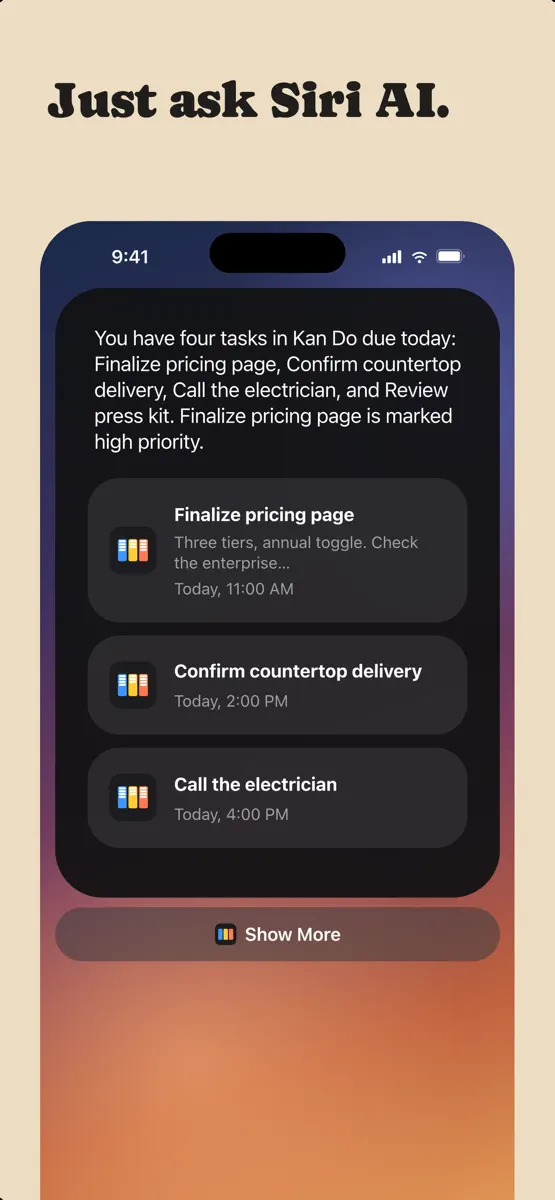


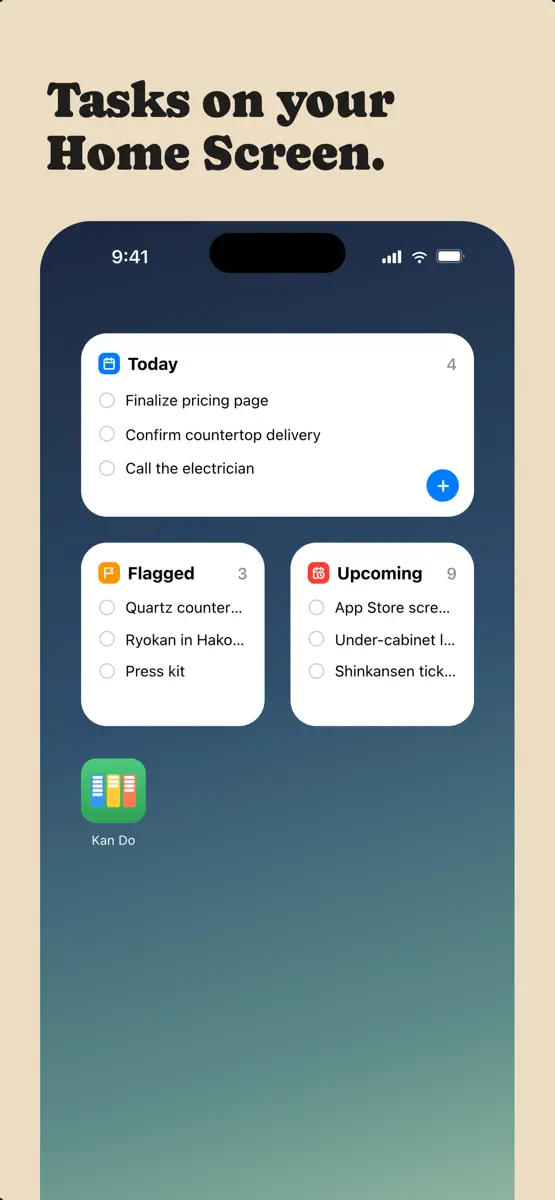

More from Stephen Robles
| App | Best rank now | Released | App Store |
|---|---|---|---|
 HomeNom: Recipe BoxFood & Drink · | Grossing · Food & DrinkCanada#88 | ||
 Lookout: TV DashboardUtilities · | Not charting |

As of 21 Nov 2026, Kan Do: Project Management is #33 in Paid · Productivity in Australia, its best of 4 chart positions across 4 countries. Over the last 7 days its biggest climb was 2 places, to #74 in Paid · Productivity in the United Kingdom. Its best rank in the last 7 days was #16 in Paid · Productivity in the United States. Appulse Index first saw Kan Do: Project Management in a tracked chart on 8 Oct 2026. Since then it has charted on 44 days in 11 countries, with a best rank of #4 in Paid · Productivity in India on 30 Oct 2026. Its best in an overall chart was #90 in Top Paid in India, on 30 Oct 2026.
Store listing
How the app presents itself on the App Store. Select a screenshot to open it full size.
App facts
What Apple publishes about this app. Ratings are from one country's App Store.
- Price
- $2.99
- Released
- 5 Aug 2026
- Last update
- Version 1.7.5
- Requires
- iOS 26.0or later
- Size
- 69 MB
- Languages
- 1
Chart record
Every tracked chart, country and day since Appulse Index first saw this app in a chart.
Rank history
Higher on the chart is better: #1 is at the top.
Sign in to see 30 days, 90 days and all history.
Australia · Paid · Productivity: best #21, latest #33, over 7 snapshots since 15 Nov.
Current rankings
Every chart this app is in right now, best position first.
| Chart | Rank | 24 h | 7 days | Best | Days on chart |
|---|---|---|---|---|---|
| Australia· Paid · Productivity · best #10 · 24 days · 7 days Down 23 places | #33 | New entry | Down 23 places | #10 | 24 |
| United States· Paid · Productivity · best #7 · 41 days · 7 days Down 20 places | #54 | Down 6 places | Down 20 places | #7 | 41 |
| United Kingdom· Paid · Productivity · best #5 · 34 days · 7 days Up 2 places | #74 | Down 34 places | Up 2 places | #5 | 34 |
| Germany· Paid · Productivity · best #12 · 19 days | #81 | Down 49 places | Not enough history yet | #12 | 19 |
Ranking events
Entries, big moves, #1s and new versions we've recorded, by day.
- Dropped #32 → #81 in Paid · ProductivityGermany
- Entered the Paid · Productivity chart at #33Australia
- Dropped #40 → #74 in Paid · ProductivityUnited Kingdom
- Climbed #59 → #32 in Paid · ProductivityGermany
- Entered the Paid · Productivity chart at #40United Kingdom
- Entered the Paid · Productivity chart at #48United States
- New version 1.7.5 (was 1.7.4)
- Entered the Paid · Productivity chart at #59Germany
- Dropped #21 → #48 in Paid · ProductivityUnited States
- Dropped #36 → #74 in Paid · ProductivityUnited Kingdom
- New version 1.7.4 (was 1.7.2)
- Entered the Paid · Productivity chart at #20India
- Entered the Paid · Productivity chart at #17France
- Dropped #21 → #48 in Paid · ProductivityAustralia
- Climbed #98 → #36 in Paid · ProductivityUnited Kingdom
- Climbed #40 → #10 in Paid · ProductivityAustralia
- Dropped #56 → #86 in Paid · ProductivityCanada
- Dropped #40 → #76 in Paid · ProductivityUnited Kingdom
- Entered the Paid · Productivity chart at #46France
- Entered the Paid · Productivity chart at #56Canada
- Dropped #22 → #57 in Paid · ProductivityUnited States
- Entered the Paid · Productivity chart at #16Mexico
- New version 1.7.2 (was 1.7.1)
- Entered the Paid · Productivity chart at #17United Kingdom
- Entered the Paid · Productivity chart at #7Brazil
- New version 1.7.1 (was 1.6.9)
- Entered the Paid · Productivity chart at #64Germany
- Entered the Paid · Productivity chart at #34Australia
- Climbed #70 → #45 in Paid · ProductivityUnited States
- Entered the Paid · Productivity chart at #12Canada
Competitors
Compare with the top 3Full chartTop of Paid · Productivity in Australia. Kan Do: Project Management is #33 there. Changes are over 7 days.
- #1 (number one)Up 1 placeGoblin ToolsSkyhook
- #2Up 2 placesSite Audit ProVeam Studios Ltd
- #3Down 2 placesTypeDrawTrautmann & Dorre GbR Shaped Agency
- #4Up 68 placesMobileFamilyTree 11Synium Software GmbH
- #5Up 9 placesWhisper Notes - Speech to TextSmashMelon LLC
- #6Up 14 placesShow StopWatchJack Lord
- #7Not enough history yetMining ToolkitJory Dion
- #8New entryBrain Wave - Sharp Mind ™Banzai Labs
- #9Down 1 placeThings 3Cultured Code GmbH & Co. KG
- #10Down 7 placesPocket Mac LabDeclann Tan
- #11Up 10 placesiFacialMocapDevelopW LLC
- #12Up 6 places2Do: To Do List & Task ManagerBeehive Innovations Services
- #13Up 58 placesiA Writer: Get FocusedInformation Architects AG
- #14Up 34 placesCamScanner +Linguan Data
- #15Not enough history yetShut Up?!: Talk BalancePraesto Logica LLC
- #16New entrySyncCalDominique Andr Gunia
- #17New entryLineLearnerPeter Allday
- #18New entryGroup SMS with Delivery ReportSHARK Intelligence
- #19New entryEasy OffsetAllen Sieler
- #20New entryKlappoMiguel Furst
- #33New entry
 Kan Do: Project ManagementThis app
About
From the app's App Store listing.
Organize your work into Spaces and Projects, then move tasks across the columns you define. Every card shows what matters at a glance: a cover image, subtitle, tags, priority, and due date. Open any task and you get a full markdown notes editor with headings, lists, checkboxes, images, and file attachments.
ORGANIZE YOUR WAY
- Kanban boards with drag-and-drop cards, columns, and dividers
- A list view for every project, with drag to reorder
- Spaces group your projects; tags cut across them
•
What's new
Version 1.7.5 · 19 Nov 2026 ·
Apple Reminders
- Sync with Reminders: a new switch in Settings > Sync > Apple Reminders keeps one Reminders list in step with Kan Do. Your open tasks appear in the list, and a reminder you add to it becomes a task in the Inbox
- Title, due date, priority, and checking off travel both ways
- Tasks to Sync chooses All Tasks or only Tasks with a Date
- Deleting a reminder never deletes its task
- Turn it on on one device only. Your other devices get the changes through iCloud
Archive
- The Archive box at the top of the sidebar now lists tasks archived inside your projects, grouped by project, with Restore and Delete. It used to read "Nothing Archived" while projects held archived tasks
Projects and boards
- Duplicate, All Tasks Unchecked: a second button when you duplicate a project makes the copy with every task and subtask open again
- Tapping the + beside Add task puts the cursor in the field
Selecting several tasks
- Due Date in the selection bar: tap Select, pick the tasks, then tap Due Date to move them all to Today, Tomorrow, Next Week, or a date you pick. Good for moving what's left of the day to tomorrow
- Select now works in Board Layout for Today, Upcoming, and custom smart lists
Reminders
- Snooze 15 Minutes: a new button when you press and hold a reminder. It brings the same reminder back in fifteen minutes and leaves the task's date alone
- Subtask reminders now have the snooze buttons too
Shortcuts
- Add Task with Open Task After Creating now opens the new task
Comments
- The comment box stays above the keyboard. On a task with subtasks and a few comments it slid under the keyboard from about the third comment on, on iPhone and on both screens of iPhone Duo
- Typing in the note on a task with subtasks and comments keeps the note in view above the keyboard
- Return on a hardware keyboard posts the comment, and Return on an empty comment box puts the keyboard away
iPhone Duo
- With the sidebar hidden on the open screen, swipe in from the left edge to bring it back
More from Stephen Robles
Their other apps that Appulse has seen in the charts, charting ones first.
| App | Best rank now | Released | App Store |
|---|---|---|---|
HomeNom: Recipe BoxFood & Drink · | Grossing · Food & DrinkCanada#88 | ||
Lookout: TV DashboardUtilities · | Not charting |
Ranks come from Apple's public App Store charts, checked once a day. Appulse Index isn't affiliated with Apple.