

Odo Speedometer: Drive Tracker
Taohidul Islam
As of 21 Nov 2026, Odo Speedometer: Drive Tracker is #68 in Grossing · Navigation in Canada, its best of 2 chart positions across 2 countries. Over the last 7 days its biggest fall was 17 places, to #73 in Grossing · Navigation in India. Its best rank in the last 7 days was #22 in Grossing · Navigation in India. Appulse Index first saw Odo Speedometer: Drive Tracker in a tracked chart on 8 Oct 2026. Since then it has charted on 31 days in 9 countries, with a best rank of #6 in Grossing · Navigation in India on 13 Oct 2026.
Current rank
#68Canada · Grossing · Navigation
- Was
- —7 days ago
- Change
- Not enough history yetover 7 days
- Best
- #47in 7 days
- Longest chart run
- 25 daysIndia · Grossing · Navigation
- New ratings, 7 days
- 0India · since 14 Nov 2026
Chart record
Every tracked chart, country and day since Appulse Index first saw this app in a chart.
What's new
Version 5.3.0 · 2 days ago
自分だけの CarPlay ダッシュボードを作成 • CarPlay に最大6個のメーターを同時に表示できます。すべて同じサイズ、またはメインメーターとその横の小さなメーターから選べます。 • メーターごとに表示する値とスタイルを設定でき、iPhone でお気に入りのメーターデザインも使えます。 • クラスター、グランドツアラー、シックスパック、ナビゲーターなど、数十種類の完成済みテンプレートから選んで、自分好みに調整できます。 • 統計とメーターは位置を保ち、データが届くまで空欄で表示されるようになりました。画面の構成が途中で変わることはもうありません。 18種類の新しいメーターデザイン • 「モダン」カテゴリに、スイープ、クロノ、トレース、タイドなど18種類の新しいスピードメーターを追加。 • メーターの色を選べます。テーマの色、モノクロ、ブルー、グリーン、パープル、ピンク、アンバーから選択できます。 • iPhone でも CarPlay でも、すべてのメーターで数字と単位がよりはっきりと読みやすくなりました。 訪問した都市 • 「最も訪問した」が「訪問した都市」になりました。訪れたすべての都市をマップとリストで確認できます。 • 「全期間」「年」「月」を切り替えて、各期間をその前の期間と比較できます。 • マップから星図まで、5つのスタイルで都市を画像として共有できます。 CarPlay とライブアクティビティに走行距離を追加 • CarPlay 用の新しい「走行距離」タイルと、ライブアクティビティのカスタムレイアウト用の新しい「走行距離」フィールドを追加。走行中のドライブも含まれます。 • CarPlay ダッシュボードのカードで、回転数が常に省略されずに表示されるようになりました。 OBDLink MX+ に対応 • Odo が OBDLink MX+ に接続できるようになりました。OBD 設定で「OBDLink MX+ を接続」をタップし、アダプタを選択してください。 • アダプタは車両ごとに保存され、車に戻ると自動的に再接続します。 シェア用リール:より豊かな 3D の世界 • リプレイで選べる新しい「レーシングカー」を追加。 • 道路沿いの木々、ガードレール、フェンス、刈り込まれた芝生が「ゲーム」スタイルをいきいきと演出します。 • リプレイ全体を通して、車の動きがよりなめらかになりました。 細かな改善 • 「すべてのルート」マップで、長距離ドライブが道路に沿って正確に表示されるようになり、拡大すると細部まで確認できます。 • 位置情報へのアクセスがオフの場合、CarPlay は空のマップの代わりに統計画面を開き、「位置情報を有効にする」ボタンを表示します。 • CarPlay の設定がシンプルになり、メーターと統計がそれぞれ専用の画面になりました。 • OBD 故障コードの説明を含め、さらに多くの画面が日本語に翻訳されました。 これらのアップデートを気に入っていただければ幸いです! 新機能をお楽しみいただけましたら、ぜひ評価をお願いいたします。皆さまの評価が、アプリのさらなる改善と成長につながります! ご意見・ご感想はこちらまで:[email protected]
Ranking events
- Dropped #40 → #73 in Grossing · NavigationIndia
- Entered the Grossing · Navigation chart at #83Japan
- Entered the Grossing · Navigation chart at #47Canada
- Entered the Grossing · Navigation chart at #84Brazil
- Entered the Grossing · Navigation chart at #22India
- Entered the Grossing · Navigation chart at #80Germany
Show 24 earlier events
- Dropped #57 → #99 in Grossing · NavigationAustralia
- New version 5.3.0 (was 5.2.0)
- Entered the Grossing · Navigation chart at #57Australia
- Dropped #57 → #99 in Grossing · NavigationAustralia
- Entered the Free · Navigation chart at #99India
- Entered the Grossing · Navigation chart at #72France
- Entered the Grossing · Navigation chart at #57Australia
- Entered the Grossing · Navigation chart at #84Brazil
- Entered the Free · Navigation chart at #98Canada
- New version 5.2.0 (was 4.5.0)
- Entered the Grossing · Navigation chart at #67India
- Entered the Grossing · Navigation chart at #66Germany
- Entered the Grossing · Navigation chart at #100United Kingdom
- Dropped #69 → #95 in Grossing · NavigationIndia
- New version 4.5.0 (was 4.4.0)
- Entered the Grossing · Navigation chart at #96Germany
- Dropped #47 → #88 in Grossing · NavigationSpain
- Dropped #21 → #47 in Grossing · NavigationSpain
- Entered the Grossing · Navigation chart at #21Spain
- Entered the Grossing · Navigation chart at #14India
- New version 4.4.0 (was 4.2.0)
- Dropped #72 → #97 in Grossing · NavigationIndia
- Entered the Grossing · Navigation chart at #94Brazil
- Climbed #83 → #7 in Grossing · NavigationIndia
About
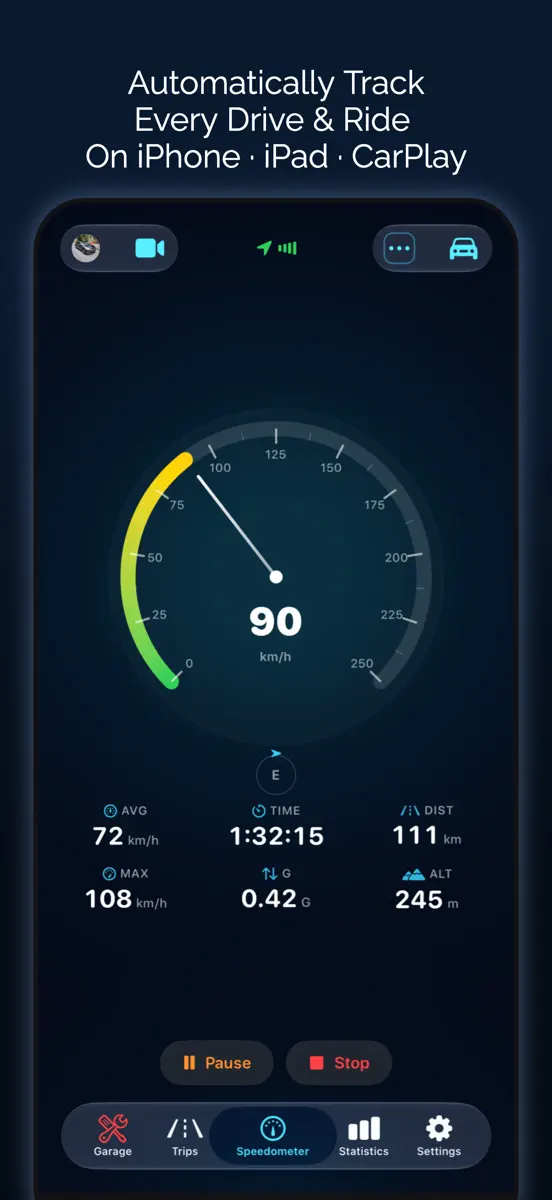
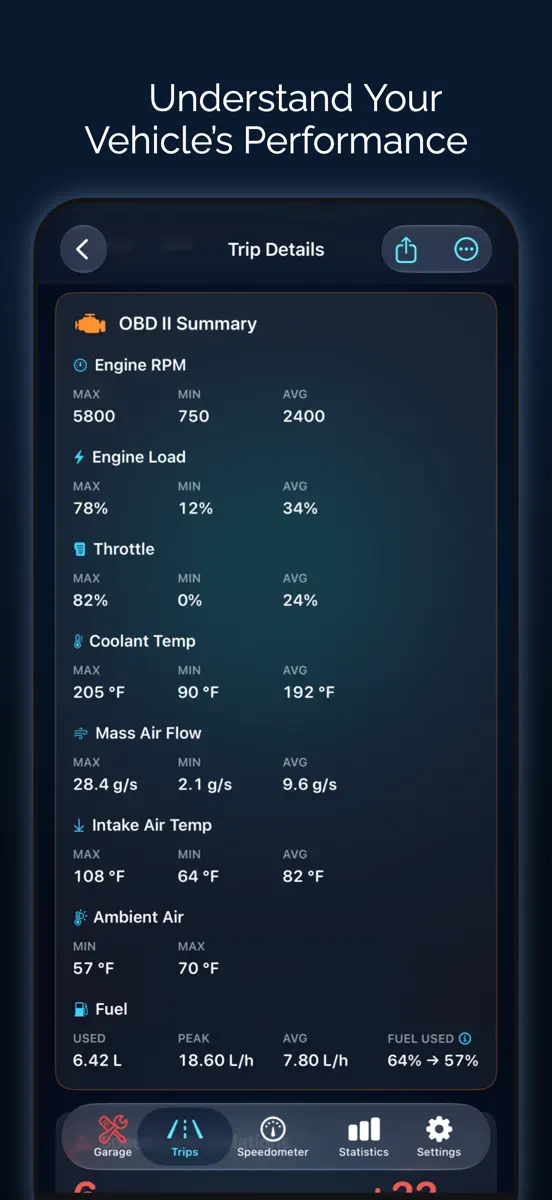
Odo は、車・バイク・自転車で使える GPS スピードメーター(速度計)であり、ドライブの走行記録と走行距離を管理する車載アプリです。iPhone、iPad、CarPlay に対応。すべてのドライブの速度、時速、ルート、走行距離を自動で記録し、制限速度のアラート、ターンバイターンのナビ、0-60 や 0-100 km/h の加速タイム計測、OBD2 スキャナーによる故障コードの読み取りまでこなします。オドメーターのような走行距離ログ、ガソリン代と燃費、EV の充電、メンテナンスや支出もひとつのアプリでまとめて管理できるので、毎日の通勤からツーリング、仕事での走行距離の記録まで幅広く使えます。 自動トリップ記録 • モーション検知、CarPlay、Bluetooth を使って、トリップが自動で開始・終了します。車、バイク、自転車のどれでも、乗ったらそのまま出発するだけで記録の付け忘れがありません • 自動一時停止、トリップを自動終了、CarPlay・Bluetooth・VIN による車両の自動判別。複数台の車やバイクを持っていても切り替えは不要です •…
Ranks come from Apple's public App Store charts, checked once a day. Appulse Index isn't affiliated with Apple.
Rank history
Higher on the chart is better: #1 is at the top.
Sign in to see 30 days, 90 days and all history.
Canada · Grossing · Navigation: best #47, latest #68, over 7 snapshots since 15 Nov.
In 2 charts now
| Chart | Rank | 24 h | 7 days | Best | Days on chart |
|---|---|---|---|---|---|
| Canada· Grossing · Navigation · best #47 · 2 days | #68 | Down 21 places | Not enough history yet | #47 | 2 |
| India· Grossing · Navigation · best #6 · 25 days · 7 days Down 17 places | #73 | Down 33 places | Down 17 places | #6 | 25 |
Competitors
Compare with the top 3Full chartTop of Grossing · Navigation in Canada. Odo Speedometer: Drive Tracker is #68 there. Changes are over 7 days.
- #1 (number one)No change
 Trucker Path:GPS para camionesTrucker Path Inc.
- #2No change
 onX Hunt: GPS Hunting MapsonXmaps, Inc.
- #3No change
 Avenza MapsAvenza Systems Inc.
- #4No change
 Transit - Horarios Bus y MetroTransit App, Inc.
- #5Up 4 places
 Navionics® BoatingGarmin
- #6Down 1 place
 Spoke Route PlannerCircuit Routing
- #7Down 1 place
 Gaia GPSTrailBehind
- #8Down 1 place
 Trailforks: Offline Bike MapsOutside Interactive Canada, Inc
- #9Up 2 places
 HuntScout: Canada Hunting HubHype Software LLC
- #10No change
 MapXplorer: GPS Maps & TrafficGoldlab Applications Yazilim Bilişim Anonim Şirketi
- #11Down 3 places
 BRMB Maps by Backroad MapsMussio Ventures Ltd.
- #12No change
 FleetworthyGO (Drivewyze)Drivewyze Inc.
- #13No change
 Geocaching®Groundspeak Inc.
- #14No change
 onX Offroad: Navigate OfflineonXmaps, Inc.
- #15Up 6 places
 ChargeHub EV Charge Point MapMogile Technologies
- #16Down 1 place
 RoadWarrior Route PlannerMapQuest Holdings LLC
- #17Up 1 place
 OilTrailsAsh Point Ltd.
- #18Down 2 places
 Hammer: Truck GPS & MapsTruckersReport.com
- #19Down 2 places
 GoTrackLambdasoft LLC
- #20Up 15 places
 Hunting Points: GPS & Hunt AppFishing Points d.o.o.
Screenshots




Odo Speedometer: Drive Tracker
Taohidul Islam
As of 21 Nov 2026, Odo Speedometer: Drive Tracker is #68 in Grossing · Navigation in Canada, its best of 2 chart positions across 2 countries. Over the last 7 days its biggest fall was 17 places, to #73 in Grossing · Navigation in India. Its best rank in the last 7 days was #22 in Grossing · Navigation in India. Appulse Index first saw Odo Speedometer: Drive Tracker in a tracked chart on 8 Oct 2026. Since then it has charted on 31 days in 9 countries, with a best rank of #6 in Grossing · Navigation in India on 13 Oct 2026.
Store listing
How the app presents itself on the App Store. Select a screenshot to open it full size.
App facts
What Apple publishes about this app. Ratings are from one country's App Store.
- Price
- Free
- Rating
- 4.9 / 5 stars17 ratings India
- Released
- 5 Mar 2026
- Last update
- Version 5.3.0
- Requires
- iOS 18.6or later
- Size
- 237 MB
- Languages
- 33
Chart record
Every tracked chart, country and day since Appulse Index first saw this app in a chart.
Rank history
Higher on the chart is better: #1 is at the top.
Sign in to see 30 days, 90 days and all history.
Canada · Grossing · Navigation: best #47, latest #68, over 7 snapshots since 15 Nov.
Current rankings
Every chart this app is in right now, best position first.
| Chart | Rank | 24 h | 7 days | Best | Days on chart |
|---|---|---|---|---|---|
| Canada· Grossing · Navigation · best #47 · 2 days | #68 | Down 21 places | Not enough history yet | #47 | 2 |
| India· Grossing · Navigation · best #6 · 25 days · 7 days Down 17 places | #73 | Down 33 places | Down 17 places | #6 | 25 |
Ranking events
Entries, big moves, #1s and new versions we've recorded, by day.
- Dropped #40 → #73 in Grossing · NavigationIndia
- Entered the Grossing · Navigation chart at #83Japan
- Entered the Grossing · Navigation chart at #47Canada
- Entered the Grossing · Navigation chart at #84Brazil
- Entered the Grossing · Navigation chart at #22India
- Entered the Grossing · Navigation chart at #80Germany
- Dropped #57 → #99 in Grossing · NavigationAustralia
- New version 5.3.0 (was 5.2.0)
- Entered the Grossing · Navigation chart at #57Australia
- Dropped #57 → #99 in Grossing · NavigationAustralia
- Entered the Free · Navigation chart at #99India
- Entered the Grossing · Navigation chart at #72France
- Entered the Grossing · Navigation chart at #57Australia
- Entered the Grossing · Navigation chart at #84Brazil
- Entered the Free · Navigation chart at #98Canada
- New version 5.2.0 (was 4.5.0)
- Entered the Grossing · Navigation chart at #67India
- Entered the Grossing · Navigation chart at #66Germany
- Entered the Grossing · Navigation chart at #100United Kingdom
- Dropped #69 → #95 in Grossing · NavigationIndia
- New version 4.5.0 (was 4.4.0)
- Entered the Grossing · Navigation chart at #96Germany
- Dropped #47 → #88 in Grossing · NavigationSpain
- Dropped #21 → #47 in Grossing · NavigationSpain
- Entered the Grossing · Navigation chart at #21Spain
- Entered the Grossing · Navigation chart at #14India
- New version 4.4.0 (was 4.2.0)
- Dropped #72 → #97 in Grossing · NavigationIndia
- Entered the Grossing · Navigation chart at #94Brazil
- Climbed #83 → #7 in Grossing · NavigationIndia
Competitors
Compare with the top 3Full chartTop of Grossing · Navigation in Canada. Odo Speedometer: Drive Tracker is #68 there. Changes are over 7 days.
- #1 (number one)No changeTrucker Path:GPS para camionesTrucker Path Inc.
- #2No changeonX Hunt: GPS Hunting MapsonXmaps, Inc.
- #3No changeAvenza MapsAvenza Systems Inc.
- #4No changeTransit - Horarios Bus y MetroTransit App, Inc.
- #5Up 4 placesNavionics® BoatingGarmin
- #6Down 1 placeSpoke Route PlannerCircuit Routing
- #7Down 1 placeGaia GPSTrailBehind
- #8Down 1 placeTrailforks: Offline Bike MapsOutside Interactive Canada, Inc
- #9Up 2 placesHuntScout: Canada Hunting HubHype Software LLC
- #10No changeMapXplorer: GPS Maps & TrafficGoldlab Applications Yazilim Bilişim Anonim Şirketi
- #11Down 3 placesBRMB Maps by Backroad MapsMussio Ventures Ltd.
- #12No changeFleetworthyGO (Drivewyze)Drivewyze Inc.
- #13No changeGeocaching®Groundspeak Inc.
- #14No changeonX Offroad: Navigate OfflineonXmaps, Inc.
- #15Up 6 placesChargeHub EV Charge Point MapMogile Technologies
- #16Down 1 placeRoadWarrior Route PlannerMapQuest Holdings LLC
- #17Up 1 placeOilTrailsAsh Point Ltd.
- #18Down 2 placesHammer: Truck GPS & MapsTruckersReport.com
- #19Down 2 placesGoTrackLambdasoft LLC
- #20Up 15 placesHunting Points: GPS & Hunt AppFishing Points d.o.o.
- #68Not enough history yet
 Odo Speedometer: Drive TrackerThis app
About
From the app's App Store listing.
Odo は、車・バイク・自転車で使える GPS スピードメーター(速度計)であり、ドライブの走行記録と走行距離を管理する車載アプリです。iPhone、iPad、CarPlay に対応。すべてのドライブの速度、時速、ルート、走行距離を自動で記録し、制限速度のアラート、ターンバイターンのナビ、0-60 や 0-100 km/h の加速タイム計測、OBD2 スキャナーによる故障コードの読み取りまでこなします。オドメーターのような走行距離ログ、ガソリン代と燃費、EV の充電、メンテナンスや支出もひとつのアプリでまとめて管理できるので、毎日の通勤からツーリング、仕事での走行距離の記録まで幅広く使えます。
自動トリップ記録
- モーション検知、CarPlay、Bluetooth を使って、トリップが自動で開始・終了します。車、バイク、自転車のどれでも、乗ったらそのまま出発するだけで記録の付け忘れがありません
- 自動一時停止、トリップを自動終了、CarPlay・Bluetooth・VIN による車両の自動判別。複数台の車やバイクを持っていても切り替えは不要です
•…
What's new
Version 5.3.0 · 18 Nov 2026 ·
自分だけの CarPlay ダッシュボードを作成
- CarPlay に最大6個のメーターを同時に表示できます。すべて同じサイズ、またはメインメーターとその横の小さなメーターから選べます。
- メーターごとに表示する値とスタイルを設定でき、iPhone でお気に入りのメーターデザインも使えます。
- クラスター、グランドツアラー、シックスパック、ナビゲーターなど、数十種類の完成済みテンプレートから選んで、自分好みに調整できます。
- 統計とメーターは位置を保ち、データが届くまで空欄で表示されるようになりました。画面の構成が途中で変わることはもうありません。
18種類の新しいメーターデザイン
- 「モダン」カテゴリに、スイープ、クロノ、トレース、タイドなど18種類の新しいスピードメーターを追加。
- メーターの色を選べます。テーマの色、モノクロ、ブルー、グリーン、パープル、ピンク、アンバーから選択できます。
- iPhone でも CarPlay でも、すべてのメーターで数字と単位がよりはっきりと読みやすくなりました。
訪問した都市
- 「最も訪問した」が「訪問した都市」になりました。訪れたすべての都市をマップとリストで確認できます。
- 「全期間」「年」「月」を切り替えて、各期間をその前の期間と比較できます。
- マップから星図まで、5つのスタイルで都市を画像として共有できます。
CarPlay とライブアクティビティに走行距離を追加
- CarPlay 用の新しい「走行距離」タイルと、ライブアクティビティのカスタムレイアウト用の新しい「走行距離」フィールドを追加。走行中のドライブも含まれます。
- CarPlay ダッシュボードのカードで、回転数が常に省略されずに表示されるようになりました。
OBDLink MX+ に対応
- Odo が OBDLink MX+ に接続できるようになりました。OBD 設定で「OBDLink MX+ を接続」をタップし、アダプタを選択してください。
- アダプタは車両ごとに保存され、車に戻ると自動的に再接続します。
シェア用リール:より豊かな 3D の世界
- リプレイで選べる新しい「レーシングカー」を追加。
- 道路沿いの木々、ガードレール、フェンス、刈り込まれた芝生が「ゲーム」スタイルをいきいきと演出します。
- リプレイ全体を通して、車の動きがよりなめらかになりました。
細かな改善
- 「すべてのルート」マップで、長距離ドライブが道路に沿って正確に表示されるようになり、拡大すると細部まで確認できます。
- 位置情報へのアクセスがオフの場合、CarPlay は空のマップの代わりに統計画面を開き、「位置情報を有効にする」ボタンを表示します。
- CarPlay の設定がシンプルになり、メーターと統計がそれぞれ専用の画面になりました。
- OBD 故障コードの説明を含め、さらに多くの画面が日本語に翻訳されました。
これらのアップデートを気に入っていただければ幸いです!
新機能をお楽しみいただけましたら、ぜひ評価をお願いいたします。皆さまの評価が、アプリのさらなる改善と成長につながります!
ご意見・ご感想はこちらまで:[email protected]
Ranks come from Apple's public App Store charts, checked once a day. Appulse Index isn't affiliated with Apple.