

RadarAll Speed Camera Detector
Little Mouse Software
As of 21 Nov 2026, RadarAll Speed Camera Detector is #65 in Grossing · Navigation in Brazil, its best of 3 chart positions across 3 countries. Over the last 7 days its biggest climb was 17 places, to #65 in Grossing · Navigation in Brazil. Its best rank in the last 7 days was #44 in Grossing · Navigation in India. Appulse Index first saw RadarAll Speed Camera Detector in a tracked chart on 8 Oct 2026. Since then it has charted on 37 days in 8 countries, with a best rank of #24 in Grossing · Navigation in Mexico on 19 Oct 2026.
Current rank
#65Brazil · Grossing · Navigation
- Was
- #827 days ago
- Change
- Up 17 placesover 7 days
- Best
- #65in 7 days
- Longest chart run
- 17 daysIndia · Grossing · Navigation
- New ratings, 7 days
- —Needs a week of rating history
Chart record
Every tracked chart, country and day since Appulse Index first saw this app in a chart.
What's new
Version 9.0.1 · 4 days ago
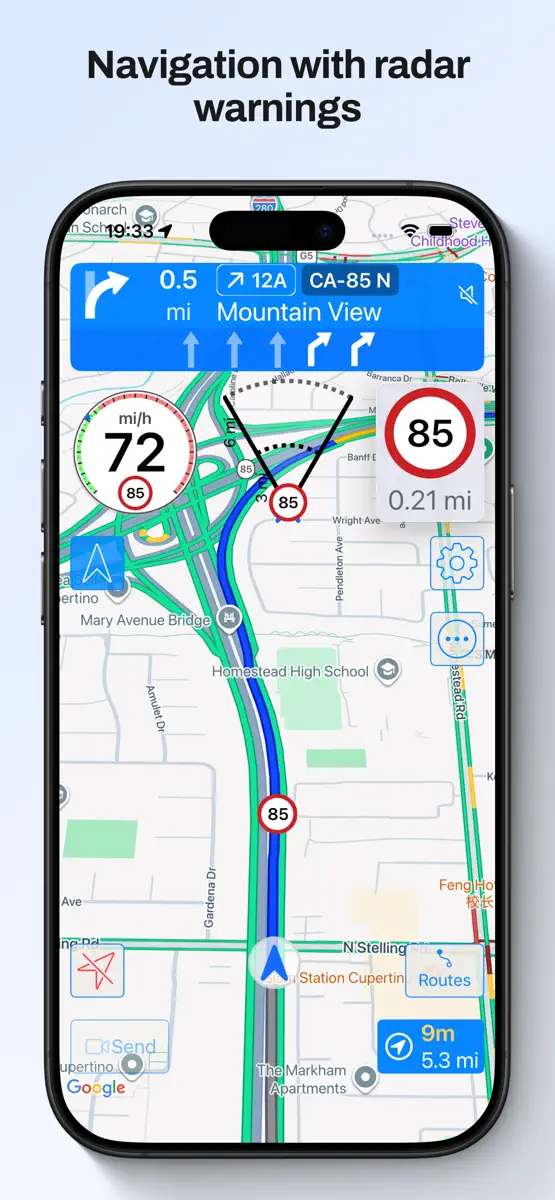
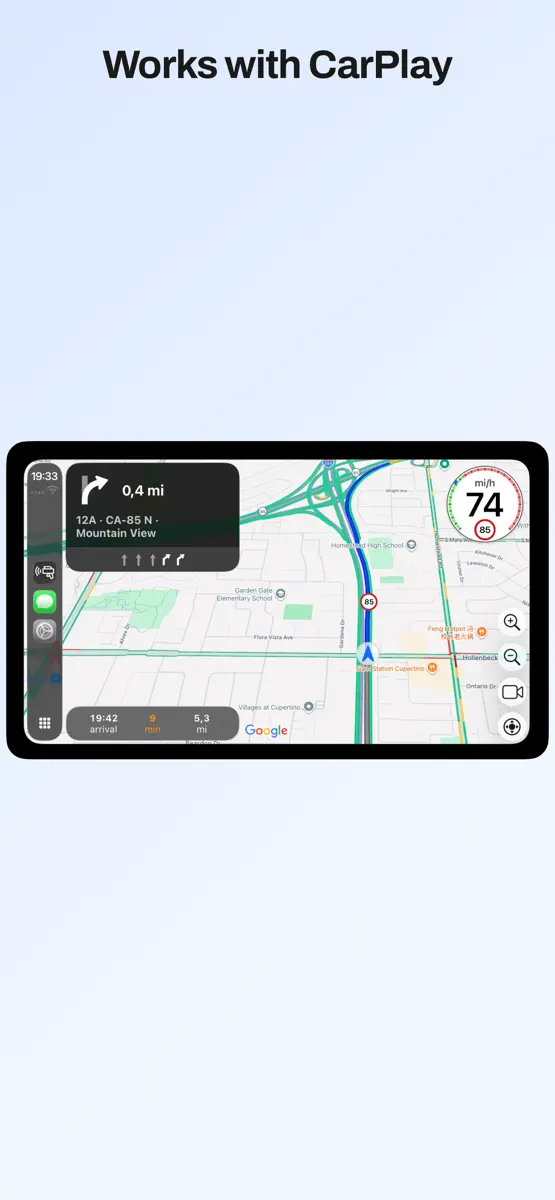
- iPhone Duo support - Fixes and improvements In previous versions: - CarPlay with map in Ultra version - Support for CarPlay metadata (maneuvers, lane guidance and more information) in the instrument cluster or in the HUD in units which support these features - All CarPlay scenes available: standard, dashboard and instrument cluster with metadata - Upcoming maneuvers in CarPlay displayed, as many as your units supports - Navigation alerts in CarPlay for warnings in your way (configured by default to be shown when the app is in background in CarPlay, only in Ultra version) - Support for iOS 26 - New gestures for CarPlay in iOS 26 and in units which support gestures New shortcuts for your automations: - Navigate to a favorite location - Navigate a route from your location going through its waypoints - Navigate to an address you provide - Open the detector in background - Activate / silence the navigation voice - Activate / silence the detector voice and sounds Route recorder: - When the app is started it records your path with the speed you have - You can check the speed you had when going through a speed camera or in any point - Distande and duration of each route - You can configure for how many days the routes are kept, and the minimum distance and duration to save them - You can disable the recording completely - This data is kept in your device, it is not sent anywhere Route planner: - You can plan a route, with intermediate waypoints, to check the speed cameras you will find in it taking into account the direction in which you shall pass them - Speed limits of the route - You can launch the navigation from the route, the best option will be calculted acoording to the current conditions of traffic and taking into account the waypoints it has Navigation: - Navigation integrated with speed camera warnings and traffic map. All in the same screen, no need to use several apps - Warnings of only the speed cameras with are in your route (configurable). Avoid false positives from nearby roads - Speed limits when navigating - Indication of the lanes to follow - Spoken instructions together with speed camera warnings - Navigation instructions in the Watch with indication of the lanes to follow - Notifications for the navigation instructions Others: - CarPlay with map in Ultra version - CarPlay with a list of the following warnings in pro version - You can choose the voice for the warnings and navigation according to the voices you have downloaded in your device - Shortcut to stop the detector - Shortcuts for the Watch app
Ranking events
- Climbed #95 → #65 in Grossing · NavigationBrazil
- Dropped #64 → #89 in Grossing · NavigationIndia
- Entered the Grossing · Navigation chart at #95Brazil
- Climbed #89 → #55 in Grossing · NavigationGermany
- Entered the Grossing · Navigation chart at #82United Kingdom
- Entered the Grossing · Navigation chart at #44India
Show 24 earlier events
- Dropped #63 → #89 in Grossing · NavigationGermany
- Entered the Grossing · Navigation chart at #90Spain
- Climbed #84 → #55 in Grossing · NavigationGermany
- New version 9.0.1 (was 9.0.0)
- Dropped #56 → #96 in Grossing · NavigationSpain
- Dropped #25 → #56 in Grossing · NavigationSpain
- Dropped #57 → #100 in Grossing · NavigationGermany
- Entered the Grossing · Navigation chart at #81Australia
- Entered the Grossing · Navigation chart at #25Spain
- Dropped #49 → #87 in Grossing · NavigationIndia
- Climbed #94 → #57 in Grossing · NavigationGermany
- Entered the Grossing · Navigation chart at #82Brazil
- Entered the Grossing · Navigation chart at #49India
- Entered the Grossing · Navigation chart at #76France
- Entered the Grossing · Navigation chart at #94Germany
- Entered the Grossing · Navigation chart at #58Germany
- Entered the Grossing · Navigation chart at #53India
- Entered the Grossing · Navigation chart at #83Germany
- Entered the Grossing · Navigation chart at #78Brazil
- Entered the Grossing · Navigation chart at #61France
- Entered the Grossing · Navigation chart at #82Germany
- Dropped #37 → #72 in Grossing · NavigationSpain
- Entered the Grossing · Navigation chart at #37Spain
- New version 9.0.0 (was 8.5.1)
About
Enjoy driving with the best navigator, speed camera detector and real-time traffic information. Forget about fines and drive with peace of mind. MAIN FEATURES - 100% legal speed camera detector - Turn by turn GPS navigation, with lane guidance, spoken instructions, speed limits, and the speed camera detector fully integrated into the navigation - Automatic route recorder. Shows the total distance and time spent traveling the route, speed at each point and speed cameras you passed. Check the…
Ranks come from Apple's public App Store charts, checked once a day. Appulse Index isn't affiliated with Apple.
Rank history
Higher on the chart is better: #1 is at the top.
Sign in to see 30 days, 90 days and all history.
Brazil · Grossing · Navigation: best #65, latest #65, over 7 snapshots since 15 Nov.
In 3 charts now
| Chart | Rank | 24 h | 7 days | Best | Days on chart |
|---|---|---|---|---|---|
| Brazil· Grossing · Navigation · best #65 · 10 days · 7 days Up 17 places | #65 | Up 30 places | Up 17 places | #65 | 10 |
| India· Grossing · Navigation · best #36 · 17 days · 7 days Down 2 places | #89 | Down 25 places | Down 2 places | #36 | 17 |
| United Kingdom· Grossing · Navigation · best #82 · 6 days | #96 | Down 14 places | Not enough history yet | #82 | 6 |
Competitors
Compare with the top 3Full chartTop of Grossing · Navigation in Brazil. RadarAll Speed Camera Detector is #65 there. Changes are over 7 days.
- #1 (number one)No change
 Radarbot Speed Camera DetectorIteration Mobile S.L
- #2No change
 Spoke Route PlannerCircuit Routing
- #3No change
 Moovit: Public Transport LiveMoovit App Global LTD
- #4No change
 Navionics® BoatingGarmin
- #5No change
 Wikiloc - Trails of the WorldWikiloc Outdoor SL
- #6No change
 MapXplorer: GPS Maps & TrafficGoldlab Applications Yazilim Bilişim Anonim Şirketi
- #7Up 6 places
 Localização: Buscar AmigosRU ART AND DESIGN LLC
- #8Up 2 places
 Avenza MapsAvenza Systems Inc.
- #9Up 13 places
 Ways Map : Open Street ViewVasundhara Infotech LLP
- #10Down 3 places
 Car Play Connect: Auto SyncVALERY STAKARSKI
- #11Down 2 places
- #12Up 3 places
 Velocímetro GPS HUD: SpeedAceChangsha Liangchao Technology Co., Ltd.
- #13Up 1 place
 Famio: Rastreador de CelularGismart Limited
- #14Up 4 places
 Sygic: Sat Nav - Live GPS MapsSygic a. s.
- #15Up 1 place
- #16Down 5 places
 GPS AgricolaOran Dynamics Ltd
- #17No change
 RWY EFBOzRunways Pty. Ltd.
- #18Up 20 places
- #19Down 7 places
 Find Location - Friend TrackerR&R STUDIO
- #20Up 11 places
 Find my Phone - Family LocatorGeoTracks labs LTD


Screenshots



More from Little Mouse Software
| App | Best rank now | Released | App Store |
|---|---|---|---|
 Radares: Avisador y NavegadorNavigation · | Grossing · NavigationSpain#20 | ||
 Traffic Maps: Tráfico en vivoNavigation · | Not charting |

RadarAll Speed Camera Detector
Little Mouse Software
As of 21 Nov 2026, RadarAll Speed Camera Detector is #65 in Grossing · Navigation in Brazil, its best of 3 chart positions across 3 countries. Over the last 7 days its biggest climb was 17 places, to #65 in Grossing · Navigation in Brazil. Its best rank in the last 7 days was #44 in Grossing · Navigation in India. Appulse Index first saw RadarAll Speed Camera Detector in a tracked chart on 8 Oct 2026. Since then it has charted on 37 days in 8 countries, with a best rank of #24 in Grossing · Navigation in Mexico on 19 Oct 2026.
Store listing
How the app presents itself on the App Store. Select a screenshot to open it full size.
App facts
What Apple publishes about this app. Ratings are from one country's App Store.
- Price
- Free
- Rating
- 4.6 / 5 stars456 ratings United Kingdom
- Released
- 6 Jun 2021
- Last update
- Version 9.0.1
- Requires
- iOS 17.4or later
- Size
- 83 MB
- Languages
- 26
Chart record
Every tracked chart, country and day since Appulse Index first saw this app in a chart.
Rank history
Higher on the chart is better: #1 is at the top.
Sign in to see 30 days, 90 days and all history.
Brazil · Grossing · Navigation: best #65, latest #65, over 7 snapshots since 15 Nov.
Current rankings
Every chart this app is in right now, best position first.
| Chart | Rank | 24 h | 7 days | Best | Days on chart |
|---|---|---|---|---|---|
| Brazil· Grossing · Navigation · best #65 · 10 days · 7 days Up 17 places | #65 | Up 30 places | Up 17 places | #65 | 10 |
| India· Grossing · Navigation · best #36 · 17 days · 7 days Down 2 places | #89 | Down 25 places | Down 2 places | #36 | 17 |
| United Kingdom· Grossing · Navigation · best #82 · 6 days | #96 | Down 14 places | Not enough history yet | #82 | 6 |
Ranking events
Entries, big moves, #1s and new versions we've recorded, by day.
- Climbed #95 → #65 in Grossing · NavigationBrazil
- Dropped #64 → #89 in Grossing · NavigationIndia
- Entered the Grossing · Navigation chart at #95Brazil
- Climbed #89 → #55 in Grossing · NavigationGermany
- Entered the Grossing · Navigation chart at #82United Kingdom
- Entered the Grossing · Navigation chart at #44India
- Dropped #63 → #89 in Grossing · NavigationGermany
- Entered the Grossing · Navigation chart at #90Spain
- Climbed #84 → #55 in Grossing · NavigationGermany
- New version 9.0.1 (was 9.0.0)
- Dropped #56 → #96 in Grossing · NavigationSpain
- Dropped #25 → #56 in Grossing · NavigationSpain
- Dropped #57 → #100 in Grossing · NavigationGermany
- Entered the Grossing · Navigation chart at #81Australia
- Entered the Grossing · Navigation chart at #25Spain
- Dropped #49 → #87 in Grossing · NavigationIndia
- Climbed #94 → #57 in Grossing · NavigationGermany
- Entered the Grossing · Navigation chart at #82Brazil
- Entered the Grossing · Navigation chart at #49India
- Entered the Grossing · Navigation chart at #76France
- Entered the Grossing · Navigation chart at #94Germany
- Entered the Grossing · Navigation chart at #58Germany
- Entered the Grossing · Navigation chart at #53India
- Entered the Grossing · Navigation chart at #83Germany
- Entered the Grossing · Navigation chart at #78Brazil
- Entered the Grossing · Navigation chart at #61France
- Entered the Grossing · Navigation chart at #82Germany
- Dropped #37 → #72 in Grossing · NavigationSpain
- Entered the Grossing · Navigation chart at #37Spain
- New version 9.0.0 (was 8.5.1)
Competitors
Compare with the top 3Full chartTop of Grossing · Navigation in Brazil. RadarAll Speed Camera Detector is #65 there. Changes are over 7 days.
- #1 (number one)No changeRadarbot Speed Camera DetectorIteration Mobile S.L
- #2No changeSpoke Route PlannerCircuit Routing
- #3No changeMoovit: Public Transport LiveMoovit App Global LTD
- #4No changeNavionics® BoatingGarmin
- #5No changeWikiloc - Trails of the WorldWikiloc Outdoor SL
- #6No changeMapXplorer: GPS Maps & TrafficGoldlab Applications Yazilim Bilişim Anonim Şirketi
- #7Up 6 placesLocalização: Buscar AmigosRU ART AND DESIGN LLC
- #8Up 2 placesAvenza MapsAvenza Systems Inc.
- #9Up 13 placesWays Map : Open Street ViewVasundhara Infotech LLP
- #10Down 3 placesCar Play Connect: Auto SyncVALERY STAKARSKI
- #11Down 2 places
- #12Up 3 placesVelocímetro GPS HUD: SpeedAceChangsha Liangchao Technology Co., Ltd.
- #13Up 1 placeFamio: Rastreador de CelularGismart Limited
- #14Up 4 placesSygic: Sat Nav - Live GPS MapsSygic a. s.
- #15Up 1 place
- #16Down 5 placesGPS AgricolaOran Dynamics Ltd
- #17No changeRWY EFBOzRunways Pty. Ltd.
- #18Up 20 places
- #19Down 7 placesFind Location - Friend TrackerR&R STUDIO
- #20Up 11 placesFind my Phone - Family LocatorGeoTracks labs LTD
- #65Up 17 places
 RadarAll Speed Camera DetectorThis app
About
From the app's App Store listing.
Enjoy driving with the best navigator, speed camera detector and real-time traffic information. Forget about fines and drive with peace of mind.
MAIN FEATURES
- 100% legal speed camera detector
- Turn by turn GPS navigation, with lane guidance, spoken instructions, speed limits, and the speed camera detector fully integrated into the navigation
- Automatic route recorder. Shows the total distance and time spent traveling the route, speed at each point and speed cameras you passed. Check the…
What's new
Version 9.0.1 · 16 Nov 2026 ·
- iPhone Duo support
- Fixes and improvements
In previous versions:
- CarPlay with map in Ultra version
- Support for CarPlay metadata (maneuvers, lane guidance and more information) in the instrument cluster or in the HUD in units which support these features
- All CarPlay scenes available: standard, dashboard and instrument cluster with metadata
- Upcoming maneuvers in CarPlay displayed, as many as your units supports
- Navigation alerts in CarPlay for warnings in your way (configured by default to be shown when the app is in background in CarPlay, only in Ultra version)
- Support for iOS 26
- New gestures for CarPlay in iOS 26 and in units which support gestures
New shortcuts for your automations:
- Navigate to a favorite location
- Navigate a route from your location going through its waypoints
- Navigate to an address you provide
- Open the detector in background
- Activate / silence the navigation voice
- Activate / silence the detector voice and sounds
Route recorder:
- When the app is started it records your path with the speed you have
- You can check the speed you had when going through a speed camera or in any point
- Distande and duration of each route
- You can configure for how many days the routes are kept, and the minimum distance and duration to save them
- You can disable the recording completely
- This data is kept in your device, it is not sent anywhere
Route planner:
- You can plan a route, with intermediate waypoints, to check the speed cameras you will find in it taking into account the direction in which you shall pass them
- Speed limits of the route
- You can launch the navigation from the route, the best option will be calculted acoording to the current conditions of traffic and taking into account the waypoints it has
Navigation:
- Navigation integrated with speed camera warnings and traffic map. All in the same screen, no need to use several apps
- Warnings of only the speed cameras with are in your route (configurable). Avoid false positives from nearby roads
- Speed limits when navigating
- Indication of the lanes to follow
- Spoken instructions together with speed camera warnings
- Navigation instructions in the Watch with indication of the lanes to follow
- Notifications for the navigation instructions
Others:
- CarPlay with map in Ultra version
- CarPlay with a list of the following warnings in pro version
- You can choose the voice for the warnings and navigation according to the voices you have downloaded in your device
- Shortcut to stop the detector
- Shortcuts for the Watch app
More from Little Mouse Software
Their other apps that Appulse has seen in the charts, charting ones first.
| App | Best rank now | Released | App Store |
|---|---|---|---|
Radares: Avisador y NavegadorNavigation · | Grossing · NavigationSpain#20 | ||
Traffic Maps: Tráfico en vivoNavigation · | Not charting |
Ranks come from Apple's public App Store charts, checked once a day. Appulse Index isn't affiliated with Apple.