

As of 21 Nov 2026, Open Minis isn't in any of the App Store charts Appulse Index tracks. Its best rank in the last 7 days was #85 in Free · Productivity in Mexico. Appulse Index first saw Open Minis in a tracked chart on 18 Nov 2026. Since then it has charted on 2 days in 2 countries, with a best rank of #85 in Free · Productivity in Mexico on 18 Nov 2026.
Not charting right now
This app isn't in any tracked top 100 at the moment.
- Longest chart run
- —Counted while Appulse tracks it
- New ratings, 7 days
- —Needs a week of rating history
Chart record
Every tracked chart, country and day since Appulse Index first saw this app in a chart.
What's new
Version 1.16 · 6 days ago
iPhone Duo support Better two-column and vertical-bar layouts: home buttons sit clear of the hinge, and in the vertical bar Search, Share Chat, and read replies are buttons of their own. The column divider is draggable and the split view survives backgrounding; a hidden list comes back with an edge swipe or a sideways drag. Files shared into Minis go to the chat open in the right column. In-app floating windows Web pages, images, video, audio, and document previews can collapse into a floating round icon: tap to expand, long-press for a preview. Pull a preview down, or long-press a link or image, to float it. Network settings and Tailscale A new Network section in Settings: upstream proxies and a built-in Tailscale node with browser sign-in. Each provider, the browser, MCP sign-in, and backups can go direct, through Tailscale, or through a proxy, and so can terminal programs. Network disks Add a WebDAV, SMB, SFTP, S3, or FTP server in Settings as a read-only disk for file tools, Browse Files, and chat media. Home "Recent" section and question alerts A new Recent section at the top of Home holds unread, running, and recently active chats. A chat waiting for your answer is marked, with a banner and a waiting-questions button. Better groups A group's avatar is a tile of its newest chats, a running group shows a lit arc, files and chats can be dragged onto a group card, and auto-grouping only touches groups you switched it on for. Browser and page preview The assistant's browser is now a multi-tab browser you can take over at any time. A local HTML page runs in fullscreen, and a pull down at the top closes the preview. More languages Added Persian, Arabic, Dutch, Italian, Hungarian, and Czech. Arabic and Persian screens read right-to-left. Adding a provider is easier Add Provider offers vendor templates, so a new provider needs only a key; each cloud template says how to get one. Voice Fish Audio is supported, a voice you cloned at the vendor can be pasted in to read aloud, and Bailian, iFlytek, and Doubao recognition use their latest protocols. Sub-agents and scheduled tasks A finished sub-agent can be given more to do, Stop can end only the current turn, and scheduled tasks are saved so a run missed while the app was killed is caught up. Built-in manual and skills A read-only manual the assistant searches first when you ask how Minis works; skills can list trigger words. Backup and sync Restore is more complete, same-second messages keep their order, and empty files and folders now restore. Memory and Soul sync more reliably, and turning on sync no longer replaces another device's Soul. Usage and quota The Usage page has a summary card, a trend chart, and a breakdown; supported providers show remaining quota or balance. New models Added Claude Fable 5.2, GPT-6.1 Sol, and GPT Image 2.6. Bug Fixes - Fixed long conversations running into "Context is full" too early; old reasoning and large outputs are now trimmed first - Fixed several crashes: the iOS 16 home folders, a keyboard event on iPadOS 26.0.1, sharing a long image and backgrounding the app, and a denied OAuth sign-in - Fixed settings and mounted folders being read as "empty" after a reboot before the first unlock - Fixed a shell command freezing the whole app on a slow mounted folder - Fixed a fresh install being unable to upload to iCloud, so Mac chats never reached the iPhone - Fixed backup issues: a server backup that couldn't be restored, SMB logins failing at random, and a deleted model group not coming back - Fixed the conversation jumping when a reply starts, rows overlapping while a reply finishes, and the list jumping after rotation - Fixed a request refused as too large failing again on every fallback; it is now resent to the same model with fewer images - Fixed a new chat leaving a pile of empty "New Chat" rows when the model was switched right after the first send - Fixed Stop still falling back to the next model or retrying
Ranking events
- Entered the Free · Productivity chart at #85Mexico
- Entered the Free · Productivity chart at #98United States
About
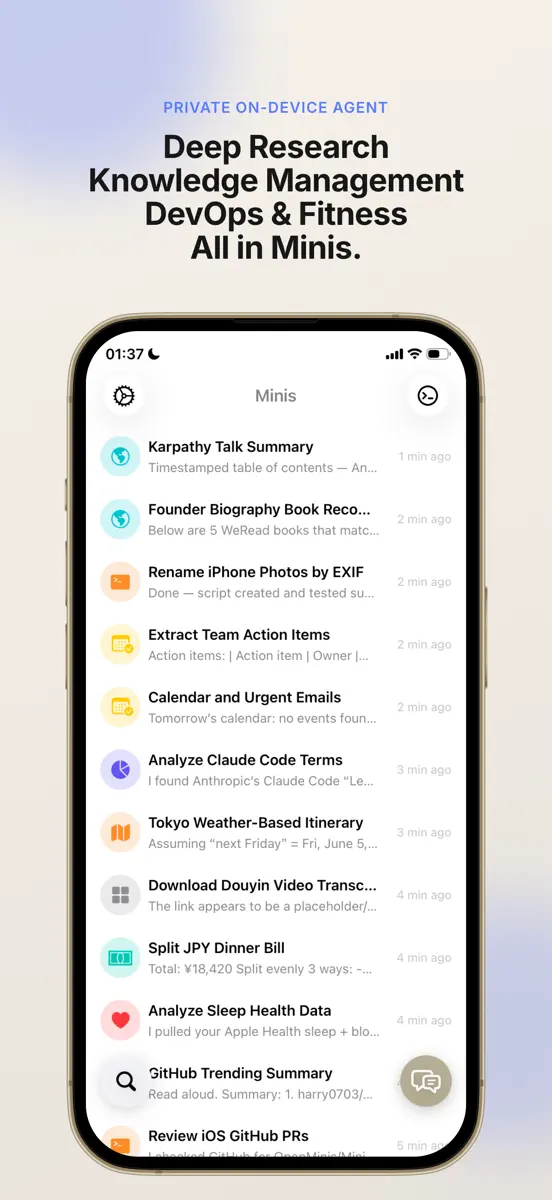
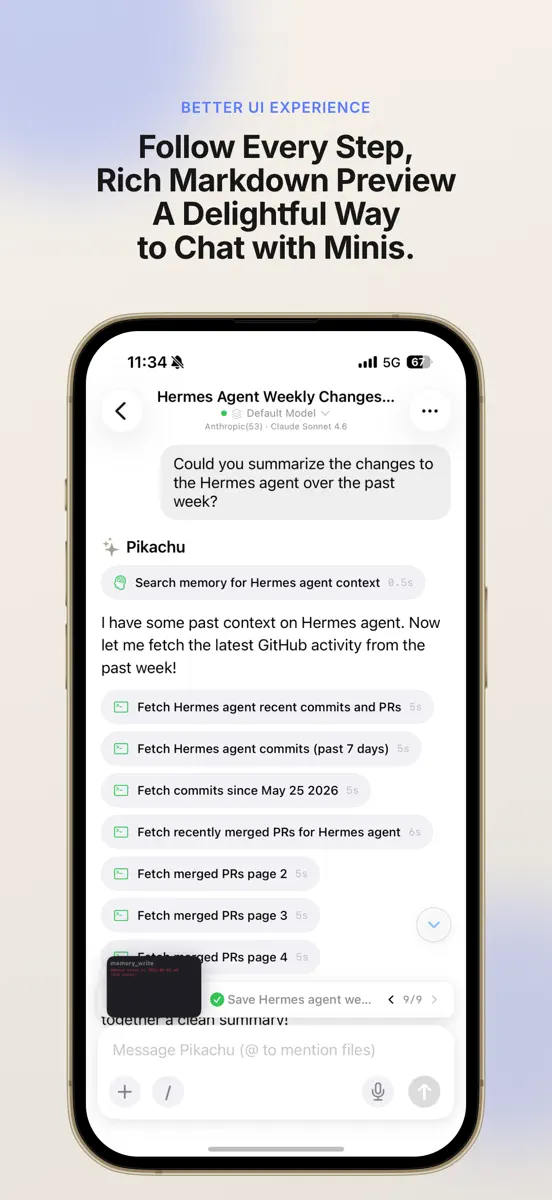
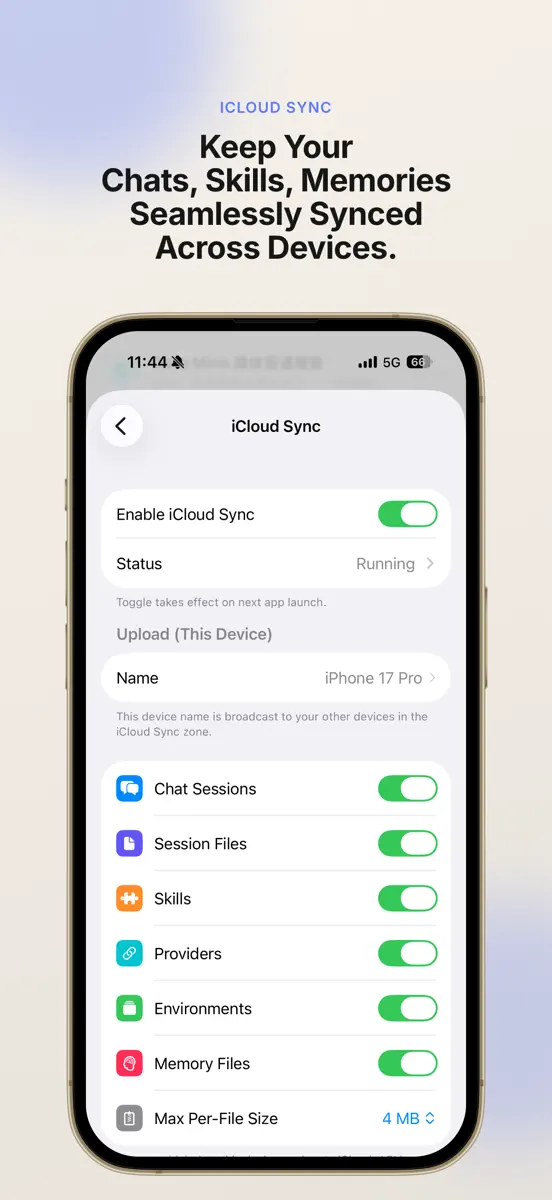
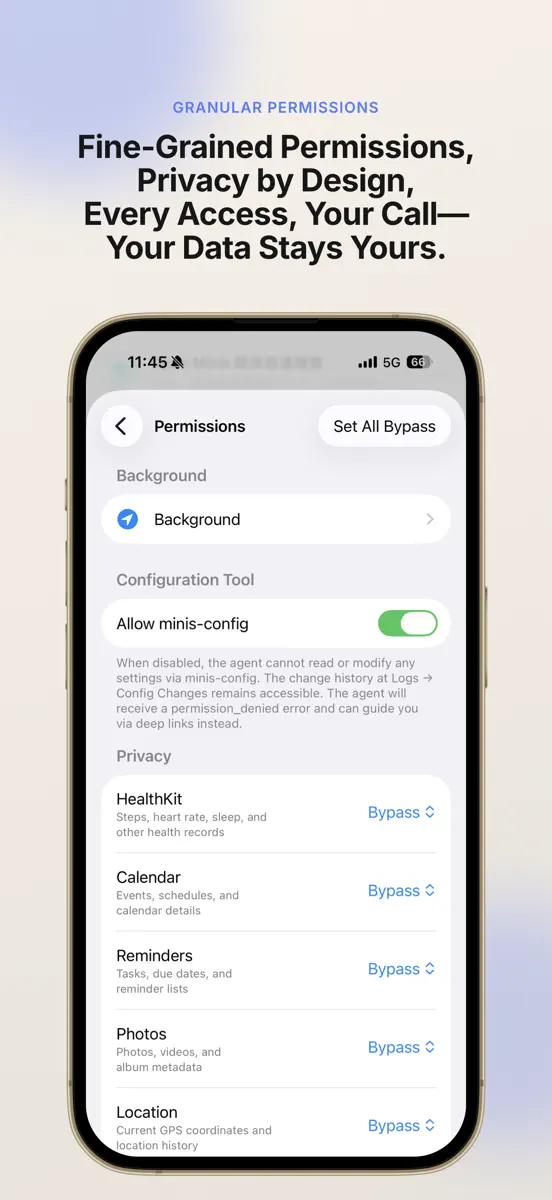
Minis — Local-First On-Device AI Agent Minis is a local-first, on-device AI agent that goes beyond chat. All your data stays on your iPhone — nothing is uploaded to a server by default. Running locally means lower latency and stronger privacy, while the agent still takes real action: browsing the web, accessing your health data, managing your schedule, controlling your smart home, and automating complex tasks. Local-First AI Agent Unlike cloud-only chatbots, Minis runs directly on your device
Ranks come from Apple's public App Store charts, checked once a day. Appulse Index isn't affiliated with Apple.
Current rankings
Not charting right now
This app isn't in any tracked top 100 at the moment. Its history shows when it was.
Competitors
Compare with the top 3Full chartTop of Free · Productivity in United States. Open Minis isn't in it right now. Changes are over 7 days.
- #1 (number one)No change
 Muse de MetaMeta Platforms, Inc.
- #2No change
 ChatGPTOpenAI OpCo, LLC
- #3No change
 Claude by AnthropicAnthropic PBC
- #4No change
 Google GeminiGoogle
- #5No change
- #6No change
 Microsoft AuthenticatorMicrosoft Corporation
- #7No change
 Grok - AI AssistantX Corp.
- #8Up 1 place
- #9Up 1 place
 Documentos GoogleGoogle
- #10Up 4 places
 Meta AIMeta Platforms, Inc.
- #11Up 4 places
 VPN - Super Unlimited Proxy ™Mobile Jump Pte Ltd
- #12Down 1 place
 Google PlanilhasGoogle
- #13Up 6 places
 Claude Duet by AnthropicAnthropic PBC
- #14Down 6 places
 Microsoft OutlookMicrosoft Corporation
- #15Down 2 places
 Microsoft WordMicrosoft Corporation
- #16Down 4 places
 Grok BotX Corp.
- #17No change
 Ligar ao WindowsMicrosoft Corporation
- #18Down 2 places
 Microsoft CopilotMicrosoft Corporation
- #19Down 1 place
- #20No change
 Google SlidesGoogle


Screenshots
More from 森 王
| App | Best rank now | Released | App Store |
|---|---|---|---|
 Scrcpy RemoteUtilities · | Paid · UtilitiesIndia#32 |

As of 21 Nov 2026, Open Minis isn't in any of the App Store charts Appulse Index tracks. Its best rank in the last 7 days was #85 in Free · Productivity in Mexico. Appulse Index first saw Open Minis in a tracked chart on 18 Nov 2026. Since then it has charted on 2 days in 2 countries, with a best rank of #85 in Free · Productivity in Mexico on 18 Nov 2026.
Store listing
How the app presents itself on the App Store. Select a screenshot to open it full size.
App facts
What Apple publishes about this app. Ratings are from one country's App Store.
- Price
- Free
- Rating
- 4.9 / 5 stars102 ratings United States
- Released
- 14 Mar 2026
- Last update
- Version 1.16
- Requires
- iOS 16.0or later
- Size
- 386.6 MB
- Languages
- 23
Chart record
Every tracked chart, country and day since Appulse Index first saw this app in a chart.
Rank history
Higher on the chart is better: #1 is at the top.
No chart history to show
History appears for charts the app is currently in.
Current rankings
Every chart this app is in right now, best position first.
Not charting right now
This app isn't in any tracked top 100 at the moment. Its history shows when it was.
Ranking events
Entries, big moves, #1s and new versions we've recorded, by day.
- Entered the Free · Productivity chart at #85Mexico
- Entered the Free · Productivity chart at #98United States
Competitors
Compare with the top 3Full chartTop of Free · Productivity in United States. Open Minis isn't in it right now. Changes are over 7 days.
- #1 (number one)No changeMuse de MetaMeta Platforms, Inc.
- #2No changeChatGPTOpenAI OpCo, LLC
- #3No changeClaude by AnthropicAnthropic PBC
- #4No changeGoogle GeminiGoogle
- #5No change
- #6No changeMicrosoft AuthenticatorMicrosoft Corporation
- #7No changeGrok - AI AssistantX Corp.
- #8Up 1 place
- #9Up 1 placeDocumentos GoogleGoogle
- #10Up 4 placesMeta AIMeta Platforms, Inc.
- #11Up 4 placesVPN - Super Unlimited Proxy ™Mobile Jump Pte Ltd
- #12Down 1 placeGoogle PlanilhasGoogle
- #13Up 6 placesClaude Duet by AnthropicAnthropic PBC
- #14Down 6 placesMicrosoft OutlookMicrosoft Corporation
- #15Down 2 placesMicrosoft WordMicrosoft Corporation
- #16Down 4 placesGrok BotX Corp.
- #17No changeLigar ao WindowsMicrosoft Corporation
- #18Down 2 placesMicrosoft CopilotMicrosoft Corporation
- #19Down 1 place
- #20No changeGoogle SlidesGoogle
About
From the app's App Store listing.
Minis — Local-First On-Device AI Agent
Minis is a local-first, on-device AI agent that goes beyond chat. All your data stays on your iPhone — nothing is uploaded to a server by default. Running locally means lower latency and stronger privacy, while the agent still takes real action: browsing the web, accessing your health data, managing your schedule, controlling your smart home, and automating complex tasks.
Local-First AI Agent Unlike cloud-only chatbots, Minis runs directly on your device
What's new
Version 1.16 · 14 Nov 2026 ·
iPhone Duo support Better two-column and vertical-bar layouts: home buttons sit clear of the hinge, and in the vertical bar Search, Share Chat, and read replies are buttons of their own. The column divider is draggable and the split view survives backgrounding; a hidden list comes back with an edge swipe or a sideways drag. Files shared into Minis go to the chat open in the right column.
In-app floating windows Web pages, images, video, audio, and document previews can collapse into a floating round icon: tap to expand, long-press for a preview. Pull a preview down, or long-press a link or image, to float it.
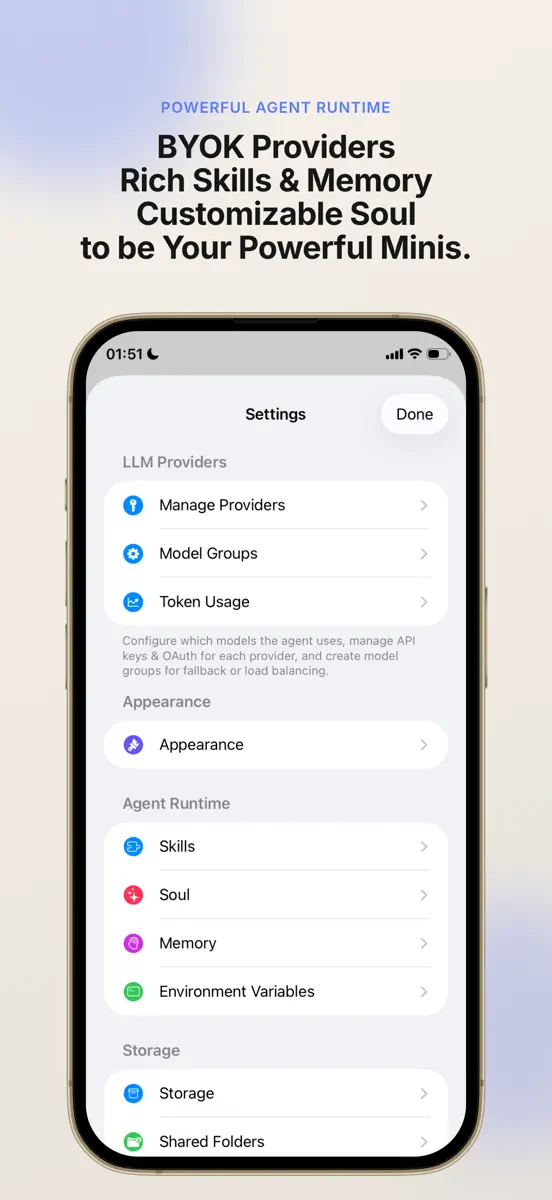
Network settings and Tailscale A new Network section in Settings: upstream proxies and a built-in Tailscale node with browser sign-in. Each provider, the browser, MCP sign-in, and backups can go direct, through Tailscale, or through a proxy, and so can terminal programs.
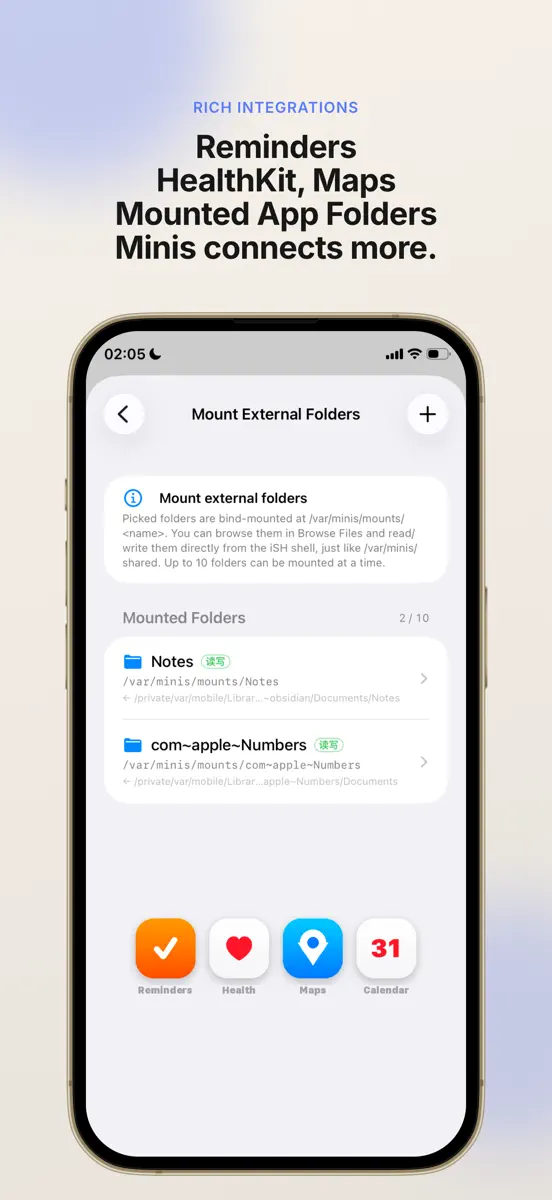
Network disks Add a WebDAV, SMB, SFTP, S3, or FTP server in Settings as a read-only disk for file tools, Browse Files, and chat media.
Home "Recent" section and question alerts A new Recent section at the top of Home holds unread, running, and recently active chats. A chat waiting for your answer is marked, with a banner and a waiting-questions button.
Better groups A group's avatar is a tile of its newest chats, a running group shows a lit arc, files and chats can be dragged onto a group card, and auto-grouping only touches groups you switched it on for.
Browser and page preview The assistant's browser is now a multi-tab browser you can take over at any time. A local HTML page runs in fullscreen, and a pull down at the top closes the preview.
More languages Added Persian, Arabic, Dutch, Italian, Hungarian, and Czech. Arabic and Persian screens read right-to-left.
Adding a provider is easier Add Provider offers vendor templates, so a new provider needs only a key; each cloud template says how to get one.
Voice Fish Audio is supported, a voice you cloned at the vendor can be pasted in to read aloud, and Bailian, iFlytek, and Doubao recognition use their latest protocols.
Sub-agents and scheduled tasks A finished sub-agent can be given more to do, Stop can end only the current turn, and scheduled tasks are saved so a run missed while the app was killed is caught up.
Built-in manual and skills A read-only manual the assistant searches first when you ask how Minis works; skills can list trigger words.
Backup and sync Restore is more complete, same-second messages keep their order, and empty files and folders now restore. Memory and Soul sync more reliably, and turning on sync no longer replaces another device's Soul.
Usage and quota The Usage page has a summary card, a trend chart, and a breakdown; supported providers show remaining quota or balance.
New models Added Claude Fable 5.2, GPT-6.1 Sol, and GPT Image 2.6.
Bug Fixes
- Fixed long conversations running into "Context is full" too early; old reasoning and large outputs are now trimmed first
- Fixed several crashes: the iOS 16 home folders, a keyboard event on iPadOS 26.0.1, sharing a long image and backgrounding the app, and a denied OAuth sign-in
- Fixed settings and mounted folders being read as "empty" after a reboot before the first unlock
- Fixed a shell command freezing the whole app on a slow mounted folder
- Fixed a fresh install being unable to upload to iCloud, so Mac chats never reached the iPhone
- Fixed backup issues: a server backup that couldn't be restored, SMB logins failing at random, and a deleted model group not coming back
- Fixed the conversation jumping when a reply starts, rows overlapping while a reply finishes, and the list jumping after rotation
- Fixed a request refused as too large failing again on every fallback; it is now resent to the same model with fewer images
- Fixed a new chat leaving a pile of empty "New Chat" rows when the model was switched right after the first send
- Fixed Stop still falling back to the next model or retrying
More from 森 王
Their other apps that Appulse has seen in the charts, charting ones first.
| App | Best rank now | Released | App Store |
|---|---|---|---|
Scrcpy RemoteUtilities · | Paid · UtilitiesIndia#32 |
Ranks come from Apple's public App Store charts, checked once a day. Appulse Index isn't affiliated with Apple.