

As of 21 Nov 2026, Timelet isn't in any of the App Store charts Appulse Index tracks. Its best rank in the last 7 days was #40 in Paid · Utilities in Japan. Appulse Index first saw Timelet in a tracked chart on 5 Nov 2026. Since then it has charted on 4 days in 2 countries, with a best rank of #40 in Paid · Utilities in Japan on 15 Nov 2026.
Not charting right now
This app isn't in any tracked top 100 at the moment.
- Longest chart run
- —Counted while Appulse tracks it
- New ratings, 7 days
- 0Japan · since 10 Nov 2026
Chart record
Every tracked chart, country and day since Appulse Index first saw this app in a chart.
What's new
Version 4.1.0 · 17 days ago
・iPhone Duoに対応しました。 ・その他、細かな改善を行いました。
Ranking events
- Dropped #40 → #98 in Paid · UtilitiesJapan
- Entered the Paid · Utilities chart at #40Japan
- Entered the Paid · Utilities chart at #80Japan
- Entered the Paid · Utilities chart at #77Canada
About
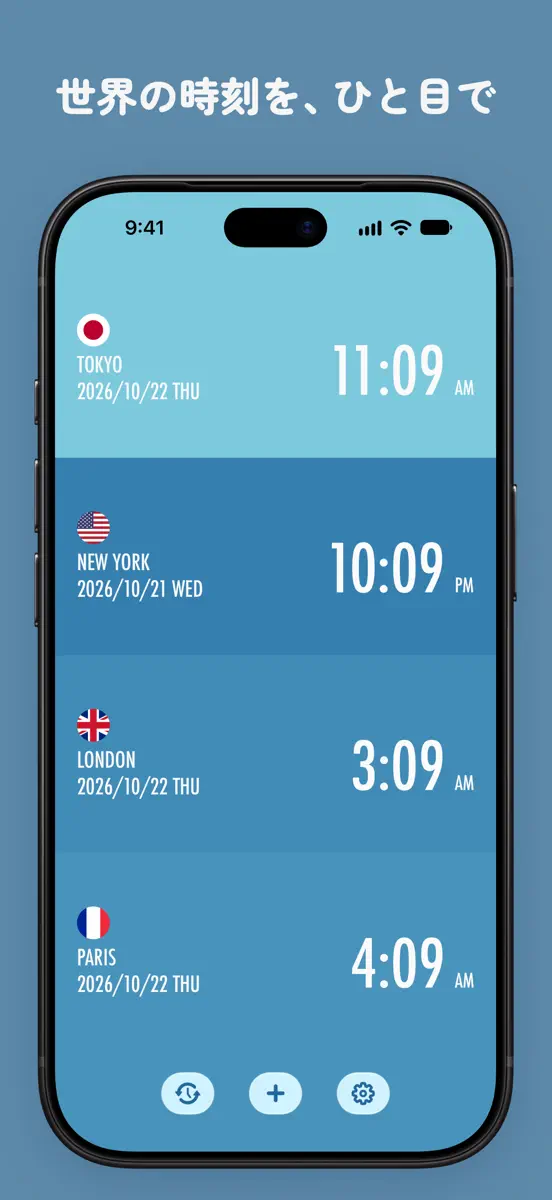
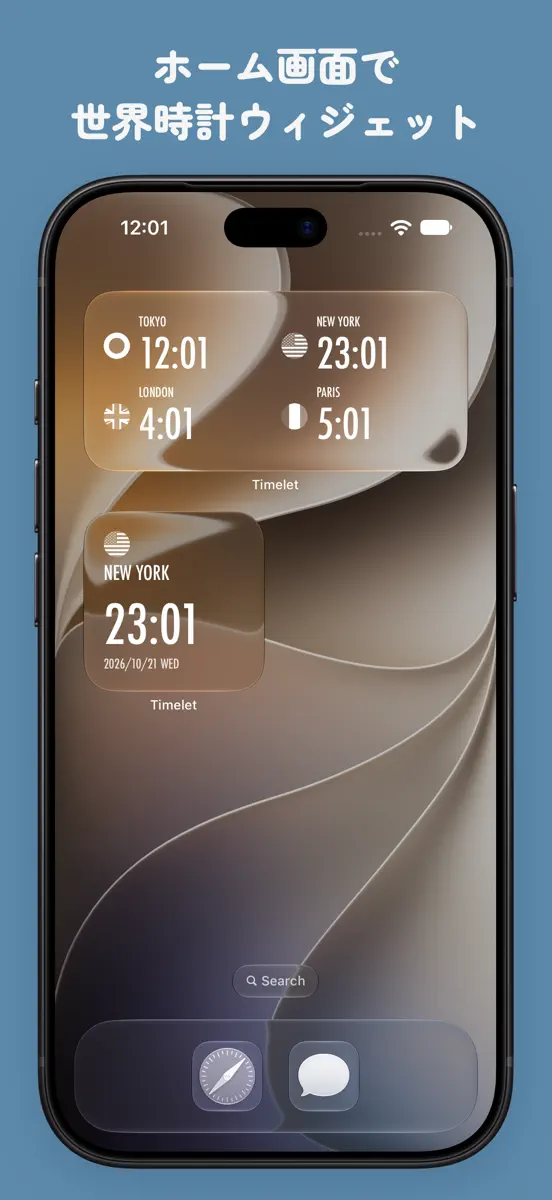
世界各地の現地時刻を表示し、指定した日時に各地が何時になるかをかんたんに確認できます。 海外旅行や海外出張、海外にいる友人や同僚との予定調整に便利です。 旅行中や移動中でも、かんたんに操作できます。 ウィジェットにも対応。ホーム画面から各地の時刻を確認できます。 機能: ・ リストから都市を選んで登録し、各地の現地時刻を表示できます(最大20都市)。 ・ 「+」「−」ボタンで日時を進めたり戻したりして、指定した日時の現地時刻を確認できます。 ・ 時間帯に合わせて、昼は明るく、夜は暗い色に変化します。 ・ 8種類のカラーテーマから選べます。 ・ 12時間表示と24時間表示を切り替えられます。 ・ ウィジェットで各地の現地時刻を確認できます。 使い方: ・ 時計を追加するには「+」ボタンをタップ ・ 日時を変更するには時計ボタンをタップ ・ 時計をスワイプして削除 ・ 時計を長押しして並べ替え ・ 設定画面では、12時間表示と24時間表示の切り替えや、カラーテーマの変更ができます
Ranks come from Apple's public App Store charts, checked once a day. Appulse Index isn't affiliated with Apple.
Current rankings
Not charting right now
This app isn't in any tracked top 100 at the moment. Its history shows when it was.
Competitors
Compare with the top 3Full chartTop of Paid · Utilities in Japan. Timelet isn't in it right now. Changes are over 7 days.
- #1 (number one)No change
 280blockerTobila Systems Inc.
- #2Up 1 place
 ShadowrocketShadow Launch Technology Limited
- #3Down 1 place
 FlickMeBitta, Inc.
- #4No change
 CalCs - Calendar ComplicationsAkihiro Usui
- #5Up 1 place
 まもるくん:スマホ置き忘れ防止KAZUTO MATSUBARA
- #6Up 4 places
 AdGuard Pro: Safari Ad BlockerAdguard Software Limited
- #7Not enough history yet
 実寸大定規Jumpei Adachi
- #8Down 1 place
 FX検証Shuhei Sakai
- #9New entry
 フリマ王コピー出品Villness Inc.
- #10Up 47 places
 Stash - Rule Based ProxySTASH NETWORKS LIMITED
- #11Up 2 places
 iZip Pro -Zip Unzip Unrar ToolComcSoft Corporation
- #12Up 2 places
 Noir - Dark Mode for SafariJeffrey Kuiken
- #13Up 12 places
 Y!News Excluder for SafariNOZE INC.
- #14Up 29 places
 Wingboard|Duo対応 片手・左右キーボードKanana Studio
- #15Up 7 places
 FE File Explorer - SMB & FTPSkyjos Co., Ltd.
- #16Down 8 places
 Just Press RecordOpen Planet Software
- #17Not enough history yet
 バカラ予報DECADE INC.
- #18Up 40 places
- #19Up 31 places
 写真ぽいぽい - 写真整理フォトクリーナーアプリHachiware, LLC.
- #20Not enough history yet
 Sleipnir Mobile Black EditionFenrir Inc.

Screenshots



More from Flask LLP
| App | Best rank now | Released | App Store |
|---|---|---|---|
 FitPortHealth & Fitness · | Paid · Health & FitnessJapan#11 | ||
 Timesheet - Time TrackerProductivity · | Paid · ProductivityCanada#93 |

As of 21 Nov 2026, Timelet isn't in any of the App Store charts Appulse Index tracks. Its best rank in the last 7 days was #40 in Paid · Utilities in Japan. Appulse Index first saw Timelet in a tracked chart on 5 Nov 2026. Since then it has charted on 4 days in 2 countries, with a best rank of #40 in Paid · Utilities in Japan on 15 Nov 2026.
Store listing
How the app presents itself on the App Store. Select a screenshot to open it full size.
App facts
What Apple publishes about this app. Ratings are from one country's App Store.
- Price
- ¥150
- Rating
- 4.6 / 5 stars7 ratings Japan
- Released
- 8 Oct 2013
- Last update
- Version 4.1.0
- Requires
- iOS 26.0or later
- Size
- 15.5 MB
- Languages
- 2
Chart record
Every tracked chart, country and day since Appulse Index first saw this app in a chart.
Rank history
Higher on the chart is better: #1 is at the top.
No chart history to show
History appears for charts the app is currently in.
Current rankings
Every chart this app is in right now, best position first.
Not charting right now
This app isn't in any tracked top 100 at the moment. Its history shows when it was.
Ranking events
Entries, big moves, #1s and new versions we've recorded, by day.
- Dropped #40 → #98 in Paid · UtilitiesJapan
- Entered the Paid · Utilities chart at #40Japan
- Entered the Paid · Utilities chart at #80Japan
- Entered the Paid · Utilities chart at #77Canada
Competitors
Compare with the top 3Full chartTop of Paid · Utilities in Japan. Timelet isn't in it right now. Changes are over 7 days.
- #1 (number one)No change280blockerTobila Systems Inc.
- #2Up 1 placeShadowrocketShadow Launch Technology Limited
- #3Down 1 placeFlickMeBitta, Inc.
- #4No changeCalCs - Calendar ComplicationsAkihiro Usui
- #5Up 1 placeまもるくん:スマホ置き忘れ防止KAZUTO MATSUBARA
- #6Up 4 placesAdGuard Pro: Safari Ad BlockerAdguard Software Limited
- #7Not enough history yet実寸大定規Jumpei Adachi
- #8Down 1 placeFX検証Shuhei Sakai
- #9New entryフリマ王コピー出品Villness Inc.
- #10Up 47 placesStash - Rule Based ProxySTASH NETWORKS LIMITED
- #11Up 2 placesiZip Pro -Zip Unzip Unrar ToolComcSoft Corporation
- #12Up 2 placesNoir - Dark Mode for SafariJeffrey Kuiken
- #13Up 12 placesY!News Excluder for SafariNOZE INC.
- #14Up 29 placesWingboard|Duo対応 片手・左右キーボードKanana Studio
- #15Up 7 placesFE File Explorer - SMB & FTPSkyjos Co., Ltd.
- #16Down 8 placesJust Press RecordOpen Planet Software
- #17Not enough history yetバカラ予報DECADE INC.
- #18Up 40 places
- #19Up 31 places写真ぽいぽい - 写真整理フォトクリーナーアプリHachiware, LLC.
- #20Not enough history yetSleipnir Mobile Black EditionFenrir Inc.
About
From the app's App Store listing.
世界各地の現地時刻を表示し、指定した日時に各地が何時になるかをかんたんに確認できます。
海外旅行や海外出張、海外にいる友人や同僚との予定調整に便利です。 旅行中や移動中でも、かんたんに操作できます。
ウィジェットにも対応。ホーム画面から各地の時刻を確認できます。
機能: ・ リストから都市を選んで登録し、各地の現地時刻を表示できます(最大20都市)。 ・ 「+」「−」ボタンで日時を進めたり戻したりして、指定した日時の現地時刻を確認できます。 ・ 時間帯に合わせて、昼は明るく、夜は暗い色に変化します。 ・ 8種類のカラーテーマから選べます。 ・ 12時間表示と24時間表示を切り替えられます。 ・ ウィジェットで各地の現地時刻を確認できます。
使い方: ・ 時計を追加するには「+」ボタンをタップ ・ 日時を変更するには時計ボタンをタップ ・ 時計をスワイプして削除 ・ 時計を長押しして並べ替え ・ 設定画面では、12時間表示と24時間表示の切り替えや、カラーテーマの変更ができます
What's new
Version 4.1.0 · 4 Nov 2026 ·
・iPhone Duoに対応しました。 ・その他、細かな改善を行いました。
More from Flask LLP
Their other apps that Appulse has seen in the charts, charting ones first.
| App | Best rank now | Released | App Store |
|---|---|---|---|
FitPortHealth & Fitness · | Paid · Health & FitnessJapan#11 | ||
Timesheet - Time TrackerProductivity · | Paid · ProductivityCanada#93 |
Ranks come from Apple's public App Store charts, checked once a day. Appulse Index isn't affiliated with Apple.