

As of 21 Nov 2026, DS1 Companion isn't in any of the App Store charts Appulse Index tracks. Its best rank in the last 7 days was #48 in Paid · Utilities in Canada. Appulse Index first saw DS1 Companion in a tracked chart on 12 Oct 2026. Since then it has charted on 20 days in 2 countries, with a best rank of #5 in Paid · Utilities in Australia on 6 Nov 2026.
Not charting right now
This app isn't in any tracked top 100 at the moment.
- Longest chart run
- —Counted while Appulse tracks it
- New ratings, 7 days
- +1Canada · since 7 Nov 2026
Chart record
Every tracked chart, country and day since Appulse Index first saw this app in a chart.
What's new
Version 1.14.3 · 1 month ago
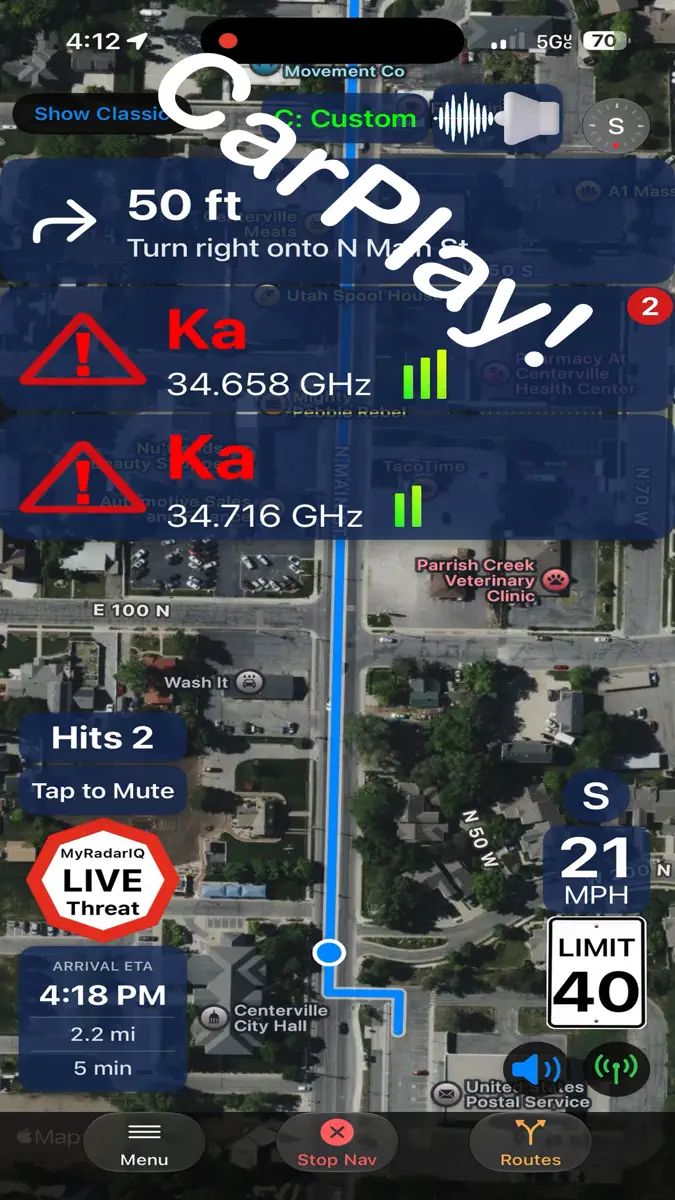
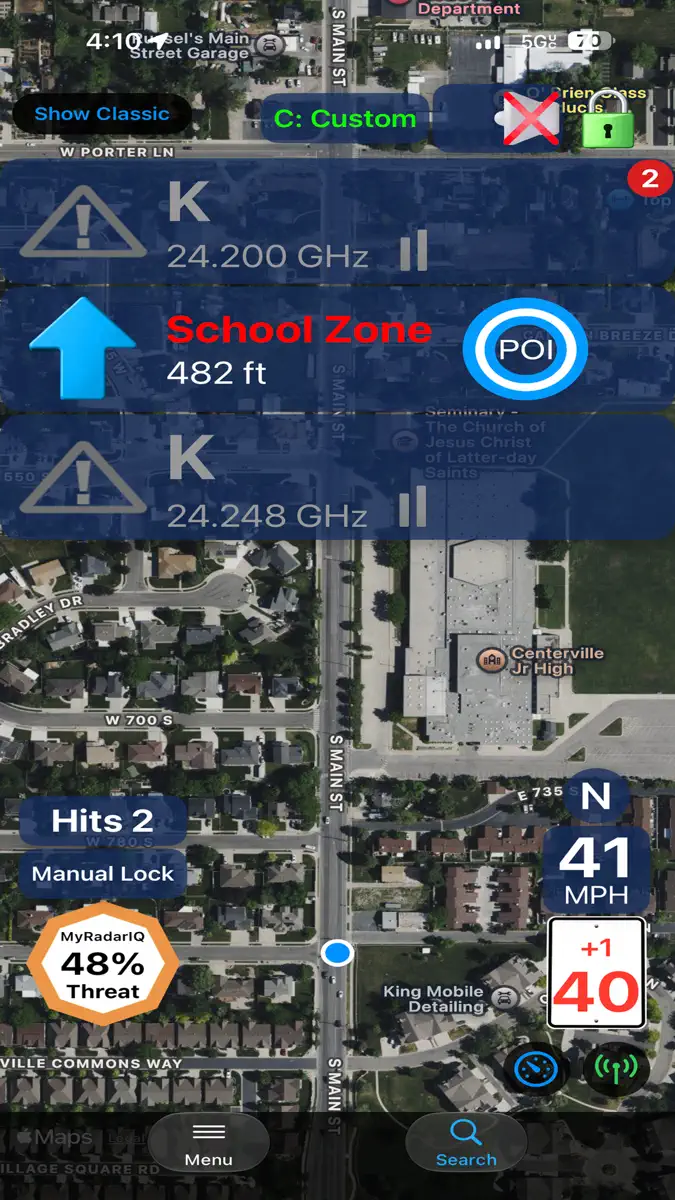
Works with CarPlay!! "Feels like a new detector!", -e "A Radar Detector Miracle!", -efr "Essential to the Radenso!" - atl New for version 1.14: • Settings screen added under CarPlay nav search button. • All new audio engine handles navigation, speech & detector tones seamlessly with options for output style, voice, speech rate, etc. • Option for altitude and car voltage on 'Active' banner. • Options for 'Nav Mute' Speaker Tap -> “Unmute” On tap, or after 5, 10, 15, 30 mins. • Option to include Alerts & Tones for nav mute tap. • Option to include all Detector audio for nav mute tap (kill switch). • CarPlay fixes for light & dark map display modes. • SpotLock engine version 2.0.09012026 - latest historical data. • Advanced false assist engine version 3.0.09012026 - latest 6+ years of historical data. Previous updates: • 3D Perspective map view for navigation. • CarPlay background-alert controls: • Reduced-frequency alerts • Passive Muted alerts • My Radar IQ alerts • Stay Alert reminders • CarPlay Fullscreen/Dashboard • CarPlay background alerts • Live Activities for CarPlay, iPhone, Apple Watch. • Alert screen (portrait & landscape views). *Option to view classic or new alert screen with a tap of a button. • Alert screen banners showing detailed alert, false assist, POI, MyRadarIQ, over speed warnings and other detailed detector status information. • "SignalScope" shows signal strength over time of the current priority alert. • Full navigation. • Alternate Route selection with highway, and toll avoidance. • Navigation screen shows arrival time, distance & trip time remaining. • 'Show traffic' option while navigating. • 'Recent trip' quick selection. • Nearby points of interest selection. • Quick Nav selection from classic alert screen. • “Free Drive” (map / no map) alert screen when not in navigation mode. • Free Drive without map display option (battery saver). • Posted speed limit displayed on main alert screen (US, CA, AU, NZ). • Customizable low speed muting based on PSL. • Compiled with latest Xcode for iOS 27 • iOS 27 interface updates including Liquid Glass and other updated elements. • New and improved SpotLock 2.0 and Advanced False Assist 3.0. Both data driven systems have been updated using 6 years of historical data. This takes your detector to a whole new level of quietness and safety against real threats. Also features: • DS1 settings screen to modify some of the more popular DS1 settings (more to come in future updates). The list of settings that can be modified are as follows: • Frequency ON/OFF • K NOTCH OFF/ON/Weak/Block • Idle Display Scan/Time/Smart Dark/Dark/Speed • Sub Display OFF/Speed/Compass/Speed & Compass/Altitude • Laser ON/OFF • X Band ON/OFF • K Band ON/OFF • K Pop ON/OFF • K Filter ON/OFF • K Scans (Narrow, Wide, NZ Narrow) • TSR ON/OFF • Ka Band ON/OFF • Ka Pop ON/OFF • Ka Filter ON/OFF • Ka Scans (Narrow, Wide, Segmented) • Ka 1-9 Segs ON/OFF • Auto Mute Volume ON/OFF • Select Display Color • Select Display Brightness • Select Priority Band • Auto Lockout ON/OFF • Select Auto Lockout Bands ***TIP: Setting the main volume for the detector to 0 on the main alert screen and enabling the detector alert tones, will eliminate the brief audio "blips" you would normally hear when a mute command is first sent to the detector. Only potential threats will then trigger audio through your speaker or audio system providing an extremely quiet ride. This is what people are saying after using DS1 Companion™ - See what all the fuss is about, try it for yourself! "A Radar Detector miracle" "ESSENTIAL to the Radenso" -a "Great Companion to DS1" -m If you liked DS1 Companion before this release, you are going to LOVE it after! Spread the word, it is only going to get better. If you have an idea / suggestion you would like included in a future update, please visit https://crackedpixel.com/contact-us to let us know. Thanks!
Ranking events
- Entered the Paid · Utilities chart at #55Canada
- Entered the Paid · Utilities chart at #23Canada
- Dropped #45 → #96 in Paid · UtilitiesAustralia
- Dropped #5 → #45 in Paid · UtilitiesAustralia
- Entered the Paid · Utilities chart at #5Australia
- Entered the Paid · Utilities chart at #21Canada
Show 13 earlier events
- Entered the Paid · Utilities chart at #60Canada
- Dropped #17 → #48 in Paid · UtilitiesCanada
- Climbed #45 → #17 in Paid · UtilitiesCanada
- Entered the Paid · Utilities chart at #50Canada
- Dropped #73 → #98 in Paid · UtilitiesCanada
- Dropped #46 → #73 in Paid · UtilitiesCanada
- Entered the Paid · Utilities chart at #29Canada
- Dropped #49 → #76 in Paid · UtilitiesCanada
- Dropped #19 → #49 in Paid · UtilitiesCanada
- Climbed #49 → #19 in Paid · UtilitiesCanada
- Climbed #93 → #17 in Paid · UtilitiesCanada
- Dropped #41 → #76 in Paid · UtilitiesCanada
- Entered the Paid · Utilities chart at #19Canada
About
Now works with CarPlay!! DS1 Companion™ is a feature rich app, designed to give you the most out of your DS1 radar detector, while enhancing your driving experience along the way. Featuring intelligent alerts and advanced muting! DS1 Companion™ is the COMPLETE solution to enjoying your DS1. **** NOTE *** Make sure to upgrade your DS1's firmware to version 1.21. Previous versions prior to 1.15 will not keep the detector muted after you mute it. The DS1 Companion™ app leverages years of…
Ranks come from Apple's public App Store charts, checked once a day. Appulse Index isn't affiliated with Apple.
Current rankings
Not charting right now
This app isn't in any tracked top 100 at the moment. Its history shows when it was.
Competitors
Compare with the top 3Full chartTop of Paid · Utilities in Canada. DS1 Companion isn't in it right now. Changes are over 7 days.
- #1 (number one)No change
 ShadowrocketShadow Launch Technology Limited
- #2No change
 LandTracker Pro LSD FinderRocanda Technologies Inc
- #3Up 1 place
 Wipr 2Kaylee Calderolla
- #4Up 5 places
 Frame Crop – Art ModeShane Jeffers
- #5Down 2 places
 atvToolsOleksandr Hamlii
- #6Up 5 places
 Noir - Dark Mode for SafariJeffrey Kuiken
- #7Up 1 place
 FORScan Lite - for Ford, MazdaAleksei Savin
- #8Up 13 places
- #9Not enough history yet
 What Plane?David Wilkinson
- #10Up 3 places
 Necrophonicchris rogers
- #11New entry
- #12New entry
 Stay On Target 1138Harin Wickremasinghe
- #13New entry
 SpeedClock - Video RadarSten Kaiser
- #14New entry
 Smart Mouse & Keyboard: Mac/PCSensonet
- #15New entry
 iCab Mobile (Web Browser)Alexander Clauss
- #16New entry
 Signal GHGenerally Helpful Software
- #17New entry
 Dream Talk Recorder ProAXSAR Ltd
- #18New entry
 RichtaDavid Bireta
- #19New entry
 Bluetooth FinderDeucks Pty Ltd
- #20New entry
 DuoCorder+James Roche


Screenshots
More from Angela Mcarthur
| App | Best rank now | Released | App Store |
|---|---|---|---|
 R8 CompanionUtilities · | Paid · UtilitiesUnited States#18 | ||
 R9 CompanionUtilities · | Paid · UtilitiesCanada#83 | ||
 R4 CompanionUtilities · | Not charting | ||
 V1 CompanionUtilities · | Not charting |

As of 21 Nov 2026, DS1 Companion isn't in any of the App Store charts Appulse Index tracks. Its best rank in the last 7 days was #48 in Paid · Utilities in Canada. Appulse Index first saw DS1 Companion in a tracked chart on 12 Oct 2026. Since then it has charted on 20 days in 2 countries, with a best rank of #5 in Paid · Utilities in Australia on 6 Nov 2026.
Store listing
How the app presents itself on the App Store. Select a screenshot to open it full size.
App facts
What Apple publishes about this app. Ratings are from one country's App Store.
- Price
- CA$12.99
- Rating
- 4.5 / 5 stars39 ratings Canada
- Released
- 1 Sep 2023
- Last update
- Version 1.14.3
- Requires
- iOS 15.0or later
- Size
- 13.6 MB
- Languages
- 1
Chart record
Every tracked chart, country and day since Appulse Index first saw this app in a chart.
Rank history
Higher on the chart is better: #1 is at the top.
No chart history to show
History appears for charts the app is currently in.
Current rankings
Every chart this app is in right now, best position first.
Not charting right now
This app isn't in any tracked top 100 at the moment. Its history shows when it was.
Ranking events
Entries, big moves, #1s and new versions we've recorded, by day.
- Entered the Paid · Utilities chart at #55Canada
- Entered the Paid · Utilities chart at #23Canada
- Dropped #45 → #96 in Paid · UtilitiesAustralia
- Dropped #5 → #45 in Paid · UtilitiesAustralia
- Entered the Paid · Utilities chart at #5Australia
- Entered the Paid · Utilities chart at #21Canada
- Entered the Paid · Utilities chart at #60Canada
- Dropped #17 → #48 in Paid · UtilitiesCanada
- Climbed #45 → #17 in Paid · UtilitiesCanada
- Entered the Paid · Utilities chart at #50Canada
- Dropped #73 → #98 in Paid · UtilitiesCanada
- Dropped #46 → #73 in Paid · UtilitiesCanada
- Entered the Paid · Utilities chart at #29Canada
- Dropped #49 → #76 in Paid · UtilitiesCanada
- Dropped #19 → #49 in Paid · UtilitiesCanada
- Climbed #49 → #19 in Paid · UtilitiesCanada
- Climbed #93 → #17 in Paid · UtilitiesCanada
- Dropped #41 → #76 in Paid · UtilitiesCanada
- Entered the Paid · Utilities chart at #19Canada
Competitors
Compare with the top 3Full chartTop of Paid · Utilities in Canada. DS1 Companion isn't in it right now. Changes are over 7 days.
- #1 (number one)No changeShadowrocketShadow Launch Technology Limited
- #2No changeLandTracker Pro LSD FinderRocanda Technologies Inc
- #3Up 1 placeWipr 2Kaylee Calderolla
- #4Up 5 placesFrame Crop – Art ModeShane Jeffers
- #5Down 2 placesatvToolsOleksandr Hamlii
- #6Up 5 placesNoir - Dark Mode for SafariJeffrey Kuiken
- #7Up 1 placeFORScan Lite - for Ford, MazdaAleksei Savin
- #8Up 13 places
- #9Not enough history yetWhat Plane?David Wilkinson
- #10Up 3 placesNecrophonicchris rogers
- #11New entry
- #12New entryStay On Target 1138Harin Wickremasinghe
- #13New entrySpeedClock - Video RadarSten Kaiser
- #14New entrySmart Mouse & Keyboard: Mac/PCSensonet
- #15New entryiCab Mobile (Web Browser)Alexander Clauss
- #16New entrySignal GHGenerally Helpful Software
- #17New entryDream Talk Recorder ProAXSAR Ltd
- #18New entryRichtaDavid Bireta
- #19New entryBluetooth FinderDeucks Pty Ltd
- #20New entryDuoCorder+James Roche
About
From the app's App Store listing.
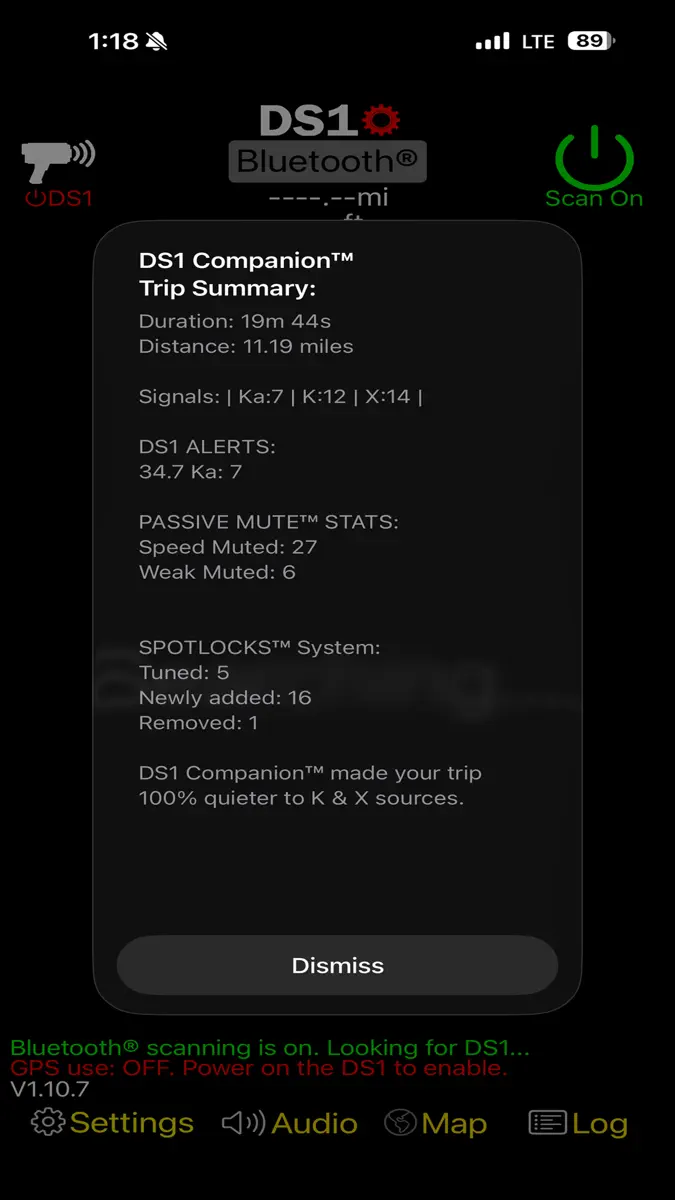
Now works with CarPlay!! DS1 Companion™ is a feature rich app, designed to give you the most out of your DS1 radar detector, while enhancing your driving experience along the way. Featuring intelligent alerts and advanced muting! DS1 Companion™ is the COMPLETE solution to enjoying your DS1.
**** NOTE *** Make sure to upgrade your DS1's firmware to version 1.21. Previous versions prior to 1.15 will not keep the detector muted after you mute it.
The DS1 Companion™ app leverages years of…
What's new
Version 1.14.3 · 24 Sep 2026 ·
Works with CarPlay!! "Feels like a new detector!", -e "A Radar Detector Miracle!", -efr "Essential to the Radenso!" - atl New for version 1.14:
- Settings screen added under CarPlay nav search button.
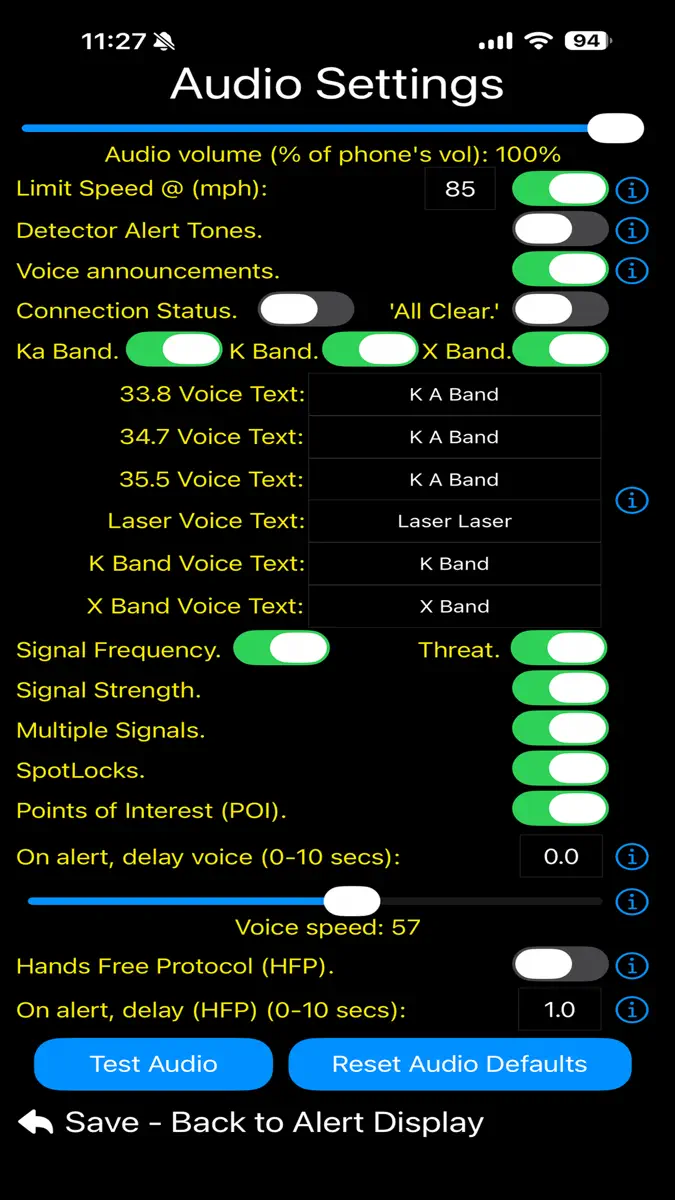
- All new audio engine handles navigation, speech & detector tones seamlessly with options for output style, voice, speech rate, etc.
- Option for altitude and car voltage on 'Active' banner.
- Options for 'Nav Mute' Speaker Tap -> “Unmute” On tap, or after 5, 10, 15, 30 mins.
- Option to include Alerts & Tones for nav mute tap.
- Option to include all Detector audio for nav mute tap (kill switch).
- CarPlay fixes for light & dark map display modes.
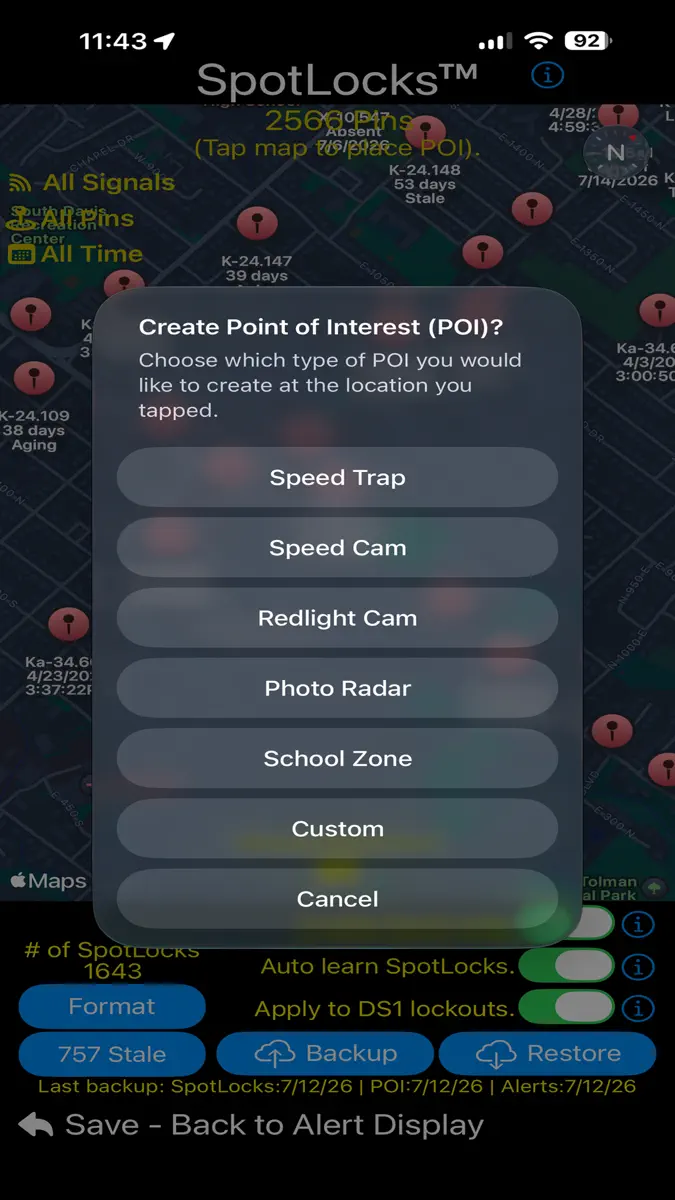
- SpotLock engine version 2.0.09012026 - latest historical data.
- Advanced false assist engine version 3.0.09012026 - latest 6+ years of historical data.
Previous updates:
- 3D Perspective map view for navigation.
- CarPlay background-alert controls:
- Reduced-frequency alerts
- Passive Muted alerts
- My Radar IQ alerts
- Stay Alert reminders
- CarPlay Fullscreen/Dashboard
- CarPlay background alerts
- Live Activities for CarPlay, iPhone, Apple Watch.
- Alert screen (portrait & landscape views). *Option to view classic or new alert screen with a tap of a button.
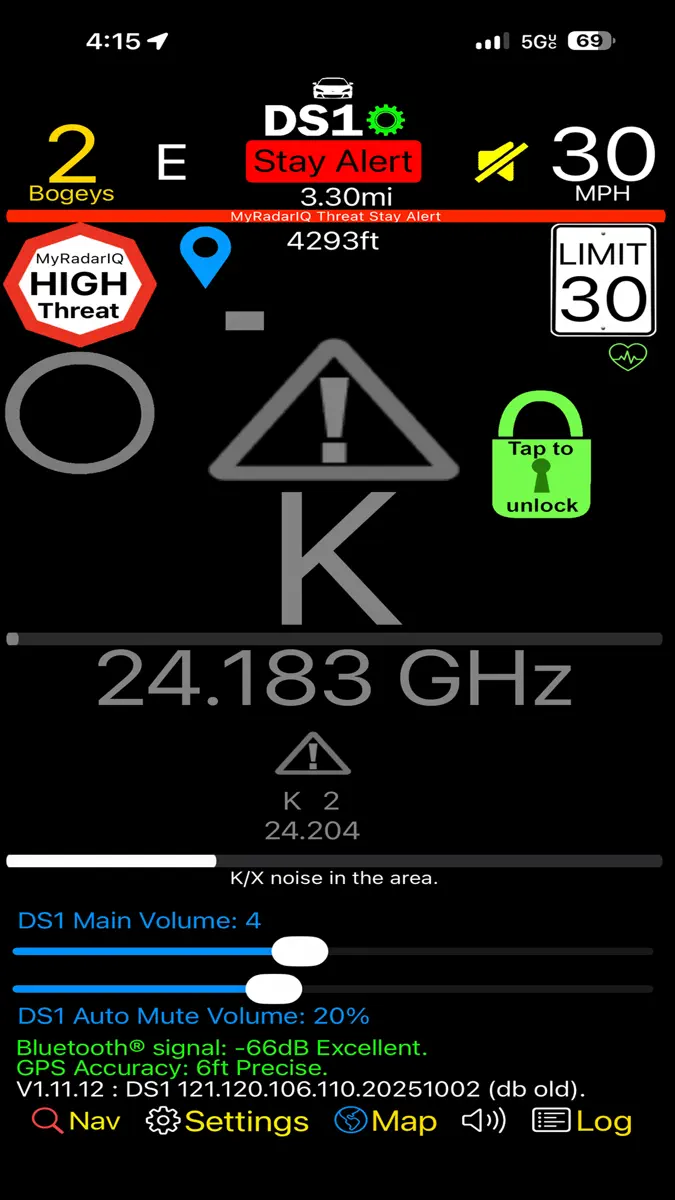
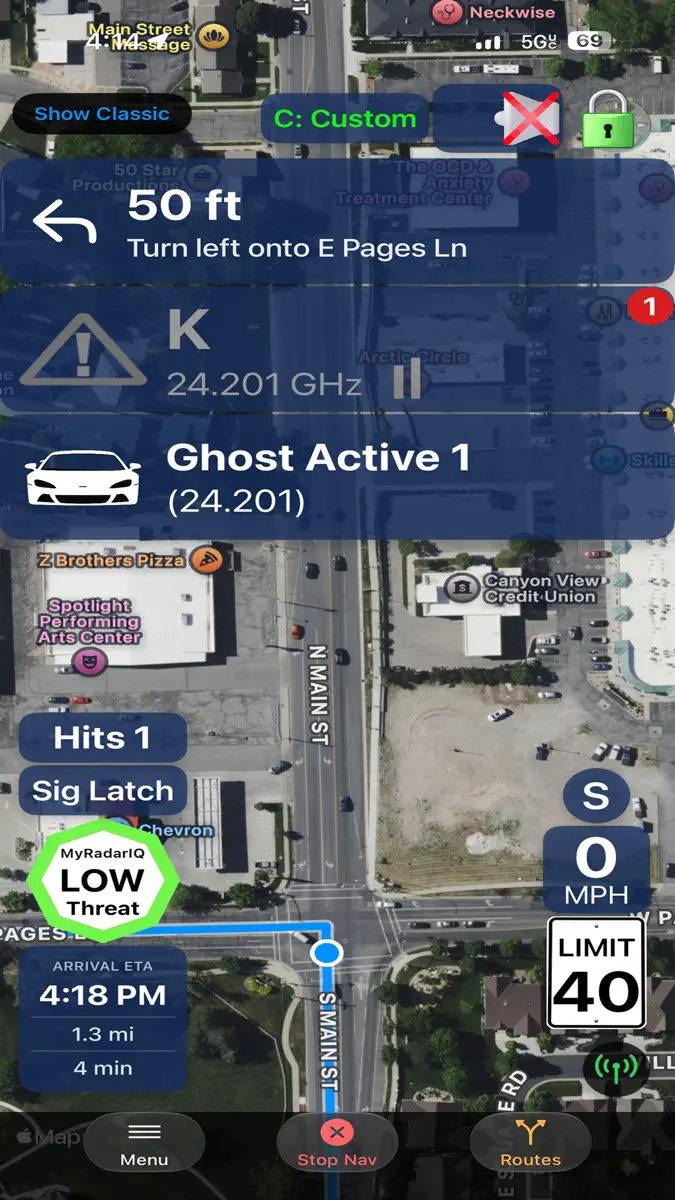
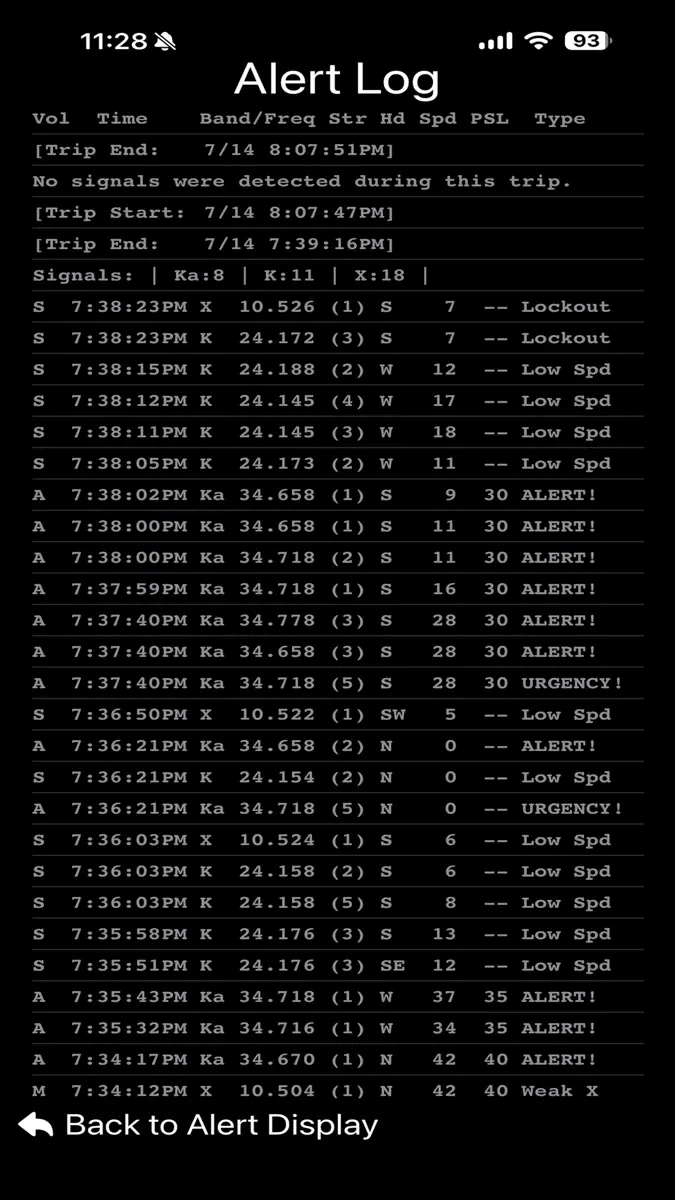
- Alert screen banners showing detailed alert, false assist, POI, MyRadarIQ, over speed warnings and other detailed detector status information.
- "SignalScope" shows signal strength over time of the current priority alert.
- Full navigation.
- Alternate Route selection with highway, and toll avoidance.
- Navigation screen shows arrival time, distance & trip time remaining.
- 'Show traffic' option while navigating.
- 'Recent trip' quick selection.
- Nearby points of interest selection.
- Quick Nav selection from classic alert screen.
- “Free Drive” (map / no map) alert screen when not in navigation mode.
- Free Drive without map display option (battery saver).
- Posted speed limit displayed on main alert screen (US, CA, AU, NZ).
- Customizable low speed muting based on PSL.
- Compiled with latest Xcode for iOS 27
- iOS 27 interface updates including Liquid Glass and other updated elements.
- New and improved SpotLock 2.0 and Advanced False Assist 3.0. Both data driven systems have been updated using 6 years of historical data. This takes your detector to a whole new level of quietness and safety against real threats.
Also features:
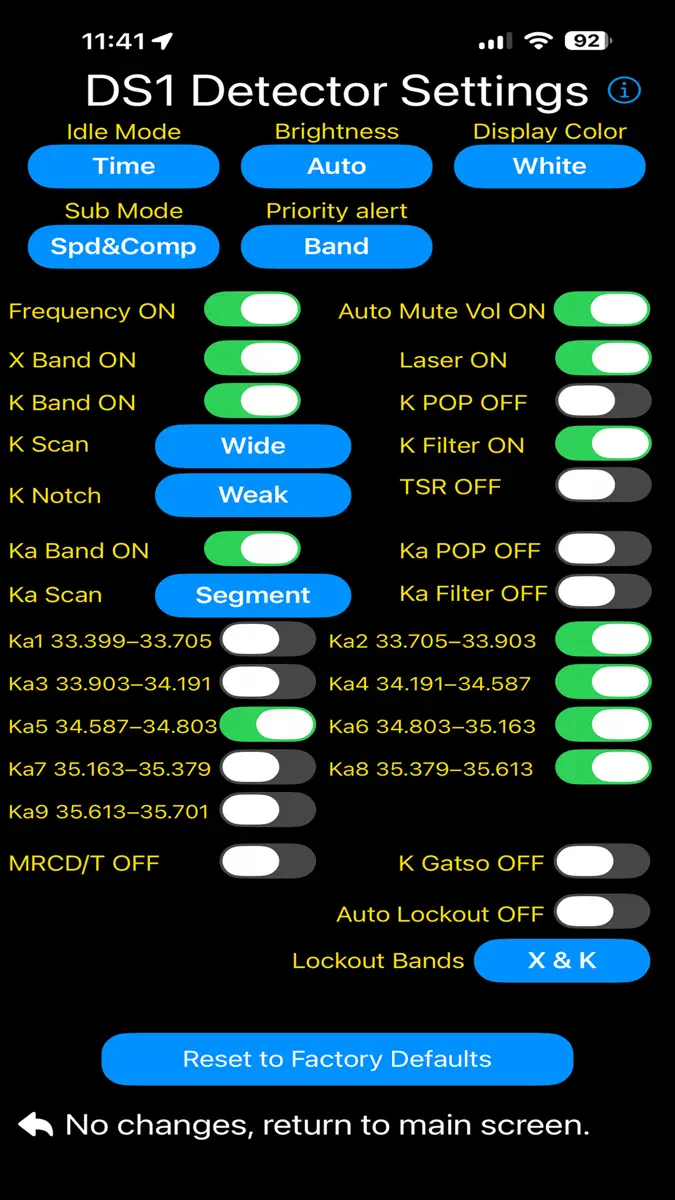
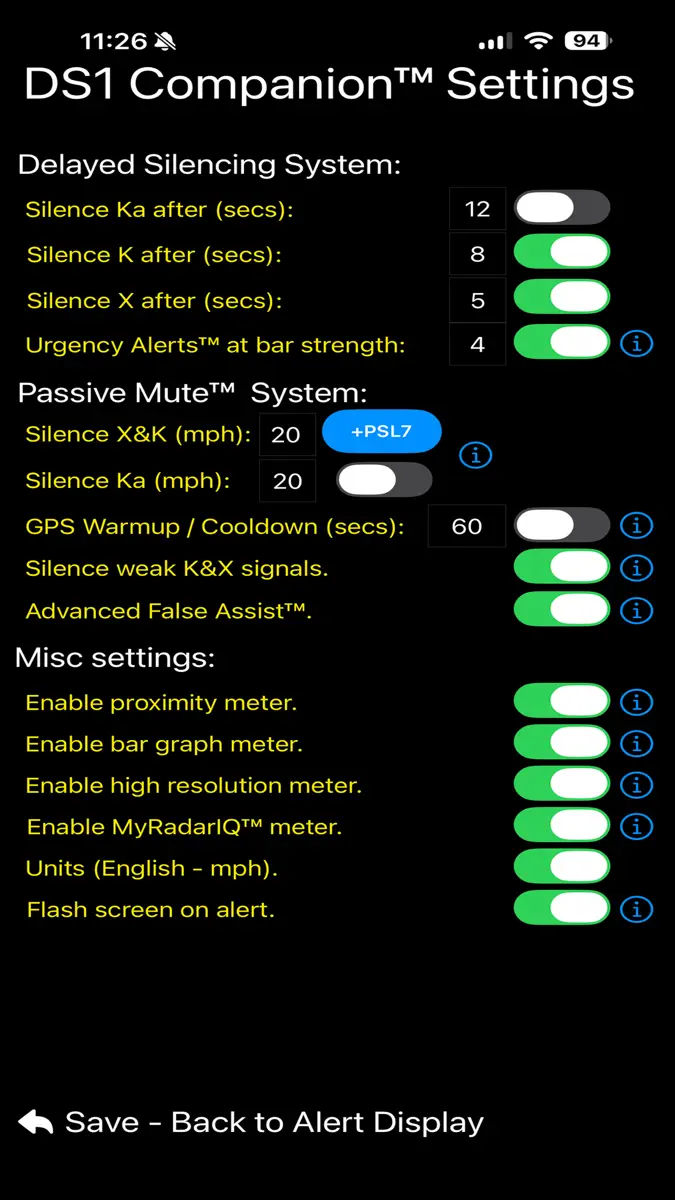
- DS1 settings screen to modify some of the more popular DS1 settings (more to come in future updates). The list of settings that can be modified are as follows:
- Frequency ON/OFF
- K NOTCH OFF/ON/Weak/Block
- Idle Display Scan/Time/Smart Dark/Dark/Speed
- Sub Display OFF/Speed/Compass/Speed & Compass/Altitude
- Laser ON/OFF
- X Band ON/OFF
- K Band ON/OFF
- K Pop ON/OFF
- K Filter ON/OFF
- K Scans (Narrow, Wide, NZ Narrow)
- TSR ON/OFF
- Ka Band ON/OFF
- Ka Pop ON/OFF
- Ka Filter ON/OFF
- Ka Scans (Narrow, Wide, Segmented)
- Ka 1-9 Segs ON/OFF
- Auto Mute Volume ON/OFF
- Select Display Color
- Select Display Brightness
- Select Priority Band
- Auto Lockout ON/OFF
- Select Auto Lockout Bands
***TIP: Setting the main volume for the detector to 0 on the main alert screen and enabling the detector alert tones, will eliminate the brief audio "blips" you would normally hear when a mute command is first sent to the detector. Only potential threats will then trigger audio through your speaker or audio system providing an extremely quiet ride.
This is what people are saying after using DS1 Companion™ - See what all the fuss is about, try it for yourself! "A Radar Detector miracle" "ESSENTIAL to the Radenso" -a "Great Companion to DS1" -m
If you liked DS1 Companion before this release, you are going to LOVE it after! Spread the word, it is only going to get better. If you have an idea / suggestion you would like included in a future update, please visit https://crackedpixel.com/contact-us to let us know. Thanks!
More from Angela Mcarthur
Their other apps that Appulse has seen in the charts, charting ones first.
| App | Best rank now | Released | App Store |
|---|---|---|---|
R8 CompanionUtilities · | Paid · UtilitiesUnited States#18 | ||
R9 CompanionUtilities · | Paid · UtilitiesCanada#83 | ||
R4 CompanionUtilities · | Not charting | ||
V1 CompanionUtilities · | Not charting |
Ranks come from Apple's public App Store charts, checked once a day. Appulse Index isn't affiliated with Apple.